From Idea to Live Website: The Full Journey Explained
A high-level walkthrough of the entire process from concept to deployment.
A Website Is Not One Big Step
When people first imagine building a website, they often picture one giant task: open the editor, write some code, and somehow end up with a finished site on the internet.
Real projects do not work like that. They move through stages. You make decisions, test ideas, change direction, improve structure, add styling, and only then think about publishing.
This is good news. Once you understand the stages, web development feels less mysterious and much more manageable.
- When you picture building a website, which part comes to mind first: design, code, content, or publishing?
- Have you ever felt stuck because the whole project felt too big at once?
- What do you think has to happen before a site can go live?
This lesson gives you the map. Later tutorials will zoom into individual stages such as writing HTML, building layouts with CSS, creating reusable patterns, and deploying a site properly.
Learning Objectives
By the end of this lesson, you'll be able to:
- Understand Understand the main stages in a web project from idea to launch
- See how planning, structure, styling, testing, and deployment connect together
- Recognise why website work is usually iterative rather than perfectly linear
- Place the Black Swan Bistro project inside the larger GraphitEdge learning journey
Why This Matters:
Beginners often learn HTML, CSS, JavaScript, and deployment as separate topics. This lesson connects them into one practical process so each future lesson feels like part of a bigger system rather than a disconnected skill.
The Big Picture
A website project usually begins with a simple question: what are we trying to make, and who is it for? Everything that follows grows out of that. The design, the code, the content, and the hosting all support the same job.
That means a good web workflow is not just about writing code. It is about moving from rough idea to clear structure, then from structure to layout, then from layout to a tested live website.
Idea
  ↓
Plan
  ↓
Structure
  ↓
Layout and Styling
  ↓
Content and Media
  ↓
Testing and Fixing
  ↓
Deployment
  ↓
Maintenance and Improvement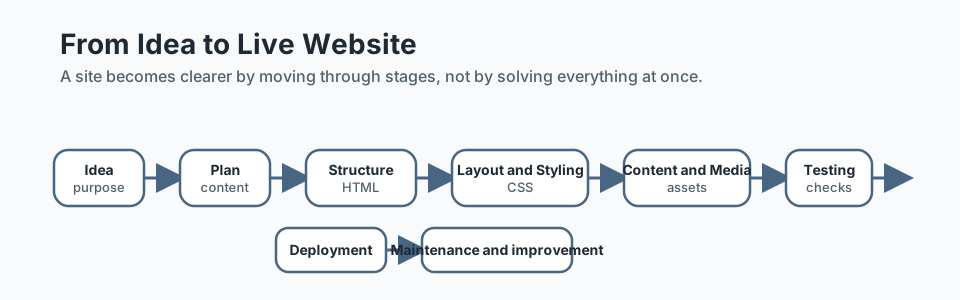
The Main Stages
1. Start with the idea
At the beginning, you are deciding what kind of site you need. Is it a portfolio, restaurant site, business homepage, blog, or booking site? What does the visitor need to understand or do?
2. Plan the content and sections
Before styling anything, it helps to list the key sections and content. A simple homepage might need a header, hero, services, contact details, and footer. This is the stage where structure starts to become visible.
3. Build the HTML structure
HTML gives the page meaning. It creates headings, paragraphs, links, images, navigation, and page regions. A page with good HTML may not look finished yet, but it already has a useful skeleton.
4. Add layout and styling with CSS
CSS turns structure into layout. It controls width, spacing, alignment, colour, and repeated visual patterns. This is where the page becomes easier to scan and feel more intentional.
5. Refine repeated patterns
Once a page starts to take shape, you begin to notice repetition. Cards, buttons, navigation, and footers often repeat. That is when reuse becomes important.
6. Test and fix
Before a site goes live, you check the basics: does it work on smaller screens, do links work, is the text readable, are the images sensible, and does the layout break anywhere?
7. Publish and maintain
A live site is not the end of the journey. Websites need updates, improvements, and occasional fixes. Launching a site is really the start of caring for it.
The Black Swan Bistro Example
GraphitEdge uses Black Swan Bistro to show how one project grows over time instead of appearing fully formed.
- Part 1 focuses on semantic HTML structure.
- Part 2 focuses on a homepage wireframe layout with CSS.
- Part 3 focuses on repeated patterns and reusable components.
- Part 4 focuses on expanding the project into a multi-page site.
- Later parts focus on deployment, launch decisions, and long-term improvement.
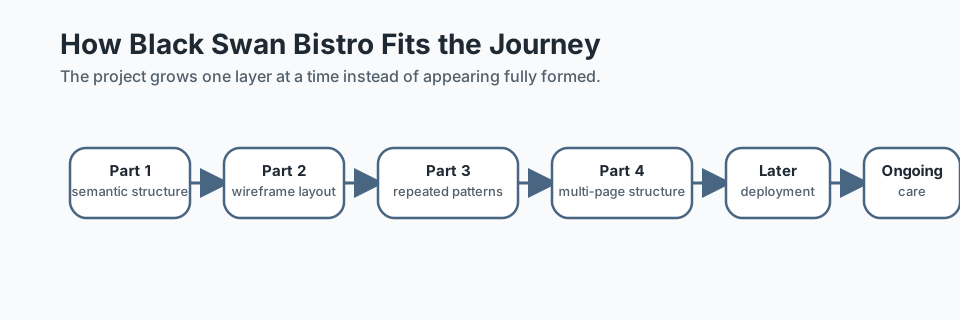
Why this matters: students often think they are "behind" if their page does not look finished early. In reality, a good project becomes clearer one layer at a time.
Common Mistakes Beginners Make
- Trying to design, code, and publish everything at once
- Worrying about polished visuals before the content structure is clear
- Skipping testing and only checking the site on one screen size
- Thinking a live site is "done forever" instead of something that needs care
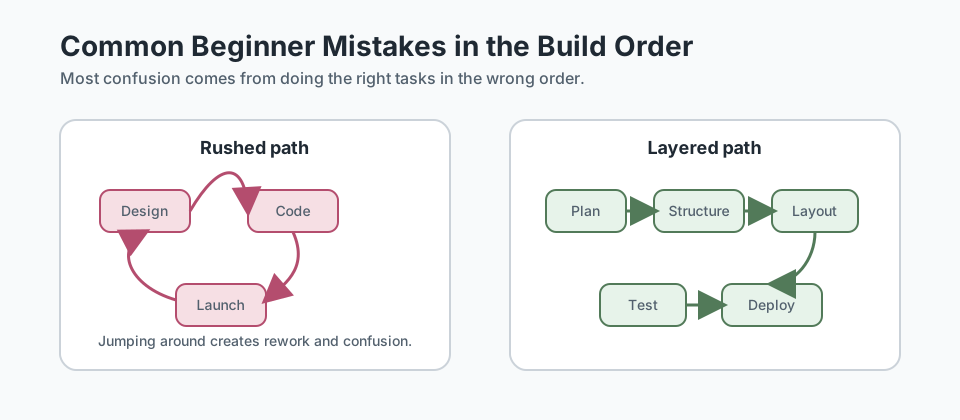
You do not avoid these mistakes by being perfect. You avoid them by working in a clear order and checking your decisions as you go.
Additional Resources
If you want a wider mental model for homepage purpose and what users expect from a front page, these resources are useful next steps:
- Nielsen Norman Group: Homepage Design Principles - a practical guide to what homepages need to communicate clearly.
- Atomic Design by Brad Frost - useful later when you start thinking about how small interface pieces grow into larger page systems.
Recap
The journey from idea to live website is not one magical leap. It is a series of smaller, understandable stages. That is exactly how GraphitEdge teaches web development: first understand the map, then learn each stage well.
Lesson Complete: You Have the Map
Key Takeaways:
- A website project usually moves through planning, structure, styling, content, testing, publishing, and maintenance.
- You do not need to finish every design decision before you begin, but you do need a clear next step.
- Good web projects are built in layers: idea first, then structure, then layout, then polish, then launch.
- The goal is not to rush from blank screen to live site. The goal is to build something clear, maintainable, and useful.
Learning Objectives Review:
Look back at what you set out to learn. Can you now:
- Explain the major stages between an idea and a live website Check!
- Describe what belongs in planning, building, testing, and publishing Got it!
- See where Black Swan Bistro fits into the wider learning journey Can explain it!
- Understand why later lessons focus on layout, patterns, components, and deployment in that order Could teach this!
If you can confidently answer "yes" to most of these, you're ready to move on!
Think & Reflect:
Project Journey
- Which stage of the website journey feels most familiar to you already?
- Which stage feels most unclear or intimidating right now?
Build Order
- Why is it useful to separate structure, layout, and polish into different stages?
- What problems happen when you jump straight to the final look too early?
Looking Ahead:
Recommended Next Steps
Additional Resources
Deepen your understanding with these helpful resources:
- NN/g: Homepage Design Principles - A strong guide to what homepages should communicate and how people use them.
- Atomic Design by Brad Frost - A useful introduction to thinking about interfaces as systems of smaller parts.