Working with Vite
Learn where Vite fits in a modern frontend workflow, how it supports frameworks without being one, and how to use its core commands with confidence.
A Tooling Lesson, Not a Framework Lesson
By the time learners meet Vite, they have usually already felt two pressures at once. Their projects are getting more capable, and the setup around those projects is starting to matter more.
You are no longer just writing a single script file and refreshing the browser manually. You may be working with modules, framework templates, local APIs, build scripts, and production output.
Vite matters here because it handles the development-and-build workflow around modern frontend projects. It is not the framework itself. It is the tool that helps you run, bundle, and preview the project with less friction.
- When you hear "Vite", do you think of a framework, a dev server, or a build tool?
- What parts of a modern frontend project still feel a bit magical right now?
- Have you ever run project scripts successfully without really knowing what each one did?
This lesson comes after intermediate JavaScript, data work, and Frameworks 101 on purpose. You now have enough context to understand Vite as the workflow layer around modern projects instead of treating it as another abstract buzzword.
Learning Objectives
By the end of this lesson, you'll be able to:
- Explain Explain what Vite does in a modern frontend workflow
- Distinguish Vite from frameworks such as Vue
- Use `dev`, `build`, and `preview` scripts more deliberately
- Recognise why a Vite project may look different from older static setups
- Connect Vite to the path from local development to deployment
Why This Matters:
Once learners understand frameworks conceptually, the next useful step is seeing the tooling that supports day-to-day implementation. This lesson makes that workflow legible.
Before You Start:
You should be familiar with:
- Applied JavaScript Review here
- Working with Data Review here
- Frameworks 101 Review here
What Vite Is
Vite is a development server and build tool for modern frontend projects. Its main job is to make local development faster and production builds easier to manage.
In practical terms, Vite usually gives you two big things:
- a fast local development server
- a production build command that prepares the app for deployment
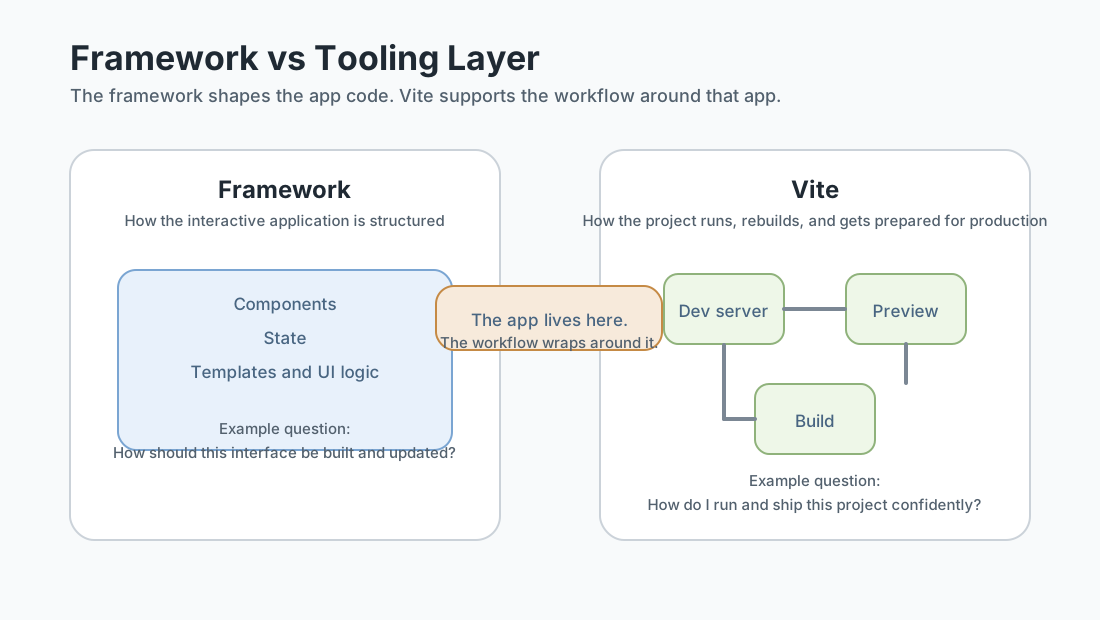
This is why it often shows up beside frameworks such as Vue, React, or Svelte. Those frameworks organise the application code. Vite helps run and build the project around that code.
A simple mental model
- Framework: how you structure interactive UI code
- Vite: how you run, bundle, and preview the project
Why This Lesson Comes After Frameworks 101
If you teach Vite too early, learners can easily confuse three different ideas: modern JavaScript, frameworks, and tooling. That makes the setup feel more complex than it really is.
Placing this lesson after your intermediate JavaScript work and Frameworks 101 solves that. At this point, learners already know why a project might need modules, reusable UI structure, and a clearer workflow. Vite then becomes the practical implementation layer instead of the place where those ideas get introduced for the first time.
Curriculum logic: this lesson should answer How do I work with a modern frontend project locally?, not What is a framework and why does it exist?
The Development Server Loop
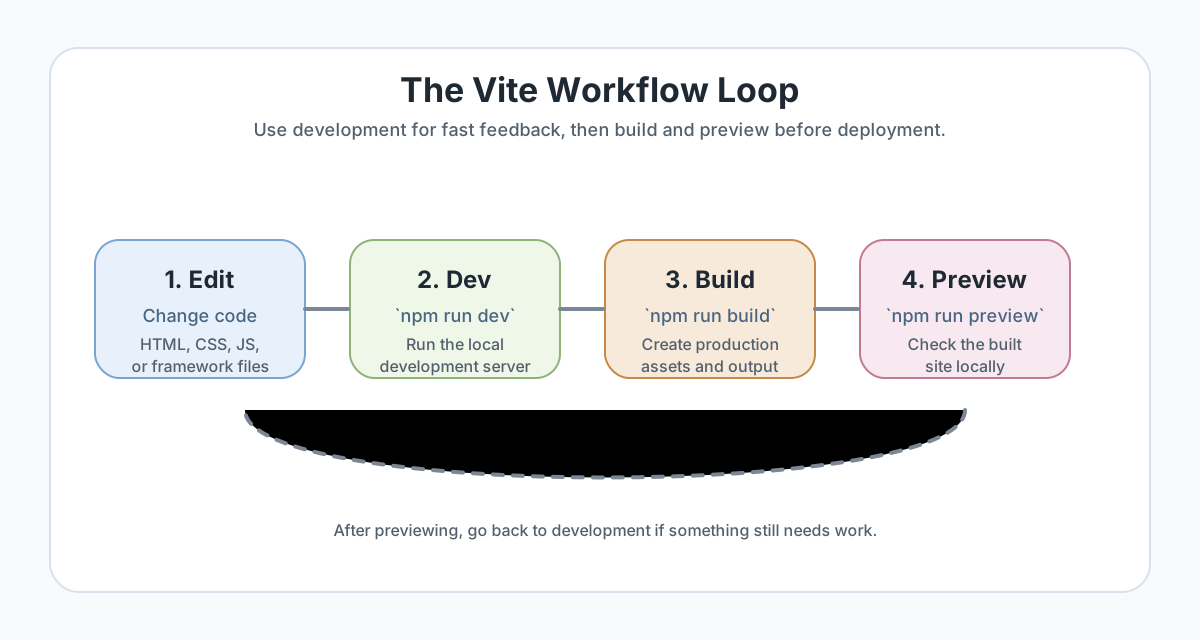
One reason Vite feels helpful so quickly is that it shortens the loop between changing code and seeing the result. Instead of editing files and repeatedly rebuilding by hand, you start the dev server once and keep iterating.
- start the dev server
- open the local site in the browser
- make a small code change
- see the result quickly
- repeat
That faster loop matters because it supports experimentation, debugging, and careful visual refinement. It reduces friction between intention and feedback.
In this repo
{
  "scripts": {
    "dev": "concurrently \"npm run dev:vite\" \"npm run dev:api\"",
    "dev:vite": "vite",
    "build": "vite-ssg build && node scripts/generate-sitemap.js",
    "build:spa": "vite build && node scripts/generate-sitemap.js",
    "preview": "vite preview"
  }
}
GraphitEdge is a useful example because it shows that real projects often wrap Vite inside a broader workflow. The core tool is still there, but it may appear through project-specific script names.
Checkpoint for Understanding
Pause here and make sure you can separate framework ideas from tooling ideas before moving into commands and project setup.
- What is the main difference between Vite and a framework such as Vue?
- Why is this lesson better placed after intermediate JavaScript and Frameworks 101?
- Why is `npm run preview` different from `npm run dev`?
Show sample answers
- Vue gives you a way to structure interactive UI code. Vite gives you the development server and build tooling around the project. One is the application framework; the other is the toolchain.
- Because learners already understand why modern projects need structure, modules, and sometimes frameworks. That lets Vite stay focused on workflow instead of carrying the whole conceptual introduction by itself.
- `npm run dev` starts the development server for fast iteration. `npm run preview` serves the production build output locally so you can inspect what the built site will behave like.
How confident are you with this concept?
Still confused | Getting there | Got it | Could explain it to a friend
Scaffolding a Project with Vite
Vite can start a new project from a template. That template might be plain JavaScript, or it might be tied to a framework such as Vue.
The important idea is this: Vite is not becoming the framework just because it can start a framework template. It is simply helping you create and run the project.
Example scaffold commands
npm create vite@latest

# Example: scaffold a Vue project directly
npm create vite@latest my-vue-app -- --template vue
A useful comparison is:
- vanilla: easier to see the tooling without framework concepts layered on top
- vue: easier to connect the tooling to the kind of project structure learners may meet next
Version note: current Vite setup expects a modern Node version. GraphitEdge already standardises on Node 22.x, which fits that workflow well.
The Core Commands to Understand
Most Vite-based projects revolve around three familiar commands:
npm run dev
Starts the development server for local work and quick feedback.
npm run build
Creates the production-ready output that a deployment platform will use.
npm run preview
Serves the built output locally so you can inspect the production version before deployment.
Those commands matter because they match three different moments in the workflow: building, checking, and shipping. Once you understand the role of each one, a new project becomes easier to read.
Why `index.html` Sits at the Project Root
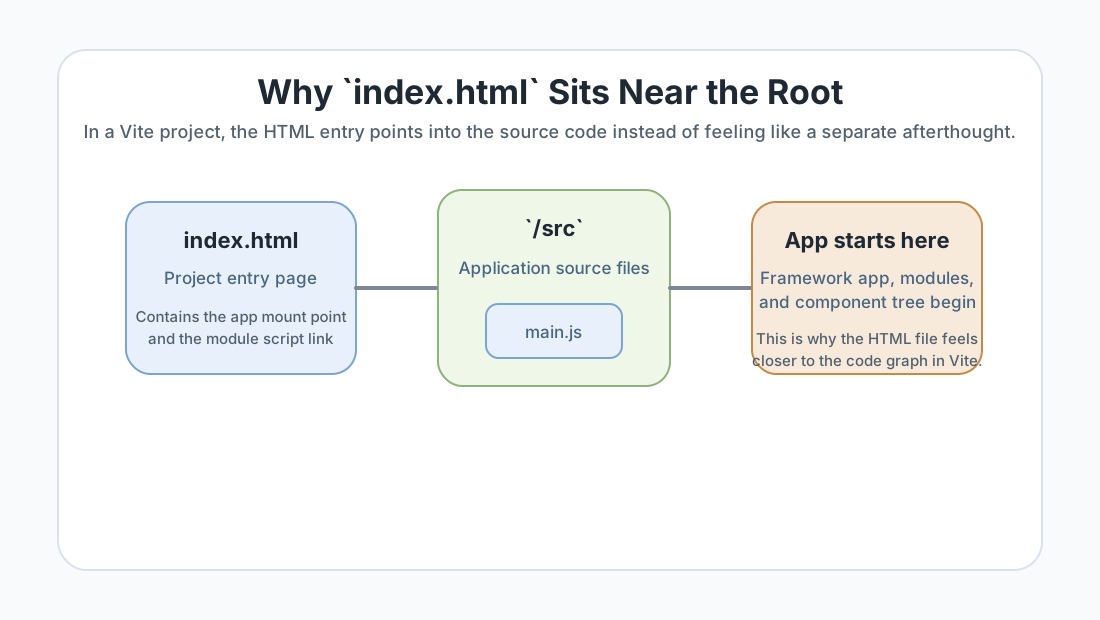
One detail that surprises learners is that a Vite project often places index.html near the root of the project instead of hiding it deep in a different folder.
That reflects how Vite treats the page during development. The HTML entry file is part of how the app starts. Rather than feeling like a passive container, it acts more like an entry point into the module graph.
A very small example
<!-- index.html -->
<body>
  <div id="app"></div>
  <script type="module" src="/src/main.js"></script>
</body>
This is one reason Vite projects can feel more direct and modern than older setups that separated the HTML entry from the rest of the app more rigidly.
Build vs Preview
Learners often understand dev quickly but blur together build and preview. Keep their jobs separate.
- Build creates the output files for production.
- Preview lets you inspect those built files locally.
This matters because development behavior and production behavior are related but not identical. A project may run fine in local development and still reveal small path, asset, or deployment-shape issues once it has been built.
Good habit: when a project is heading toward deployment, do not stop at npm run dev. Also build it and preview the result.
What Vite Is Not
To keep this lesson clean, it helps to say clearly what Vite is not.
- It is not a replacement for learning JavaScript fundamentals.
- It is not the same thing as Vue, React, or another framework.
- It is not the deployment platform.
- It is not the whole application architecture by itself.
Vite supports the workflow. It does not replace the reasoning required to build a good project.
Guided Practice
Trace the Vite workflow in a real project
Use one scratch project and one real repo to connect the commands to the actual development cycle.
Step 1: Read the scripts before you run anything
Open a Vite-based project and inspect its package.json scripts first. Look for dev, build, and preview.
In GraphitEdge, for example, dev:vite runs the Vite dev server, preview runs vite preview, and the project wraps Vite inside a wider app workflow.
Write one sentence explaining what each script is for before you execute it.
Need a hint?
Step 2: Scaffold a small Vite project
Create a scratch project with npm create vite@latest. Choose either the vanilla template or the vue template depending on what you want to compare.
The aim is not to master the template. The aim is to notice the kind of starting structure Vite gives you.
Need a hint?
Step 3: Run the development loop
Install dependencies, start the dev server with npm run dev, and make one tiny change such as editing a heading or paragraph.
Watch how quickly the browser updates. That fast feedback loop is one of the main reasons tools like Vite matter in practice.
Need a hint?
Step 4: Build and preview the production output
Run npm run build and then npm run preview. Compare the purpose of each command.
Ask yourself: what changed from the dev step? Which command creates output, and which command lets me inspect that output locally?
Need a hint?
You are on track if you can:
- You can explain what Vite is doing without calling it a framework
- You can identify the job of `dev`, `build`, and `preview` scripts
- You can scaffold a small Vite project and run it locally
- You can describe why fast feedback improves the development workflow
- You can explain why previewing the production build is useful before deployment
Independent Practice
Independent Practice: Explain and run the workflow yourself
Now repeat the core workflow on your own without step-by-step prompts.
Your Task:
Create or open a small Vite-based project. Then explain, in your own words, what each core script does and run the full sequence from local development to local production preview.
As you work, keep the lesson distinction clear: identify what belongs to the framework, what belongs to the app code, and what belongs to Vite.
Requirements:
- Identify whether the project is plain JavaScript or framework-based
- Run the development server and make one visible change
- Run the production build and then preview it locally
- Write a short explanation of why Vite is a toolchain layer rather than a framework
Stretch Goals (Optional):
- Compare a vanilla Vite template with a Vue template and note what changed versus what stayed part of the shared toolchain
- Inspect `vite.config.js` in a real project and describe one customisation you notice
Success Criteria:
| Criteria | You've succeeded if... |
|---|---|
| Tooling understanding | The learner explains Vite as development-and-build tooling rather than treating it as a framework or design system. |
| Command fluency | The learner uses `npm run dev`, `npm run build`, and `npm run preview` appropriately and can explain the purpose of each. |
| Project awareness | The learner notices how a real project can wrap Vite in additional scripts instead of assuming every repo looks identical. |
| Workflow reasoning | The learner connects the tooling to real iteration, checking, and deployment habits rather than memorising commands in isolation. |
Additional Resources
- Vite official guide - the best next stop for current commands, templates, and workflow details.
- MDN: JavaScript modules - useful if you want to connect Vite more clearly to modern module-based development.
Recap
Vite makes more sense once it stops competing with framework concepts in your head. It is the tooling layer around a modern frontend project: start the dev server, iterate quickly, build for production, and preview what you built before you ship.
That is why this lesson fits best after framework context rather than before it. At this stage, learners can see Vite as practical workflow support instead of one more unexplained piece of frontend jargon.
Lesson Complete: You Can Place Vite More Clearly
Key Takeaways:
- Vite is a dev server and build tool for modern frontend projects, not the framework itself.
- This lesson belongs after intermediate JavaScript and framework context because it extends that knowledge into practical workflow.
- The core loop is simple: scaffold or open the project, run the dev server, make changes, build for production, and preview the built output.
- Vite treats `index.html` as part of the app entry during development, which is one reason its project shape can feel different from older setups.
- Understanding the scripts in `package.json` makes a project feel more legible and less magical.
Learning Objectives Review:
Look back at what you set out to learn. Can you now:
- Explain what Vite does in a modern frontend workflow Check!
- Distinguish Vite from frameworks such as Vue or React Got it!
- Use the core `dev`, `build`, and `preview` commands with confidence Can explain it!
- Describe why Vite belongs after framework context in this curriculum Could teach this!
- Connect Vite to the development-to-deployment path more clearly Check!
If you can confidently answer "yes" to most of these, you're ready to move on!
Think & Reflect:
Tool vs Framework
- Before this lesson, which parts of modern frontend setup felt like one blurred concept?
- Can you now explain where the framework ends and where the tooling begins?
Workflow Confidence
- Which command feels most intuitive to you now: `dev`, `build`, or `preview`?
- What would you check first in a new project to understand how it is using Vite?
Looking Ahead: