Black Swan Bistro - Part 6
Deploy the Site
Publish the Black Swan Bistro using traditional hosting or a Git-connected Vue/Vite workflow, then verify that the live site is genuinely ready for visitors.
From Your Computer to the Public Web
You have planned the site, written the markup, styled the pages, improved the details, and tested the experience. Now the Bistro leaves your computer and becomes a real place on the web.
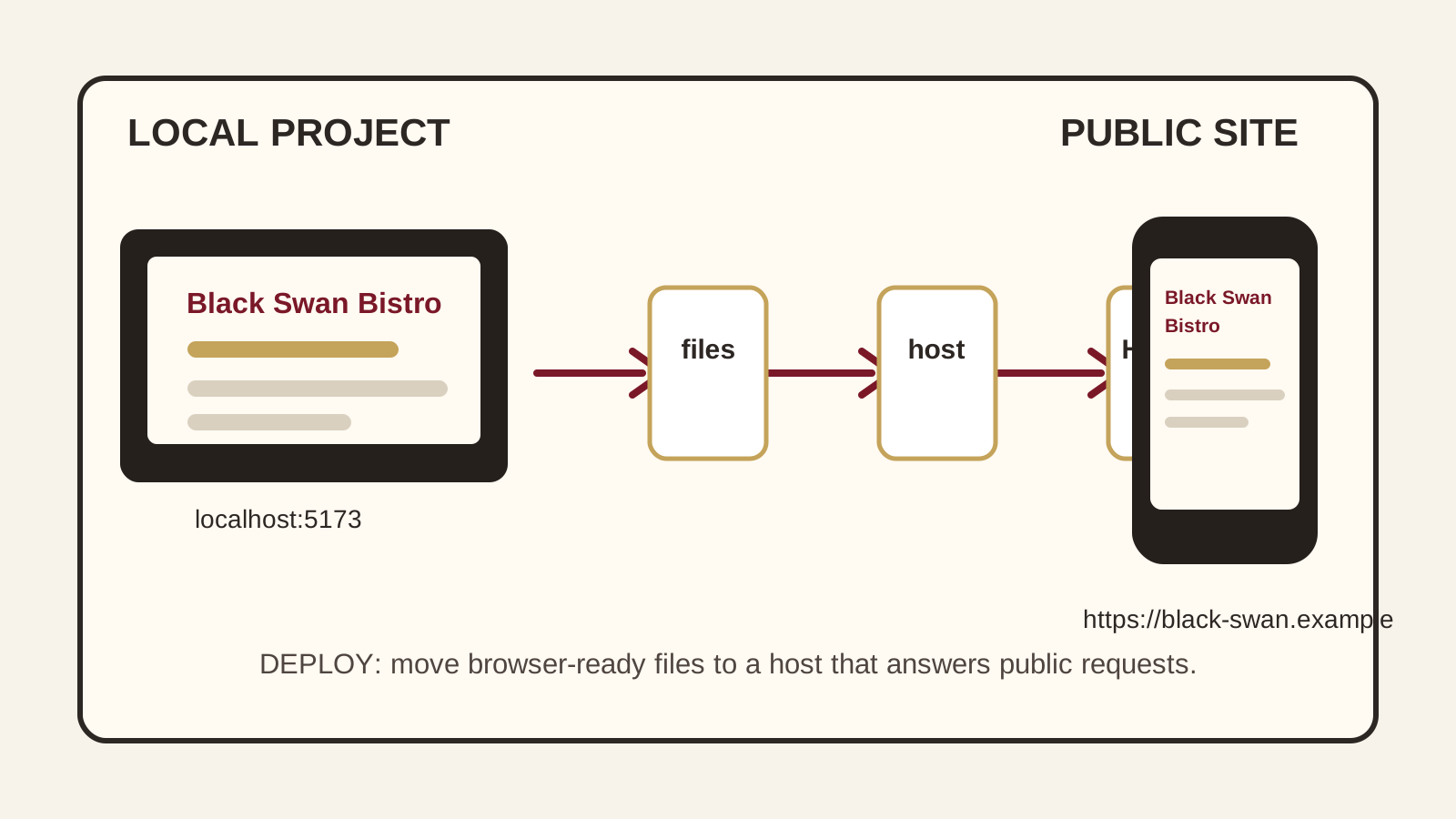
Deployment sounds grand. In practice, it means putting the browser-ready version of your site on a computer that answers public web requests. The interesting part is deciding which files are browser-ready, who builds them, and where they are served.
- What files should a visitor be able to request from your finished Bistro site?
- What might change when the site is loaded from a public URL instead of localhost?
- Where would you look first if the live site loaded but looked broken?
This lesson follows Part 5's production-readiness checklist. You will now use that readiness work to publish the Bistro and verify the live result.
Learning Objectives
By the end of this lesson, you'll be able to:
- Explain Explain the difference between source files, build output, a repository, and a hosting service
- Prepare the Black Swan Bistro for production without uploading development clutter
- Publish a static HTML site to a traditional hosting document root
- Place a Vue/Vite project in GitHub and deploy it with GitHub Pages or Vercel
- Recognise common problems involving asset paths, routes, build settings, DNS, and HTTPS
- Verify a live deployment using a repeatable launch checklist
Why This Matters:
Deployment becomes much easier when you can name each hand-off. This lesson keeps the process practical: choose the right pathway, publish the correct files, and check the public URL like a real visitor.
Before You Start:
You should be familiar with:
- BSB Part 5: Prepare for Deployment Review here
- Git Basics Review here
- Deployment Fundamentals Review here
The Deployment Model
A deployment is not magic. It is a hand-off from your project files to a public web server. Once you can name each part of that hand-off, you can debug it.
Static HTML pathway
- Your finished HTML, CSS, JavaScript, and images exist.
- You upload those files to the domain's document root.
- The web server returns those same files to visitors.
Vue/Vite pathway
- You keep Vue source and project metadata in GitHub.
- A build command creates browser-ready output in
dist. - GitHub Pages or Vercel serves the built site.
Four terms that prevent most confusion
| Term | Meaning |
|---|---|
| Source | The files you edit, such as Vue components, CSS, JavaScript, images, configuration, and package.json. |
| Build | The process that transforms source into optimised browser-ready files. In Vite, npm run build usually runs vite build. |
| Build output | The generated production files. Vite uses dist by default. Do not hand-edit it; regenerate it from source. |
| Host | The service that stores or produces the public files and answers browser requests. |
Choose Your Pathway
You can complete only the pathway that matches your project. Reading both is worthwhile, though: modern deployment is still the same web underneath, wearing more automation.
Student Downloads
Deployment checklist and templates
Use the checklist before, during, and after deployment. The configuration templates are examples for the Bistro project; they are not installed as this repository's own deployment config.
Pathway A: Deploy Static HTML Through Traditional Hosting
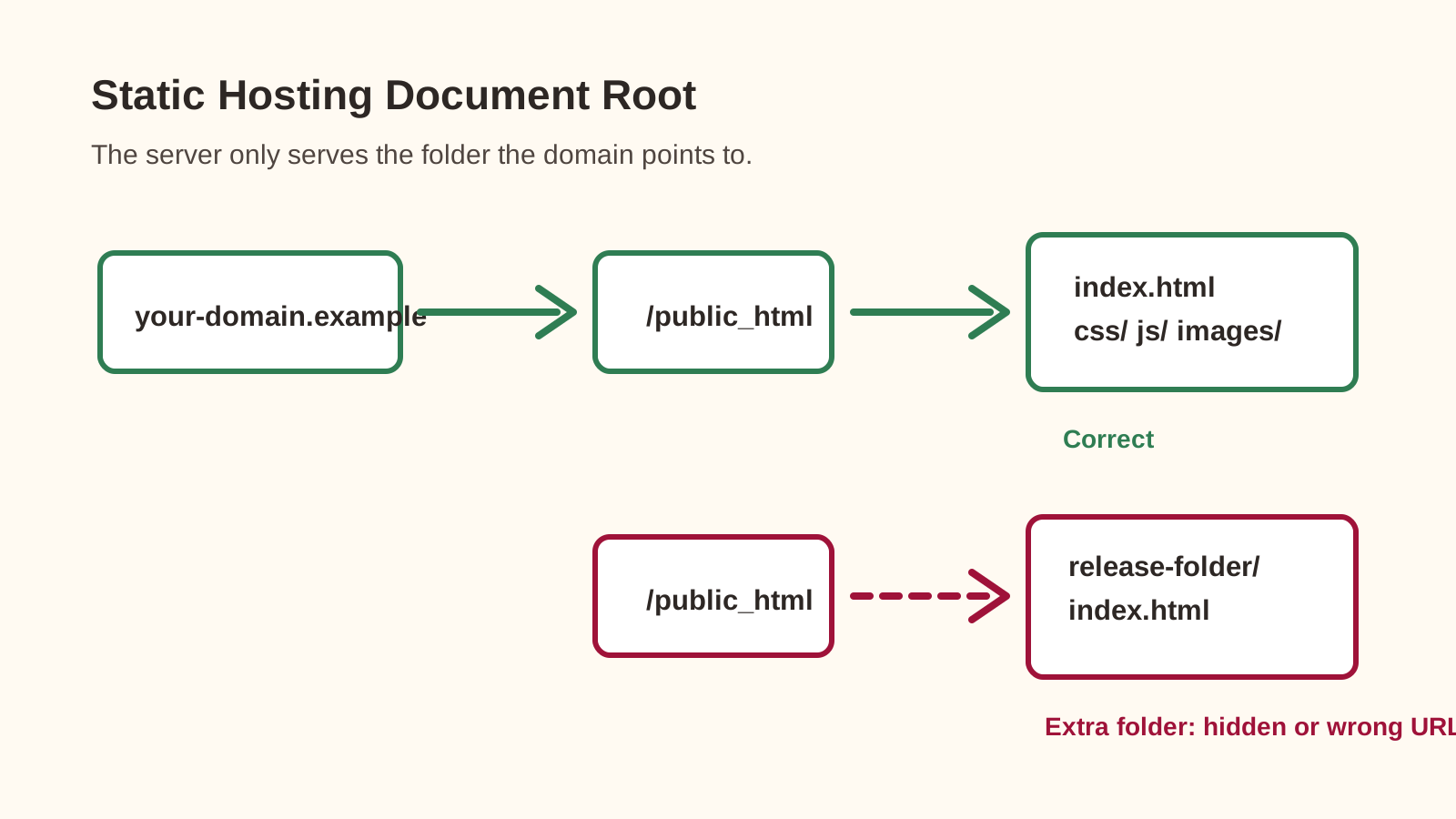
Traditional hosting usually gives each domain a document root: the folder the web server treats as the public top level of that site. In cPanel-based hosting, a primary domain often uses public_html; an additional domain may use a folder inside it. Confirm the exact document root instead of guessing.
Procedure
- Prepare a clean release folder. Copy only the public site files:
index.html, page files, CSS, JavaScript, images, and any web fonts or icons you actually use. - Test the release locally. Use a local server or editor preview and click every navigation link. Avoid relying only on double-clicked
file://URLs. - Identify the correct document root. Read it from the hosting control panel. The host controls this location.
- Back up the current live site. If files already exist, download or compress them before replacing anything.
- Upload the release. With File Manager, ZIP the release contents, upload, extract, and remove accidental nesting. With SFTP, upload the contents while preserving folders.
- Load the public URL. Use a private window, confirm HTTPS, and check whether
wwwand non-wwwbehaviour is intentional.
<!-- Relative: works when pages and assets keep this relationship -->
<link rel="stylesheet" href="css/styles.css">

<!-- Root-relative: starts at the deployed domain root -->
<link rel="stylesheet" href="/css/styles.css">

<!-- Local computer path: will fail on the public web -->
<link rel="stylesheet" href="C:\Users\You\Bistro\css\styles.css">
Pathway A checkpoint: why must index.html be in the document root?
The server maps the domain's public root to the document-root folder, so its default home document must exist where that mapping expects it.
Pathway B: Deploy Vue/Vite Through GitHub
This pathway has three connected layers: your local Vue/Vite project, a GitHub repository that stores source history, and a deployment service that installs dependencies, builds the project, and publishes the result.
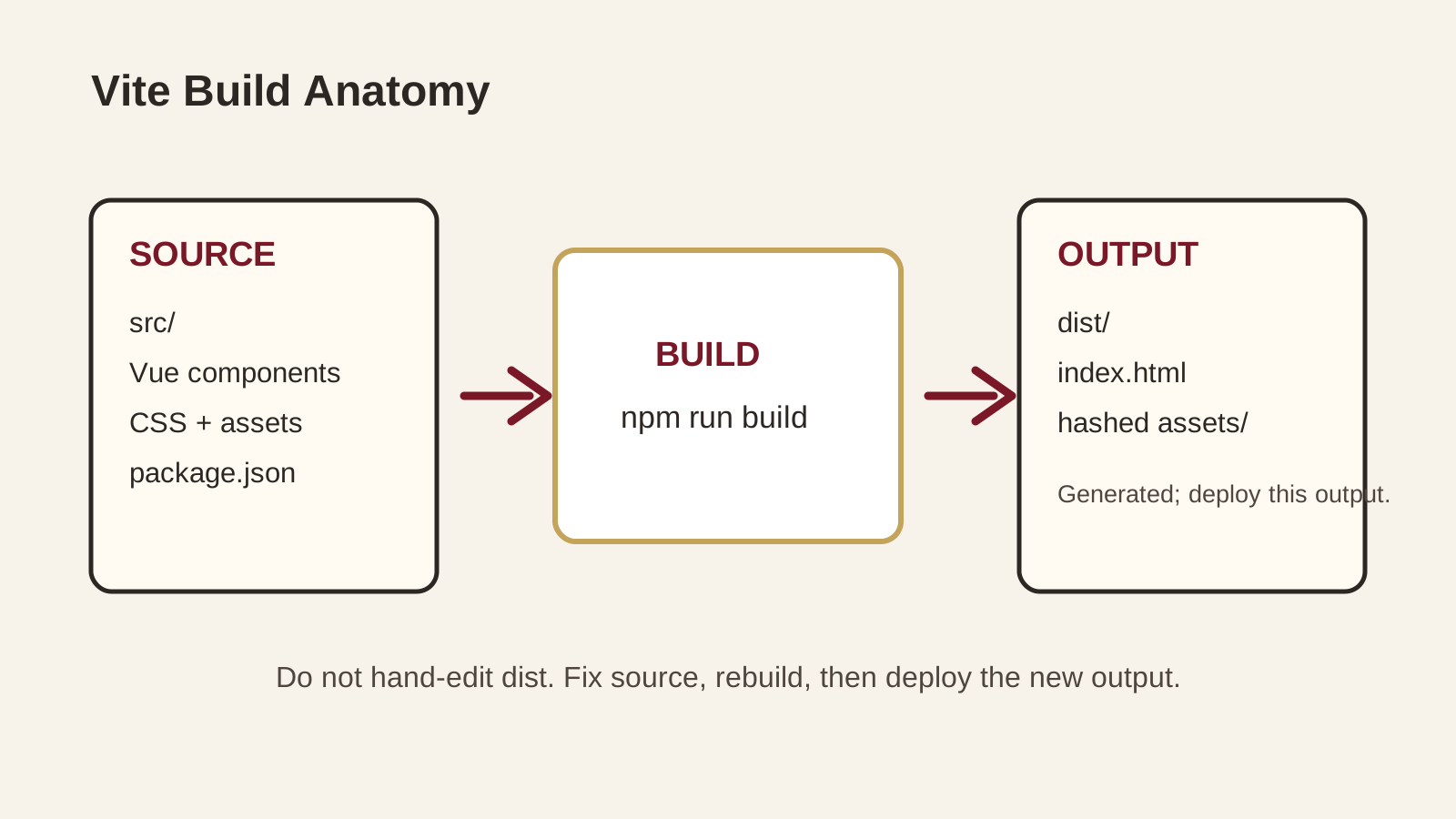
dist folder that a static host can serve. Prove the production build locally
From the folder containing package.json, confirm the scripts, install dependencies, build, and preview:
{
  "scripts": {
    "dev": "vite",
    "build": "vite build",
    "preview": "vite preview"
  }
}
npm install
npm run build
npm run preview A standard Vite build creates dist. vite preview is a local production-build preview, not a production server. If npm run build fails, fix that before opening a hosting dashboard.
Keep Git safe
Commit source, configuration, public assets, package.json, and the correct lockfile. Do not commit generated dependencies, generated output, real secret files, or private data. Values exposed to client-side Vite code are visible in the browser bundle; do not treat VITE_ variables as secret.
node_modules/
dist/
.env
.env.*
!.env.example
.DS_Store
Option B1: GitHub Pages
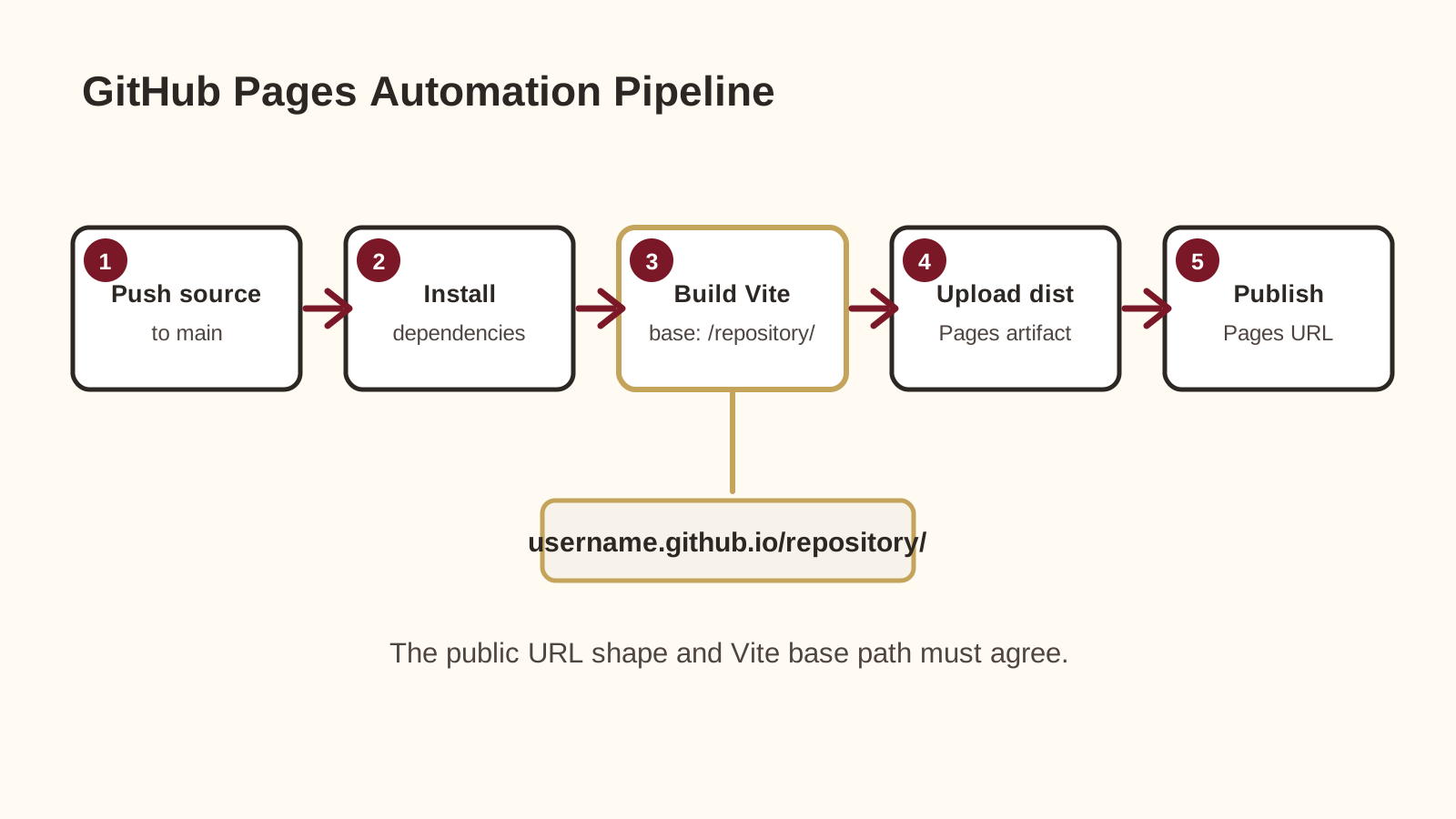
GitHub Pages serves static output. For a Vite project, GitHub Actions installs dependencies, runs the build, uploads dist as a Pages artifact, and deploys that artifact.
1. Set the correct Vite base path
For a repository site at https://YOUR-USERNAME.github.io/YOUR-REPOSITORY/, set base to the repository path. For a user site or custom-domain root, use / or omit base.
import { defineConfig } from 'vite'
import vue from '@vitejs/plugin-vue'

export default defineConfig({
  plugins: [vue()],
  base: '/YOUR-REPOSITORY/',
})
2. Add the Pages workflow
Copy the supplied workflow template to .github/workflows/deploy.yml in the Bistro project. It builds and uploads dist with the permissions needed for Pages deployment. If your production branch is not main, change the workflow trigger.
name: Deploy Black Swan Bistro to GitHub Pages

on:
  push:
    branches: [main]
  workflow_dispatch:

permissions:
  contents: read
  pages: write
  id-token: write

concurrency:
  group: pages
  cancel-in-progress: true

jobs:
  deploy:
    environment:
      name: github-pages
      url: ${{ steps.deployment.outputs.page_url }}
    runs-on: ubuntu-latest
    steps:
      - name: Check out repository
        uses: actions/checkout@v7
      - name: Set up Node.js
        uses: actions/setup-node@v6
        with:
          node-version: lts/*
          cache: npm
      - name: Install dependencies
        run: npm ci
      - name: Build production site
        run: npm run build
      - name: Configure GitHub Pages
        uses: actions/configure-pages@v6
      - name: Upload built site
        uses: actions/upload-pages-artifact@v5
        with:
          path: ./dist
      - name: Deploy to GitHub Pages
        id: deployment
        uses: actions/deploy-pages@v5
3. Enable Pages and check routing
In GitHub, open Settings -> Pages and set Source to GitHub Actions. Push the workflow and configuration, then inspect the run in Actions.
If the Bistro has no client-side router, no extra fallback is needed. If it uses Vue Router with createWebHistory(), direct visits to nested routes can return a GitHub Pages 404 because the static host looks for a real file at that path. Beginner-friendly options are hash history or a deliberate Pages-specific 404 fallback.
Option B2: Vercel
Vercel connects directly to GitHub. Production-branch pushes create production deployments; supported branches and pull requests can create preview deployments for review before production changes.
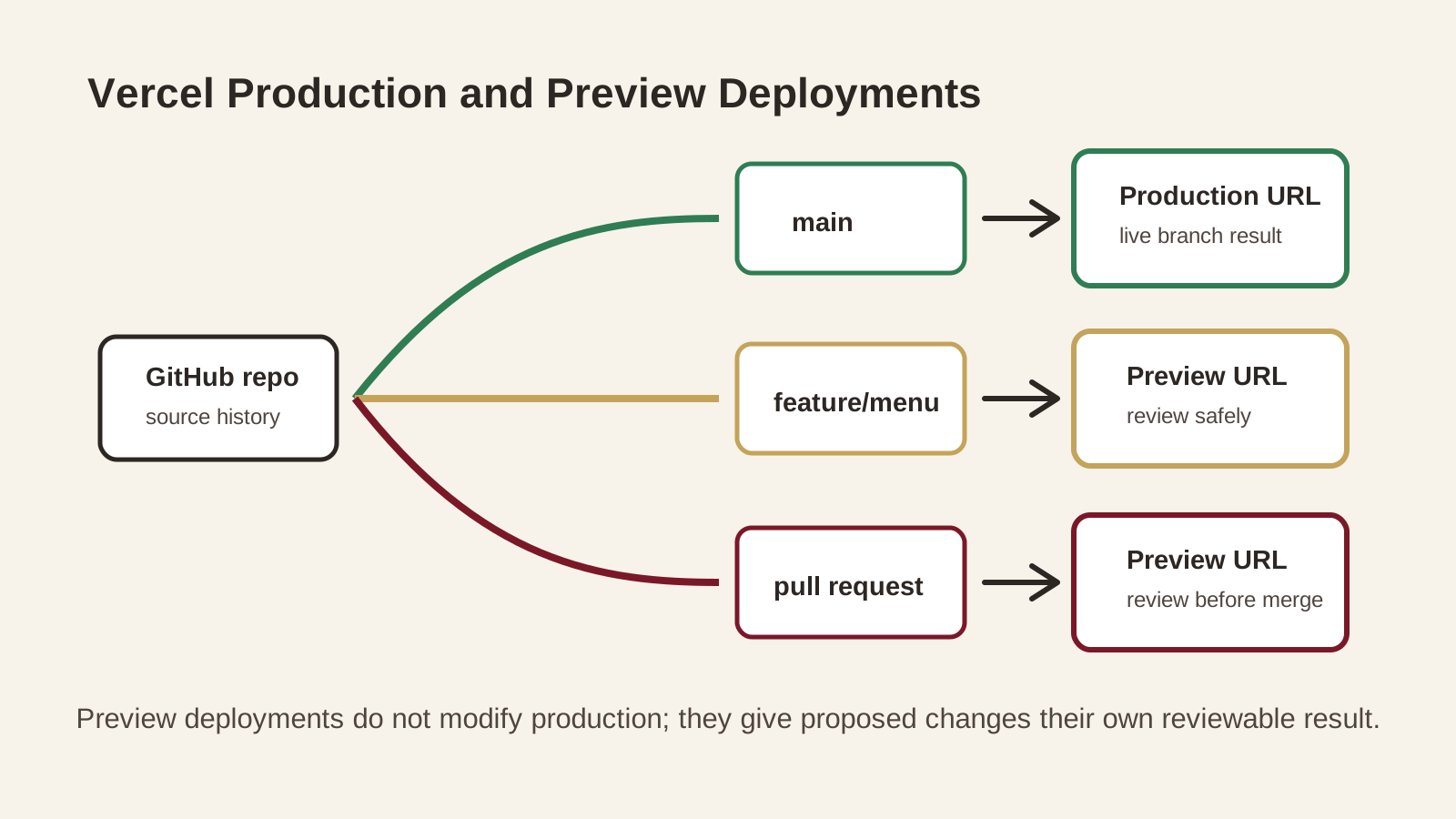
Procedure
- Import the GitHub repository in Vercel and choose the folder containing the Bistro's
package.json. - Confirm the detected settings: framework preset Vite, build command
npm run build, output directorydist, and the intended production branch. - Add environment variables only if the project genuinely needs them at build time. Do not use client-side variables for private credentials.
- Deploy, open the public URL, and use previews for non-production changes when available.
SPA rewrite: conditional, not automatic
If the app uses Vue Router history mode and direct visits to nested routes return 404, add the included vercel.json. This rewrite lets the SPA receive direct requests such as /menu and choose the view client-side. Do not add this blanket rewrite to a true multi-page site.
{
  "$schema": "https://openapi.vercel.sh/vercel.json",
  "rewrites": [
    {
      "source": "/(.*)",
      "destination": "/index.html"
    }
  ]
}
Option B checkpoint: match each item to its job
- GitHub repository: stores and versions source.
npm run build: transforms source for production.dist: browser-ready output.- GitHub Actions or Vercel: automates building and publishing.
The Launch Verification Pass
A green deployment badge means the platform completed its instructions. It does not mean the Bistro is ready for a hungry visitor. Use the downloadable checklist and complete these passes on the public URL.
Reachability
- The expected URL loads over HTTPS.
- The page is not a provider placeholder or directory listing.
- The preferred domain format is consistent.
Content and navigation
- All planned pages or views are reachable.
- Restaurant details are correct.
- Header, footer, buttons, and links work.
Visual quality
- Images load and keep sensible proportions.
- Mobile, tablet, and desktop layouts work.
- Text remains readable at 200% zoom.
Accessibility and behaviour
- Keyboard focus is visible.
- Headings follow a meaningful order.
- Forms and motion behave honestly and accessibly.
Technical quality
- The console has no unexplained errors.
- The Network panel shows no missing local assets.
- Direct visits and refreshes work on client-side routes.
Troubleshooting by Symptom
The domain shows a default hosting page
Confirm the document root, placeholder index files, DNS target, and cache. A perfect upload to the wrong folder is still invisible.
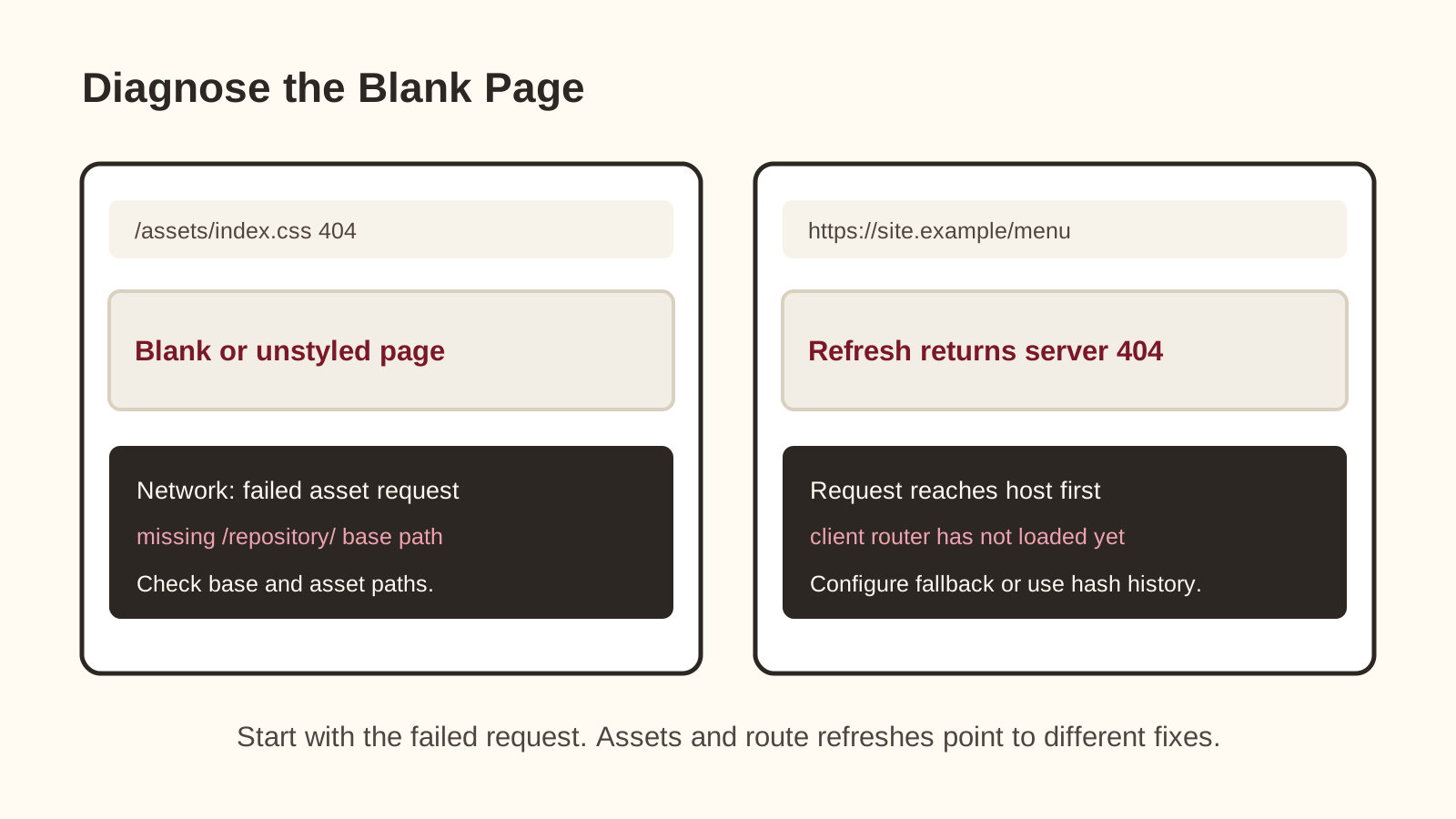
The HTML loads but the page has no styling
Inspect the stylesheet request. On traditional hosting, check case and relative paths. On GitHub Pages, check Vite base against the repository name.
The Vite deployment is a blank page
Find the first failed module or asset request. Common causes are incorrect base, runtime JavaScript errors, missing committed files, or missing build-time variables.
The deployment build fails but local development works
Run a clean local build. Check npm ci, lockfile state, filename case, Node version, committed imports, and required build-time variables.
A nested Vue route works through clicks but fails after refresh
That is a server fallback problem, not the same operation as a client-side link click. On Vercel, add the SPA rewrite when the project is truly an SPA. On GitHub Pages, use hash history or a deliberate fallback strategy.
Checkpoint: Can You Explain the Deployment Hand-Off?
Before the practical work, answer these in your own words.
- Why can plain HTML/CSS/JS be uploaded directly, while a Vite project usually needs a build step?
- What does the host serve for a standard Vite deployment?
- Why does a GitHub Pages repository site often need base: "/REPOSITORY/"?
- What is different about clicking a Vue Router link and refreshing a nested history-mode route?
Tips to Remember:
- Name the file state first: source, build output, or uploaded public files.
- A build service does not make client-exposed variables secret.
- Route refresh bugs often involve the server, not just the Vue app.
Check Your Answers
- Plain static files may already be browser-ready. A Vite project contains source modules and framework code that Vite transforms into production HTML, CSS, JavaScript, and assets.
- The host serves the generated build output, normally the dist folder, not the editable source files in src.
- A repository site is served below the repository path, so generated CSS and JavaScript URLs need to include that public base path.
- Clicking a client-side link lets Vue Router update the view after the app has loaded. Refreshing or directly visiting the route asks the server for that path first, so static hosts need an appropriate fallback or routing strategy.
How confident are you with this concept?
Still confused | Getting there | Got it | Could explain it to a friend
Guided Practice: Deploy Black Swan Bistro
Choose the pathway that matches your project, publish the correct files, and verify the public result.
Pick the matching pathway
Open your Black Swan Bistro project and identify what kind of project it is. If it is plain index.html, CSS, images, and optional browser JavaScript, use Pathway A. If it has package.json, Vite scripts, and Vue source files, use Pathway B.
Need a hint?
Prepare the release source
For traditional hosting, create a clean release folder containing only public files. For Vue/Vite, run npm run build and confirm the production output is created in dist.
Need a hint?
Publish without changing unrelated config
Follow the procedure for your host. Upload static files to the correct document root, or connect the GitHub repository to GitHub Pages/Vercel. Use the supplied templates as examples inside the Bistro project, not as changes to unrelated projects.
Need a hint?
Verify the live URL
Use the downloadable checklist on the public URL. Test navigation, assets, route refreshes, mobile layout, keyboard focus, HTTPS, console errors, and Network 404s. A successful build is not the same as a verified visitor experience.
Need a hint?
You're on track if you can:
- You can name which files went live
- The public URL loads over HTTPS
- CSS, JavaScript, images, and routes work from the live URL
- You tested mobile layout, keyboard focus, and console/network errors
- You recorded the host, URL, branch or document root, and rollback notes
Mini Challenge: Make One Safe Production Change
The first deployment proves the pipeline can work. The second proves you understand how to use it.
Deploy one low-risk follow-up
Change one low-risk content detail, such as the footer year or a short Bistro description. Test locally, deploy through the same pathway, confirm the public change, and record how you would roll it back.
Requirements:
- Choose a change that does not affect core navigation or booking/contact behaviour
- Test locally before deploying
- Use the same deployment pathway as the first launch
- Confirm the change on the public URL
- Write one rollback note in your checklist
Stretch Goals (Optional):
- Review a Vercel preview deployment before production
- Check one Lighthouse category and record one improvement idea
- Test the public URL on another device or network
Success Criteria:
| Criteria | You've succeeded if... |
|---|---|
| Deployment control | The follow-up change reaches the public URL through the intended pathway. |
| Verification | The checklist records live URL testing, not only local testing. |
| Rollback thinking | The notes explain how to restore the previous version if needed. |
Knowledge Check: Can You Verify a Deployment?
Use these questions to confirm the deployment ideas before you call the project finished.
- Why does a Vite project require a build step while a plain HTML site may not?
- What is the purpose of Vite's dist directory?
- Why can GitHub Pages require base: '/repository-name/'?
- What is the difference between a production deployment and a preview deployment on Vercel?
- Why should deployment verification happen on the live URL?
- What is the safest first response to a failed deployment build?
Tips to Remember:
- Think about which environment you are checking: local, preview, or production.
- Name the built files before naming the host.
- A live URL can reveal issues that localhost cannot.
Show Suggested Answers
- Vite transforms Vue source files, imports, and dependencies into browser-ready production files. A plain HTML site may already contain files the browser can request directly.
- The dist directory contains the generated production files that a static host should serve.
- A repository site is served below the repository path, so built asset URLs need to include that public base.
- Production is the chosen live deployment for visitors. Preview deployments are separate URLs for proposed or non-production changes.
- Hosting, paths, routing, HTTPS, caching, and DNS problems may only appear after the site is served from its public environment.
- Read the first meaningful build error, reproduce the production build locally, and fix the underlying source or configuration.
How confident are you with this concept?
Still confused | Getting there | Got it | Could explain it to a friend
What You Have Built
The Black Swan Bistro is now more than a folder on your computer. You identified the browser-ready version of the project, moved it through a deployment pathway, connected files, build output, hosting, and a public URL, and checked the result as a visitor would experience it.
That is the full web-development loop: plan, build, test, deploy, observe, improve.
Part 6 Complete: The Bistro Is Live
Key Takeaways:
- Deployment is a hand-off from project files to a public host.
- Plain static sites can publish browser-ready files directly to the document root.
- Vite projects need a production build; the generated dist folder is what static hosts serve.
- GitHub Pages repository sites and Vite base paths must agree.
- Vercel normally detects Vite, builds with npm run build, and serves dist.
- A live URL still needs human verification after the platform reports success.
Learning Objectives Review:
Look back at what you set out to learn. Can you now:
- Explain source, build output, repository, and host Check!
- Deploy a static HTML version through traditional hosting Got it!
- Prepare a Vue/Vite project for GitHub-connected deployment Can explain it!
- Configure GitHub Pages or Vercel with the correct routing assumptions Could teach this!
- Use a checklist to verify the public deployment Check!
- Diagnose common asset, route, build, DNS, and HTTPS problems Got it!
If you can confidently answer "yes" to most of these, you're ready to move on!
Think & Reflect:
Deployment Path
- Which pathway did you use, and what files actually went live?
- Where would you look first if the public site loaded without CSS?
Verification
- Which live-site check caught something local testing might miss?
- What would you record so a future deployment feels less mysterious?
Real-World Test:
Professional deployment work is less about dramatic button-clicking and more about repeatable evidence. Know what changed, where it was served, how it was checked, and how to recover if something goes sideways.
Looking Ahead:
From here, connect a custom domain, add privacy-respecting analytics, measure performance, document rollback, or move into ongoing website care.
Technical instructions last verified 4 August 2026. Interfaces and action versions can change, so preserve the concepts and re-check the official resources below when updating this lesson.
Recommended Next Steps
Continue Learning
Ready to move forward? Continue with the next tutorial in this series:
Black Swan Bistro — Part 7 (Audit the Live Website)Additional Resources
Deepen your understanding with these helpful resources:
- GitHub Pages Documentation - Official guide to deploying with GitHub Pages.
- GitHub Docs: Configuring a publishing source - Official GitHub guidance for enabling GitHub Actions as the Pages publishing source.
- Vite: Deploying a Static Site - Official Vite guidance for build output, local preview, GitHub Pages, and Vercel.
- GitHub Pages custom workflows - Official GitHub guidance for Pages artifacts and deployment workflows.
- Vercel: Deploying Git repositories - Official Vercel guidance for repository import, build settings, and Git-triggered deployments.
- Vercel: Vite on Vercel - Official Vercel guidance for deploying Vite projects and handling SPA deep links.
- cPanel File Manager - Official cPanel guide for uploading and extracting files through File Manager.
- cPanel: Manage the Domain - Official cPanel guide for document roots and domain file locations.