Deployment module
Domains, DNS, HTTPS and Going Live
Learn how registrars, DNS providers, hosting providers, SSL certificates, apex domains, www, redirects, and DNS propagation fit together.
Learning Objectives
By the end of this lesson, you'll be able to:
- Distinguish domain registrar, DNS provider, hosting provider and web server roles
- Recognise A, AAAA, CNAME and nameserver records
- Explain HTTPS, SSL issuance and www/non-www redirects
- Record website ownership details without storing passwords
Why This Matters:
Going live is less mysterious when domain, DNS, hosting and HTTPS each have a job.
Who Does What?
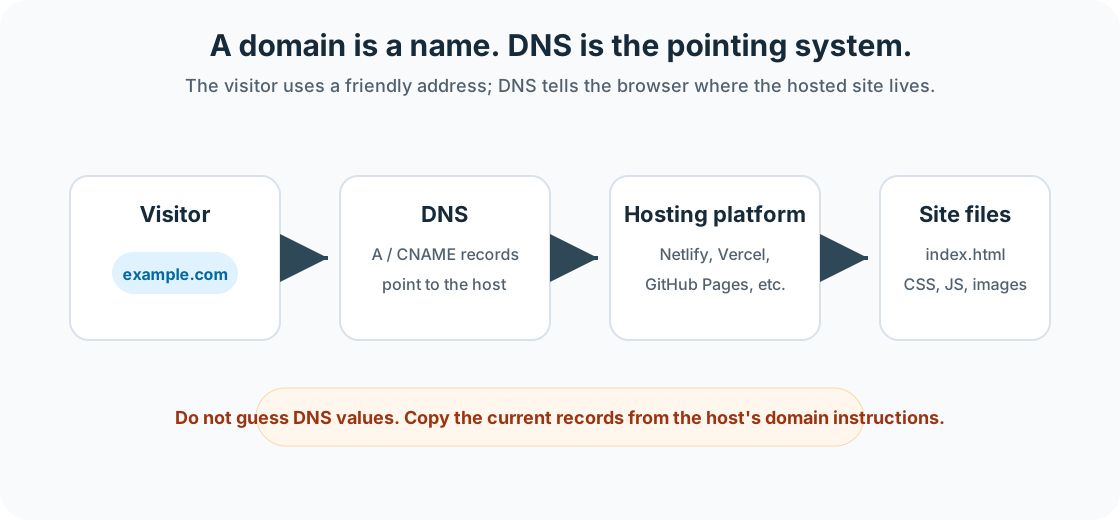
Domains and DNS feel abstract because nothing visible moves when you change them. You are editing directions. A domain is the readable name; DNS is the lookup system that tells browsers where that name should go; hosting is the place that responds with the website.
- Domain registrar: registers and renews the domain.
- DNS provider: manages the records that point names to services.
- Hosting provider: stores and serves the website files or app.
- Web server: responds to browser requests.
- SSL certificate: enables HTTPS and browser trust.
DNS Records and HTTPS
| Item | Purpose |
|---|---|
| A record | Points a name to an IPv4 address. |
| AAAA record | Points a name to an IPv6 address. |
| CNAME record | Points one hostname to another hostname. |
| Nameservers | Tell the internet which DNS provider manages the domain. |
| Apex domain | The bare domain, such as example.com. |
| www subdomain | A common subdomain, such as www.example.com. |
| DNS propagation | The time it can take for DNS changes to be visible broadly. |
| HTTPS redirect | Sends visitors to the secure version of the site. |
Do not invent DNS values. Follow the current connection instructions from the hosting provider and registrar.
Most domain tasks involve either changing nameservers or adding records. Nameservers delegate DNS management to a provider. Individual records, such as A, AAAA and CNAME records, point specific names to specific destinations. Which method is correct depends on the host. Guessing DNS values is how a tidy lesson becomes an afternoon of mysterious failure.
Website Ownership Record Exercise
Record these details, but never write passwords in the worksheet:
- domain registrar
- DNS provider
- hosting provider
- repository location
- account owner
- renewal date
- support details
- backup location
DNS Knowledge Check
Before moving forward, can you answer these?
- What is the difference between a registrar and a DNS provider?
- Why should students avoid invented DNS values?
- Why should passwords not be written into the ownership worksheet?
Check Your Answers
- The registrar registers and renews the domain; the DNS provider manages the records that point the domain to services.
- DNS values must match the current hosting provider instructions or the domain may point to the wrong place.
- The worksheet should record where accounts are managed, not expose credentials.
How confident are you with this concept?
Still confused | Getting there | Got it | Could explain it to a friend
Ready for the Next Deployment Step
Key Takeaways:
- Deployment is a publishing workflow, not just a button.
- The live URL is where deployment evidence is gathered.
- The right hosting path depends on files, update workflow, support needs and ownership.
- Troubleshooting starts with the first meaningful error.
Learning Objectives Review:
Look back at what you set out to learn. Can you now:
- Learn how registrars, DNS providers, hosting providers, SSL certificates, apex domains, www, redirects, and DNS propagation fit together. Check!
If you can name which part of the system you are changing, test the live result and record the outcome, deployment is becoming a repeatable workflow.
Think & Reflect:
Deployment evidence
- What would prove this site works for someone else?
Next action
- What should be recorded so this deployment can be repeated later?
Looking Ahead:
Next: continue with Testing and Troubleshooting a Live Website.
Recommended Next Steps
Continue Learning
Ready to move forward? Continue with the next tutorial in this series:
Testing and Troubleshooting a Live WebsiteRelated Topics
Explore these related tutorials to expand your knowledge: