How the Internet Works
Start Here: A Mind-Blowing Fact
You just opened this page. In less than a second, data traveled through cables under oceans, bounced between satellites, passed through dozens of routers, and arrived at your screen. How did that happen? More importantly, why do you need to know?
- When you type "google.com," how does your computer know where to go?
- Why does some content load instantly while other sites take forever?
- What makes a website "secure" with that padlock icon?
Understanding the internet isn't just theory - it's the foundation for building better, faster, safer websites.
Learning Objectives
By the end of this lesson, you'll be able to:
- Explain Explain how data travels across the internet using packets and IP addresses
- Describe Describe the DNS lookup process and why domain names exist
- Identify Identify the difference between HTTP and HTTPS and when each is used
- Understand Understand how web servers process requests and deliver content
Why This Matters:
Every website performance issue, security vulnerability, and user experience problem traces back to how the internet works. Knowing this helps you debug faster, optimize better, and make smarter architectural decisions. This isn't background knowledge - it's your superpower as a developer.
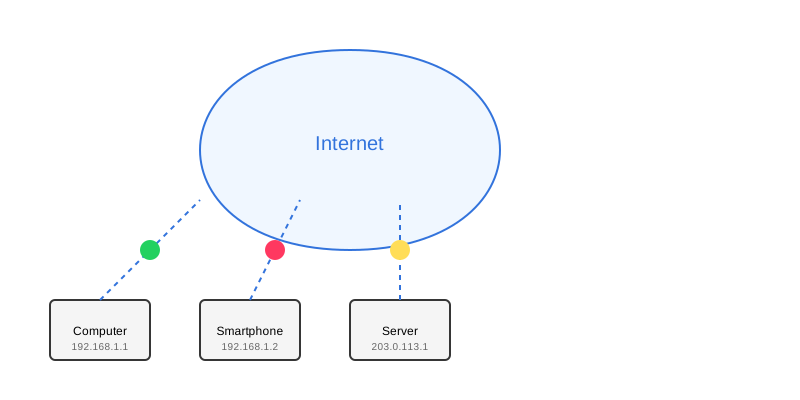
IP Addresses
Every device on the internet has a unique address, like a postal address for computers:
- IPv4: 192.168.1.1 (older, more common)
- IPv6: 2001:0db8:85a3:0000:0000:8a2e:0370:7334 (newer, more addresses)
Data Transmission
Information travels across the internet in small pieces called packets:
- Data is split into small packets
- Each packet finds its own route
- Packets are reassembled at destination
- IP Address = Postal Address
- Packets = Individual Letters
- Routers = Post Offices
- Internet = Postal System
Pause & Check: Network Basics
Before we continue, can you explain:
- What is an IP address and why does every device need one?
- Why is data sent in "packets" instead of all at once?
- Using the postal system analogy, what would a "router" do?
Check Your Answers
- Like a mailing address for computers. Every device needs a unique identifier so data knows where to go and where it came from.
- Breaking data into small pieces allows for efficient routing (different packets can take different paths), error recovery (if one packet fails, just resend that piece), and sharing bandwidth (packets from many users can share the same connection).
- Like post offices, routers receive packets, read the destination address, and forward them to the next stop on their journey to the destination.
How confident are you with this concept?
Still confused | Getting there | Got it | Could explain it to a friend
DNS Hierarchy
- Root Servers (.)
- Top-Level Domains (.com, .org, .net)
- Second-Level Domains (example.com)
- Subdomains (blog.example.com)
Common DNS Record Types
- A Record: Points domain to IPv4 address
- AAAA Record: Points domain to IPv6 address
- CNAME: Creates domain alias
- MX: Directs email
HTTP and HTTPS

HTTP Methods
- GET: Request data
- POST: Submit data
- PUT: Update data
- DELETE: Remove data
HTTPS Security
- Encrypts data transmission
- Verifies website identity
- Required for sensitive data
- Better search engine ranking
Web Servers

Types of Web Servers
- Apache: Most popular, versatile
- Nginx: Fast, good for static content
- IIS: Windows servers
Server Roles
- Process incoming requests
- Execute server-side code
- Manage security
- Handle multiple users
Quick Knowledge Check
Test your understanding:
- When you type "github.com" in your browser, what happens first?
- Why should you use HTTPS instead of HTTP for a login form?
Check Your Answers
- DNS lookup! Your computer doesn't know where "github.com" is, so it asks DNS servers to translate that domain name into an IP address (like 140.82.121.4). Only then can it make the actual HTTP request.
- HTTPS encrypts the data being sent. With HTTP, passwords travel as plain text that anyone monitoring the network can read. HTTPS ensures even if someone intercepts the packets, they can't read the password.
How confident are you with this concept?
Still confused | Getting there | Got it | Could explain it to a friend
🧑🏫 Hands-On Exploration
Guided Practice: Explore Network Commands
Use command-line tools to see the internet in action!
Step 1: Find an IP Address
- Open your terminal (Command Prompt on Windows, Terminal on Mac/Linux)
- Type:
ping google.com - Watch: The IP address appears in the results!
💡 What am I seeing?
The ping command shows Google's IP address (like 142.250.80.46) and how long packets take to travel there and back (measured in milliseconds).
Step 2: Trace the Route
- In terminal, type:
traceroute google.com(Mac/Linux) ortracert google.com(Windows) - Watch: See every router between you and Google!
💡 Understanding the output
Each line represents a "hop" - a router your data passes through. Notice how packets might travel through your ISP, then regional networks, then Google's network. This is the internet's distributed nature in action!
Step 3: Check Security
- Open a browser and visit any website
- Click the padlock icon in the address bar
- Explore: Certificate details, connection security, cookies
💡 What makes it secure?
The certificate proves the website is who it claims to be, and the "TLS" or "SSL" encryption means your data is scrambled so only you and the server can read it.
You're on track if you can:
- ☐ See an IP address using the ping command
- ☐ Count how many "hops" it takes to reach a website
- ☐ Identify whether a site uses HTTPS
💪 Independent Challenge: Network Detective
Now apply what you've learned without hints!
Your Task:
- Pick 3 different websites (e.g., social media, news site, shopping site)
- For each site:
- Find the IP address using ping
- Count the number of hops using traceroute
- Check if it uses HTTPS
- Note how fast it responds (ping time)
- Compare: Which site is fastest? Which has the most hops? Why might that be?
Success Criteria:
| Criteria | You've succeeded if... |
|---|---|
| Data Collection | You recorded IP addresses, hop counts, and response times for all 3 sites |
| Analysis | You can explain why one site might be faster than another |
| Security Understanding | You identified which sites use HTTPS and why it matters |
Common Terms
- IP Address
- Unique identifier for devices on a network
- DNS
- System that converts domain names to IP addresses
- HTTP
- Protocol for transferring web content
- HTTPS
- Secure version of HTTP using encryption
- SSL/TLS
- Security protocols for encrypted communication
Lesson Complete: You Now See the Invisible
Key Takeaways:
- The internet is a network of networks where data travels in packets between IP addresses
- DNS is the internet's phonebook - converting memorable domain names into computer-readable IP addresses
- HTTP transfers data while HTTPS adds encryption for security (always use HTTPS for sensitive data!)
- Web servers are always listening, waiting to process your requests and send back responses
- Every website interaction involves: DNS lookup → Connect to IP → HTTP request → Server processing → Response delivery
Learning Objectives Review:
Can you now:
- ✅ Explain how data travels using packets and IP addresses? Check!
- ✅ Describe the DNS lookup process? Phonebook analogy!
- ✅ Identify HTTP vs HTTPS differences? Security matters!
- ✅ Understand how servers work? Request and respond!
Think & Reflect:
🔍 Real-World Connection:
Next time a website loads slowly or fails, you'll know why:
- DNS lookup taking too long? The domain name system might be slow
- Many hops in traceroute? Your data is traveling far or through congested networks
- No padlock? Don't enter sensitive information!
- High ping times? Server might be geographically distant or overloaded
You can now diagnose network issues with confidence!
💭 Reflection Questions:
- What surprised you most about how the internet works?
- How will understanding DNS help you as a web developer?
- Why is HTTPS more important today than ever?
- If you had to explain the internet to someone, what analogy would you use?
🎯 Looking Ahead:
Now that you understand the infrastructure, you're ready to build ON it! In upcoming lessons, you'll:
- Set up your development environment
- Choose the right tools for web development
- Start writing actual HTML, CSS, and JavaScript
The theory becomes practice!