Understanding Web Development Basics
Start Here: A Quick Challenge
Right now, you're reading this tutorial on a screen. But have you ever wondered what's actually happening behind the scenes? How did this page travel from a computer somewhere in the world to appear on YOUR device in less than a second?
- How does clicking a button make something happen instantly?
- Why do some websites look beautiful while others look plain?
- What makes a website interactive versus just displaying text?
In the next 45 minutes, you'll discover the answers to all of these questions.
Learning Objectives
By the end of this lesson, you'll be able to:
- Explain Explain the 4-step process of how websites load and display in your browser
- Identify Identify the role of HTML, CSS, and JavaScript and how they work together
- Describe Describe the client-server model using real-world examples
- Demonstrate Demonstrate using browser DevTools to inspect any webpage
Why This Matters:
Understanding how the web works is like gaining X-ray vision for the internet. You'll see past the polished surfaces of websites and understand the technology that powers everything from social media to online shopping to this very tutorial. This foundation is essential for EVERY web developer, regardless of what you build later.
How Websites Work
When you visit a website, several things happen:
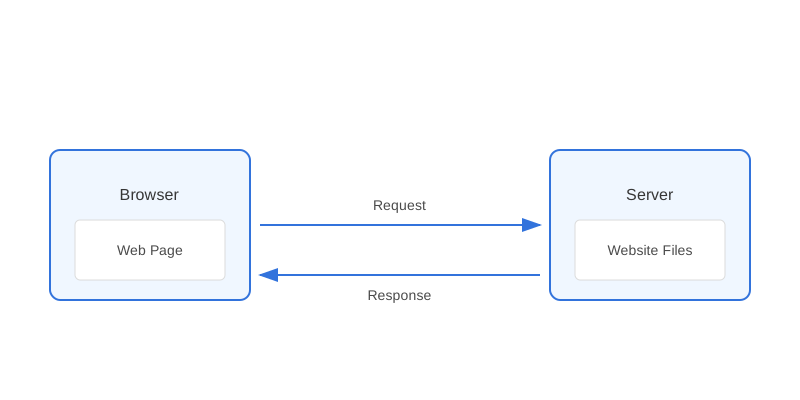
- Request: Your browser requests a webpage from a server
- Processing: The server processes the request
- Response: The server sends back HTML, CSS, and JavaScript files
- Rendering: Your browser displays the webpage
- You (the browser) request a meal (webpage)
- The kitchen (server) prepares it
- The waiter (internet) delivers it
- You receive and enjoy the meal (rendered page)
⏸️ Pause & Check: Do You Understand?
Before moving forward, can you answer these?
- In your own words, what are the 4 steps that happen when you visit a website?
- Using the restaurant analogy, what does the server do?
- Why can't you see a website without a browser?
Check Your Answers
- Request (browser asks for page) → Processing (server prepares it) → Response (server sends HTML/CSS/JS) → Rendering (browser displays it)
- Like a kitchen, it stores website files, processes requests, and sends back the files needed to display the page.
- Browsers interpret HTML, CSS, and JavaScript code and render it into the visual webpage you see. Without a browser, you'd just see raw code!
How confident are you with this concept?
Still confused | Getting there | Got it | Could explain it to a friend
Core Web Technologies
The three main technologies that power the web work together like this:
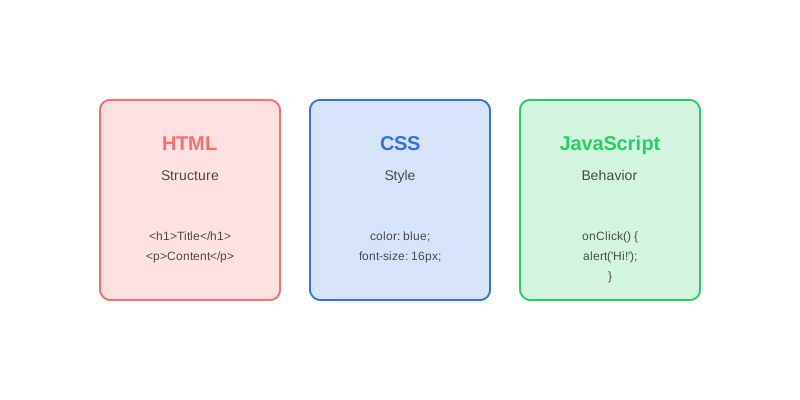
HTML (Structure)
- The backbone of web pages
- Defines content structure
- Like the skeleton of a building
<h1>Welcome</h1>

<p>This is a paragraph.</p>
CSS (Style)
- Controls appearance
- Handles layout and design
- Like paint and decorations
h1 {

color: var(--primary-dark-red);
font-size: 24px;
}
JavaScript (Behavior)
- Adds interactivity
- Handles user actions
- Like the electrical system
button.addEventListener('click', () => {

alert('Hello!');
});
The Client-Server Model
Client (Frontend)
- Web browser
- Displays content
- Handles user interaction
- Runs on user's device
Server (Backend)
- Stores website files
- Processes requests
- Manages data
- Runs on remote computer
- VS Code edits the files
- Live Server acts as your web server
- Chrome displays the results
⏸️ Quick Knowledge Check
Test your understanding of web technologies:
- If you wanted to change the color of text on a webpage, which technology would you use?
- What would happen if a webpage had HTML and JavaScript but no CSS?
Check Your Answers
- CSS (Cascading Style Sheets) - it controls all visual styling including colors, fonts, layouts, and more.
- The page would still work functionally - content would display and buttons would work - but it would look plain with default browser styling (black text, Times New Roman font, no colors or layout).
How confident are you with this concept?
Still confused | Getting there | Got it | Could explain it to a friend
How Browsers Work
Browsers process web pages in several steps:
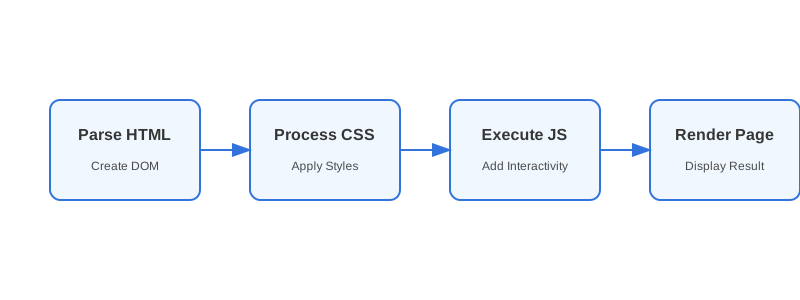
- Parse HTML
- Read HTML code
- Create Document Object Model (DOM)
- Process CSS
- Apply styles
- Calculate layouts
- Execute JavaScript
- Run scripts
- Add interactivity
- Render Page
- Display final result
- Update as needed
Try It Yourself
View Page Source
- Visit any website
- Right-click > View Page Source
- Observe HTML structure
Inspect Elements
- Right-click > Inspect
- Try modifying text
- Watch changes live
Network Tab
- Open DevTools
- Go to Network tab
- Reload page
- Watch resources load
- Create a simple HTML file
- View it in Chrome
- Use DevTools to inspect it
- Watch the Network tab as it loads
Common Terms
- URL
- Web page address
- Domain
- Website name (e.g., google.com)
- HTTP
- Protocol for web communication
- DNS
- System that converts domains to IP addresses
- Hosting
- Service that stores website files
🏁 Lesson Complete: What You Discovered
Key Takeaways:
- Websites work through a 4-step process: Request → Processing → Response → Rendering
- HTML structures content (the skeleton), CSS styles it (the paint), and JavaScript makes it interactive (the electrical system)
- The client-server model is like a restaurant: you (client/browser) order, the kitchen (server) prepares, and the internet delivers
- Browsers are incredibly powerful - they parse HTML, apply CSS, execute JavaScript, and render everything in milliseconds
- During development, your computer acts as BOTH client and server
Learning Objectives Review:
Look back at what you set out to learn. Can you now:
- Explain the 4-step process of how websites load Check!
- Identify the role of HTML, CSS, and JavaScript Got it!
- Describe the client-server model Can explain it!
- Demonstrate using browser DevTools Could teach this!
If you can confidently answer "yes" to most of these, you're ready to move on!
Think & Reflect:
💭 Reflection Questions
- What surprised you most about how websites work?
- How does understanding the client-server model change how you think about the internet?
- What's one concept you want to remember from today?
- What would you tell a friend who asks how do websites work?
Real-World Test:
Next time you visit ANY website, try this:
- Right-click → View Page Source and identify the HTML, CSS, and JavaScript
- Open DevTools → Network tab and watch the files load
- Right-click → Inspect and change some text (just for fun!)
You now see the web differently than 99% of people!
Looking Ahead:
Now that you understand HOW the web works, you're ready to start BUILDING for the web! In the next lessons, you'll write your first HTML code, style pages with CSS, and make things interactive with JavaScript.
Recommended Next Steps
Continue Learning
Ready to move forward? Continue with the next tutorial in this series:
Text Editors & VS CodeRelated Topics
Explore these related tutorials to expand your knowledge:
Additional Resources
Deepen your understanding with these helpful resources:
- MDN: Getting Started with the Web - MDN beginner guide to web development.
Progress tracking is disabled. Enable it in to track your completed tutorials.
Cookie Settings