First Vue App with Vite
Use the familiar Todo List project to understand Vue components, reactive state, and how a small Vite + Vue app fits together.
A Familiar Project, A New App Structure
After Frameworks 101 and the Vite lesson, learners usually understand the big picture: frameworks organise app code, and tooling supports the workflow around it.
The next helpful step is not a huge app. It is a familiar one. Reusing the Todo List project lets you focus on what Vue changes: where state lives, how repeated UI gets rendered, and how updates flow back into the screen.
That makes Vue feel concrete rather than mysterious.
- How would you build a Todo List right now with plain JavaScript?
- Which part of moving to Vue feels least clear: files, components, or reactivity?
- What would make a framework feel less magical to you?
This lesson sits directly after `Working with Vite`. The tooling is already in place, so now the focus can shift to the shape of a small Vue application.
Learning Objectives
By the end of this lesson, you'll be able to:
- Explain Explain how a small Vue app starts inside a Vite project
- Identify Identify the main roles of `main.js` and `App.vue`
- Store Todo List data in reactive state
- Render repeated todo items from data in the template
- Describe Describe how Vue changes the UI update workflow
Why This Matters:
A first framework lesson works best when it translates a project you already understand into a more structured application model.
Before You Start:
You should be familiar with:
- Working with Vite Review here
- Frameworks 101 Review here
- Rendering Repeated Content Review here
Why Vue Fits Here
Vue makes more sense once you already understand two ideas:
- why frameworks exist at all
- why tooling such as Vite appears around them
That is why this lesson comes here instead of earlier. You are not being asked to learn JavaScript, framework theory, and build tooling all at once. Instead, you are using a project you already recognise to see how Vue organises the same kind of work differently.
Project bridge: the Todo List is already familiar from earlier work. That reduces project noise so the framework ideas can stand out more clearly.
The Shape of the Project
In a small Vite + Vue app, the path usually feels like this:
index.htmlgives the root mount pointmain.jsstarts the Vue appApp.vuebecomes the main component shell- the component template renders the visible interface
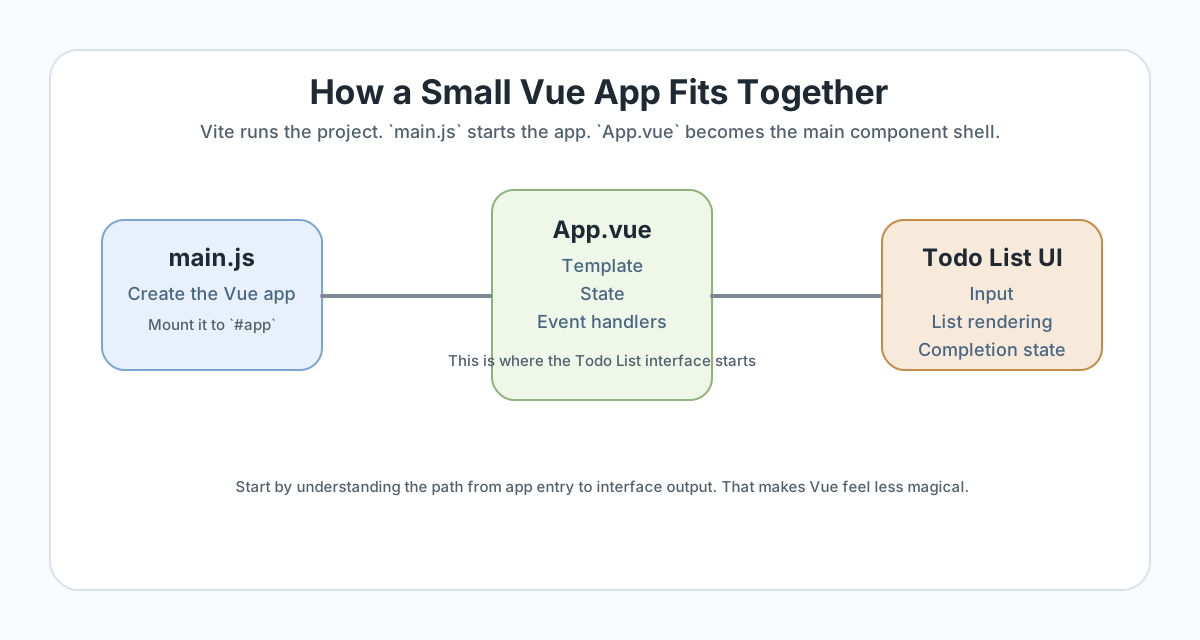
`main.js` and `App.vue`
You do not need to memorise every generated file to start using Vue well. The first important distinction is simple:
- `main.js` starts the app and mounts it into the page
- `App.vue` acts as the main component where your interface logic begins
// main.js
import { createApp } from 'vue';
import App from './App.vue';

createApp(App).mount('#app');
That line does not build the whole application for you. It simply connects the Vue app to the root element so your component tree can render inside it.
Reactive State in Plain English
The biggest shift in a first Vue app is not the file extension. It is the data model. Instead of reaching into the DOM every time the user changes something, you store the changing values in state and let the template reflect them.
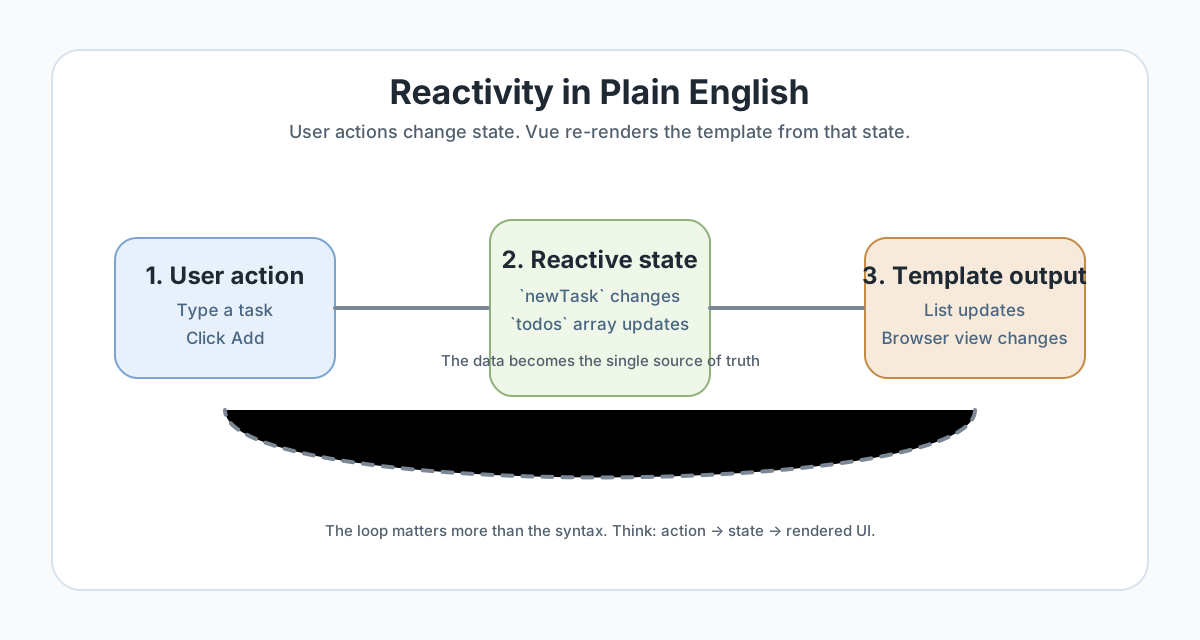
Todo List state candidates
newTaskfor the text currently being typedtodosfor the list of task objectsdoneinside each task object for completion state
<script setup>
import { ref } from 'vue';

const newTask = ref('');
const todos = ref([
  { id: 1, text: 'Outline the Vue Todo List', done: false },
  { id: 2, text: 'Render tasks from state', done: true },
]);

function addTodo() {
  if (!newTask.value.trim()) return;

  todos.value.push({
    id: Date.now(),
    text: newTask.value.trim(),
    done: false,
  });

  newTask.value = '';
}
</script>
Rendering the Todo List from Data
In plain DOM code, you may have built list items by creating elements, appending nodes, and wiring listeners by hand. Vue still ends up producing DOM output, but the route there is calmer: the template describes what the UI should look like for the current state.
<template>
<section class="section">
<div class="container">
<h1>Todo List</h1>
<input v-model="newTask" type="text" placeholder="Add a task" />
<button @click="addTodo">Add</button>
<ul>
<li v-for="todo in todos" :key="todo.id">
{{ todo.text }}
</li>
</ul>
</div>
</section>
</template>The important part is not memorising every directive name immediately. The important part is noticing that the list is rendered from the data structure instead of being written as separate static markup.
Checkpoint for Understanding
Pause here and make sure the shift from DOM-pushing to state-driven rendering feels clear.
- Why is the Todo List project a useful first Vue example?
- What is the practical job of `main.js` in a small Vue project?
- What changes when you move from manual DOM updates to Vue state-driven rendering?
Show sample answers
- Because learners already know the interface problem, so they can focus on Vue ideas such as state, template rendering, and event handling instead of learning a brand-new project goal at the same time.
- It starts the Vue application and mounts it into the page, usually by connecting the app to a root element such as `#app`.
- Instead of pushing changes into the DOM directly in many places, you update the data and let the template reflect that state more consistently.
How confident are you with this concept?
Still confused | Getting there | Got it | Could explain it to a friend
Events and Updates
Vue does not remove events. It changes how you connect them to the interface. In a Todo List, that might mean:
- typing into an input updates reactive state
- clicking a button calls a function that changes the state
- checking a box toggles one task's completion flag
- the template updates because the data changed
The workflow is still logical and explicit. It is just organised around the state layer instead of many scattered DOM edits.
Guided Practice
Rebuild the Todo List mentally before you rebuild it in code
Use the existing Todo List project as the bridge from plain JavaScript thinking into Vue structure.
Step 1: Scaffold a Vue app and identify the entry files
Create a Vue project with the official scaffold command and open the generated files.
Find main.js, App.vue, and the root index.html. Write one short note describing what each file contributes to the app.
Need a hint?
Step 2: Reframe the Todo List around state
List the core pieces of data the Todo List needs: the text currently being typed, the array of todo items, and each item's completion state.
Then ask: which of these values should live in reactive state rather than being read from the DOM each time?
Need a hint?
Step 3: Render the list from data
Create a small todo array and render it in the template. Then add one event that changes the array, such as adding a new task or toggling completion.
Watch how the interface updates because the state changed.
Need a hint?
You are on track if you can:
- You can point to the root entry path from `index.html` to `main.js` to `App.vue`
- You identified which Todo List values belong in reactive state
- You rendered todo items from data instead of hardcoding them into the HTML
- You changed the state and watched the interface update from that change
Independent Practice
Independent Practice: Build a small Vue Todo List shell
Now try the same idea with lighter support.
Your Task:
Scaffold a Vue app and rebuild a small Todo List interface with one input, one add button, and one rendered list. Keep the scope tight. The goal is not feature-complete polish. The goal is to feel how the app flows from state into the template.
Requirements:
- Use a Vue component as the main Todo List shell
- Store the current input and todo array in reactive state
- Render the list from data rather than hardcoded markup
- Handle at least one event that changes the state
Stretch Goals (Optional):
- Add task completion toggling
- Split the Todo List into a second child component once the main version works
Success Criteria:
| Criteria | You've succeeded if... |
|---|---|
| Project structure awareness | The learner can explain what the Vue entry files do without confusing Vite, Vue, and the app code. |
| State thinking | The learner stores the changing Todo List data in reactive state instead of relying on scattered DOM reads. |
| Template rendering | The interface is driven from state, with repeated todo items rendered from data rather than written manually one by one. |
| Reasoning clarity | The learner can explain how Vue changes the workflow compared with direct DOM manipulation. |
Additional Resources
- Vue official quick start - the official guide to creating a Vue app with the Vite-based scaffold.
- Vite official guide - useful when you want to separate the app framework from the build tool around it.
Recap
Vue becomes much more approachable when you stop treating it like a brand-new world and instead map it onto a familiar interface. The Todo List still asks the same questions as before: what is the current task, what are the items, and what changed? Vue simply gives you a more structured way to express those answers.
Lesson Complete: You Can Read a Small Vue App
Key Takeaways:
- Vue becomes easier to understand when you attach it to a familiar project instead of a brand-new app idea.
- `main.js` starts the app, `App.vue` acts as the main component shell, and the template reflects reactive state.
- The biggest shift is not syntax. It is moving from direct DOM pushing to state-driven rendering.
- The Todo List remains the same project underneath, but Vue changes how the project is organised and updated.
Learning Objectives Review:
Look back at what you set out to learn. Can you now:
- Explain how a small Vite plus Vue app is structured Check!
- Identify the Todo List values that belong in reactive state Got it!
- Render repeated UI from data rather than hardcoded markup Can explain it!
- Describe how Vue changes the update flow compared with direct DOM manipulation Could teach this!
If you can confidently answer "yes" to most of these, you're ready to move on!
Think & Reflect:
Project Shape
- Which file feels most important to you now: `main.js`, `App.vue`, or the template inside the component?
- What part of the app structure felt clearer after tracing the entry path?
State and Rendering
- What changes when you think "change the data" instead of "manually rewrite the DOM"?
- Which part of the Todo List is easiest to understand as reactive state?
Looking Ahead:
Next, keep the same Todo List project but add Bulma so you can see how a CSS framework speeds up interface structure inside a Vue template.
Recommended Next Steps
Continue Learning
Ready to move forward? Continue with the next tutorial in this series:
Using Bulma in a Vue ProjectRelated Topics
Explore these related tutorials to expand your knowledge:
Practice Projects
Apply what you've learned with these hands-on projects:
Additional Resources
Deepen your understanding with these helpful resources:
- Vue official quick start - Official Vue guide for the Vite-based scaffold.
- Vite official guide - Official Vite guide for dev server and build concepts.