Using Bulma in a Vue Project
Restyle the familiar Todo List project with Bulma so you can see where a CSS framework helps and where custom CSS still matters.
A CSS Framework as a Helper, Not a Replacement
After a first Vue app, learners often hit the next question quickly: if the framework helps organise the application code, what helps organise the interface styling?
This is where a CSS framework can become useful, but only if it stays in its lane. Bulma can speed up common structure, spacing, and UI building blocks. It does not replace CSS judgment, and it does not remove the need to understand what your interface is doing.
That makes it a good next step here, especially because GraphitEdge already uses Bulma in its own stack.
- What parts of a small app interface feel repetitive to style from scratch?
- Have you ever seen framework classes make a template feel noisier instead of clearer?
- What would you want a CSS framework to help with, but not control completely?
This lesson builds directly on the first Vue app lesson. The Todo List stays the same project so the new learning load is about styling structure, not a brand-new application goal.
Learning Objectives
By the end of this lesson, you'll be able to:
- Install and import Bulma into a Vue project
- Map a familiar Todo List interface to Bulma building blocks
- Use Bulma classes inside Vue templates without losing readability
- Separate framework-provided structure from project-specific custom CSS
Why This Matters:
A CSS framework becomes more understandable when learners can see exactly which interface jobs it helps with and which ones it still leaves to them.
Before You Start:
You should be familiar with:
- First Vue App with Vite Review here
- Why CSS Frameworks Exist Review here
- CSS Systems for Reusable Sections Review here
Why Bulma Fits Here
If you want to introduce a CSS framework gently, Bulma is a reasonable choice in this curriculum because its class names are readable and its role is easier to describe in plain English. It also matches the existing GraphitEdge stack, which makes the example feel less artificial.
The teaching goal is not "Bulma forever." The teaching goal is to let learners see how a CSS framework can reduce repetitive structure work while leaving the real interface decisions visible.
Install and Import
The simplest install route is to add Bulma as a dependency and then import it into your app entry or main stylesheet.
npm install bulma// main.js
import 'bulma/css/bulma.min.css';This gives the project access to Bulma's ready-made class patterns without changing the fact that Vue is still handling the app structure and state.
Separation of roles: Vue still organises the component and data flow. Bulma only helps with the styling layer.
Learning the Bulma Class Language
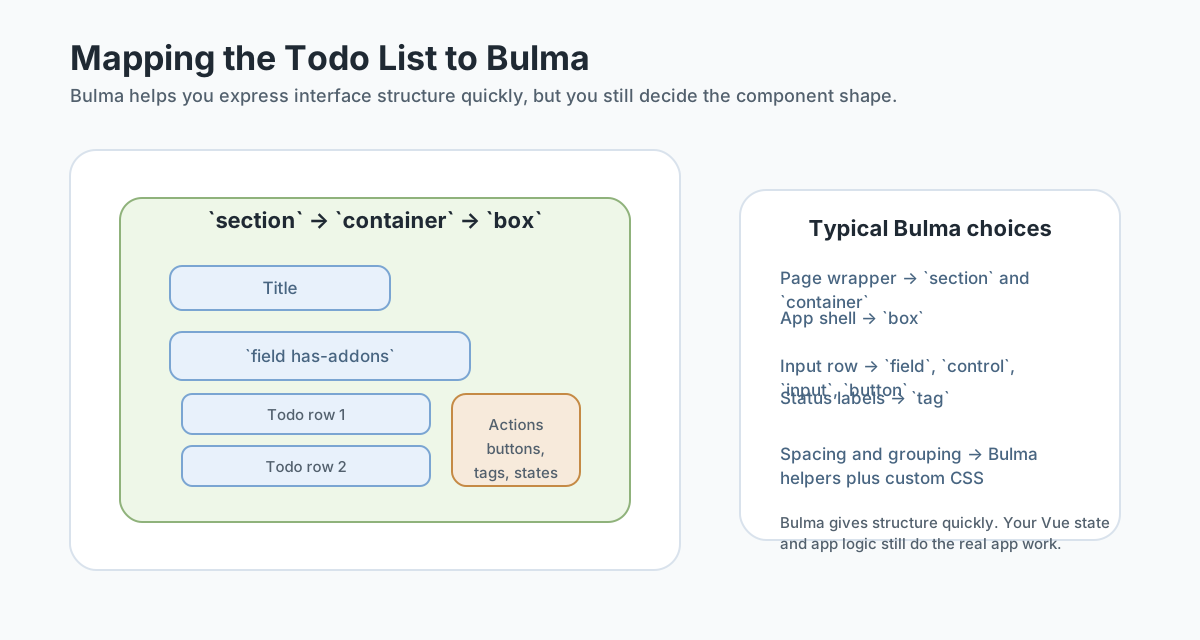
Bulma helps most when you learn its common interface vocabulary rather than adding random classes one at a time.
sectionandcontainershape the page shellboxgives a contained panelfieldandcontrolhelp group form elementsinput,button, andtagcover common UI pieces
Rebuilding the Todo List Interface
The Todo List is a good Bulma case study because it contains several common UI needs at once: a shell, a form row, action buttons, repeated rows, and status cues.
<template>
  <section class="section">
    <div class="container is-max-desktop">
      <div class="box">
        <h1 class="title is-3">Todo List</h1>

        <div class="field has-addons">
          <div class="control is-expanded">
            <input v-model="newTask" class="input" type="text" placeholder="Add a task" />
          </div>
          <div class="control">
            <button class="button is-primary" @click="addTodo">Add</button>
          </div>
        </div>
      </div>
    </div>
  </section>
</template>
That does not finish the interface for you, but it gets you to a readable shell faster than styling every piece from zero.
Checkpoint for Understanding
Pause here and check whether the role of Bulma in the Vue template feels distinct from the app logic itself.
- Why is Bulma a reasonable first CSS framework example here?
- What does Bulma give you in the Todo List project?
- Why do you still need custom CSS in a Bulma-based Vue project?
Show sample answers
- Because it uses readable semantic classes, matches the existing site stack, and helps learners see how a CSS framework supports structure without replacing CSS understanding.
- It speeds up common interface structure such as fields, controls, buttons, tags, boxes, and layout groupings so you can focus more on the component and app flow.
- Because framework classes do not automatically solve project-specific tone, spacing refinements, unusual interactions, or all polish decisions.
How confident are you with this concept?
Still confused | Getting there | Got it | Could explain it to a friend
Where Custom CSS Still Belongs
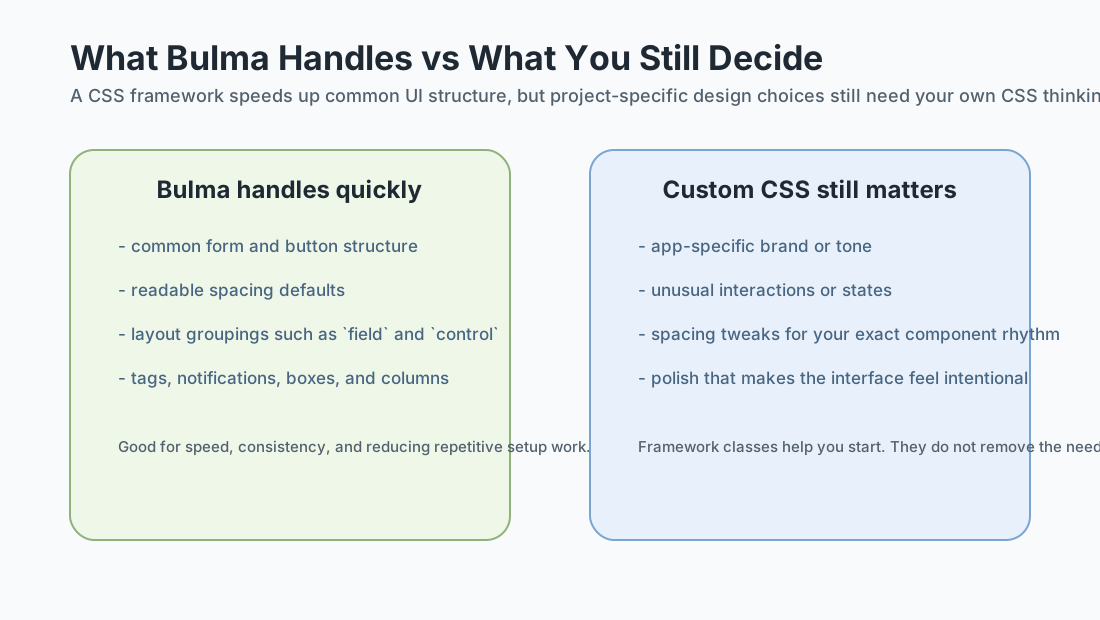
A useful framework lesson is not finished once the classes compile. You still need to decide which styles belong to the project itself.
Good custom CSS candidates after Bulma
- completion-state styling that feels specific to your Todo List
- spacing refinements between rows and action areas
- small polish details that support the tone of the project
Guided Practice
Use Bulma deliberately inside the Vue Todo List
Keep the same app logic and improve the interface structure with a readable CSS framework layer.
Step 1: Add Bulma to the Vue project
Install Bulma in the Vue app and import it into the main entry file or main stylesheet.
Then confirm that the app still runs before you change the template structure.
Need a hint?
Step 2: Map Todo List areas to Bulma structures
Take the existing Todo List component and identify which parts match Bulma patterns well: the app shell, the input row, action buttons, status labels, and grouped rows.
Write a short mapping note before editing the template.
Need a hint?
Step 3: Add Bulma classes, then layer custom CSS carefully
Update the template using Bulma classes first. After the structure feels stable, add a small amount of custom CSS only where the interface still needs project-specific refinement.
The goal is not to fight the framework. The goal is to let Bulma handle common structure and keep your own CSS focused.
Need a hint?
You are on track if you can:
- You installed and imported Bulma without losing the app structure
- You mapped the Todo List areas to sensible Bulma patterns before editing heavily
- You used Bulma for common structure and saved custom CSS for the project-specific parts
- You can explain why the framework helped and where it did not remove your design decisions
Independent Practice
Independent Practice: Restyle the Todo List with framework judgment
Apply the same workflow on your own with a small, bounded scope.
Your Task:
Take your small Vue Todo List and restyle it with Bulma. Use framework classes for the shell, form grouping, common controls, and status cues. Then add a small amount of custom CSS only where the project still needs its own spacing, tone, or interaction details.
Requirements:
- Install and import Bulma into the project
- Use Bulma for at least the outer shell, input row, and action controls
- Keep the Vue template readable after adding classes
- Add a small amount of custom CSS for project-specific refinement
Stretch Goals (Optional):
- Add a completion tag or status treatment for done items
- Compare your Bulma-based version with the earlier plain CSS version and note what became faster
Success Criteria:
| Criteria | You've succeeded if... |
|---|---|
| Framework usage | The learner uses Bulma for common UI structure instead of treating every class as an isolated styling trick. |
| Template clarity | The Vue template stays readable even after adding framework classes, with interface sections still easy to identify. |
| Custom CSS judgment | Custom CSS is added where needed for the project's own rhythm or polish rather than replacing the framework wholesale. |
| Reasoning | The learner can explain what Bulma sped up and what still required original styling choices. |
Additional Resources
- Bulma installation guide - the official installation reference, including the npm package.
- Bulma homepage and documentation - helpful for scanning the component vocabulary and common layout primitives.
Recap
Bulma is most helpful when you treat it like a layer of reusable UI structure, not a replacement for CSS understanding. In the Todo List example, it helps you reach a clean shell, form row, and action language faster. But you still decide how the app should feel, how much polish it needs, and what details deserve custom CSS.
Lesson Complete: You Can Use a CSS Framework More Intentionally
Key Takeaways:
- Bulma helps most when you treat it as a structural assistant rather than a total replacement for CSS thinking.
- In a Vue app, framework classes live inside the template alongside your component structure and state logic.
- The Todo List is a good case study because it contains common interface chunks such as forms, buttons, grouped rows, and status labels.
- Custom CSS still matters for project-specific polish, spacing, and tone.
Learning Objectives Review:
Look back at what you set out to learn. Can you now:
- Install and import Bulma into a Vue project Check!
- Map a familiar interface to Bulma's common component and layout patterns Got it!
- Use Bulma classes without losing template readability Can explain it!
- Decide where custom CSS should still shape the final interface Could teach this!
If you can confidently answer "yes" to most of these, you're ready to move on!
Think & Reflect:
Framework Help
- Which part of the Todo List became easier to style once Bulma was in place?
- Which part still needed your own CSS judgment instead of framework defaults?
Template Readability
- Did the Bulma classes make the template clearer or noisier for you?
- What would help you keep framework-heavy templates readable over time?
Looking Ahead:
From here, you can move back toward larger project workflows and deployment with a clearer picture of how framework code, tooling, and UI structure fit together.
Recommended Next Steps
Continue Learning
Ready to move forward? Continue with the next tutorial in this series:
Black Swan Bistro - Part 5 (Prepare for Deployment)Related Topics
Explore these related tutorials to expand your knowledge:
Practice Projects
Apply what you've learned with these hands-on projects:
Enhanced Todo List
Compare the Vue + Bulma version with a more styled Todo List reference.
Start ProjectAdditional Resources
Deepen your understanding with these helpful resources:
- Bulma installation guide - Official Bulma installation and import options.
- Bulma documentation - Official docs for components, helpers, and layout patterns.