Caching, Compression and Content Delivery
Understand how browser caching, compression, response headers, hosting, and CDNs influence the performance of delivered website resources.
Start Here
Frontend performance does not end at the source code.
How resources are compressed, cached, stored, and delivered also affects the visitor.
- Where have you already seen caching, compression and content delivery in a real interface?
- Which part of this topic currently feels most important to test in a real page?
Understand how browser caching, compression, response headers, hosting, and CDNs influence the performance of delivered website resources.
Learning Objectives
By the end of this lesson, you'll be able to:
- explain browser caching
- recognise caching headers
- explain gzip and Brotli
- explain the purpose of a CDN
- inspect response headers
Why This Matters:
Understand how browser caching, compression, response headers, hosting, and CDNs influence the performance of delivered website resources.
Delivery pathway
A simplified delivery pathway looks like this:
- Visitor requests a page.
- DNS points the browser toward the host or CDN.
- The delivery layer checks whether a cached resource can be returned.
- If yes, the cached resource is returned.
- If no, the origin may need to handle the request.
Compression
Text resources commonly benefit from transfer compression.
Examples include:
- HTML
- CSS
- JavaScript
- JSON
- SVG
Common mechanisms include gzip and Brotli. Compression does not change the source file you edit; it changes how bytes are transferred over the network.
Response headers
Headers tell the browser how a response was delivered and how it may be reused.
In DevTools:
- Open Network.
- Reload the page.
- Select an HTML, CSS, or JavaScript request.
- Choose Headers.
- Inspect response headers.
Look for cache-control, content-encoding, and content-type.
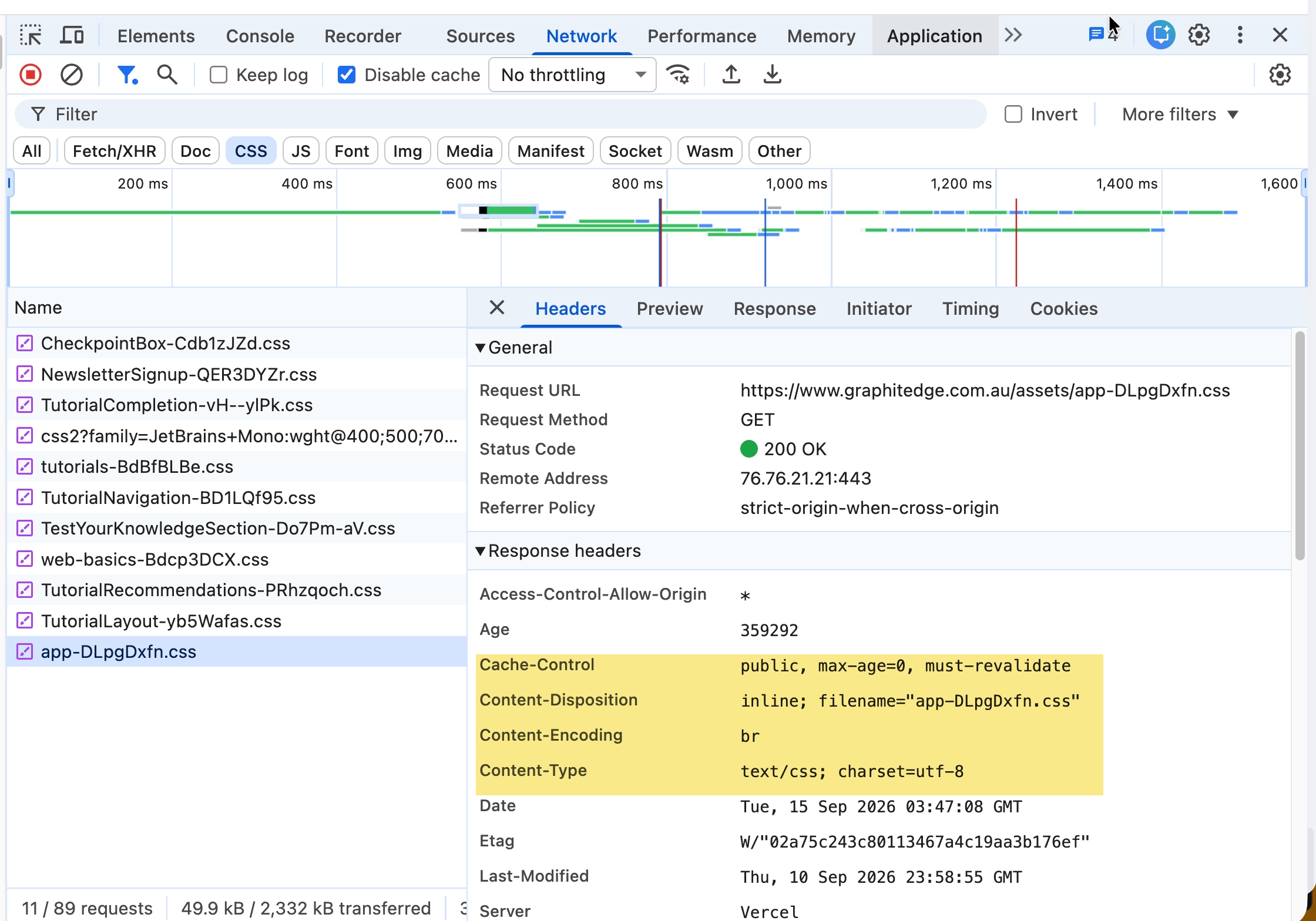
This response uses Brotli (br) and text/css. Its max-age=0, must-revalidate policy requires revalidation; it is not an example of long-lived immutable caching.
CDN concept
A CDN is distributed delivery infrastructure, not a magic speed button.
A badly optimised 8 MB photograph remains badly optimised even if it is delivered through excellent infrastructure. Delivery choices help most when the assets themselves are also sensible.
Check Your Understanding
Before moving forward, can you answer these?
- 1. What kinds of resources commonly benefit from compression?
- 2. What does `cache-control` help describe?
- 3. Why is a CDN not a substitute for optimisation?
Check Your Answers
- Text resources such as HTML, CSS, JavaScript, JSON, and SVG.
- How the browser or intermediary caches may store and reuse a response.
- Because it may improve delivery distance or caching, but it does not fix oversized or unnecessary assets.
How confident are you with this concept?
Still confused | Getting there | Got it | Could explain it to a friend
Guided Practice
Inspect response headers on a deployed site.
Step 1 - Open a deployed page
Use a live page rather than localhost if possible.
Step 2 - Inspect headers
Select HTML, CSS, JavaScript, and image requests. Record cache-control, content-encoding, and content-type where present.
Step 3 - Interpret differences
Describe which resources appear cacheable and which appear compressed.
Independent Practice
Compare two deployed projects if available, such as a traditional hosting example and a static CDN platform example.
Your Task:
Compare two deployed projects if available, such as a traditional hosting example and a static CDN platform example.
Requirements:
- inspect headers for comparable resources
- record caching and compression differences
- avoid declaring one host universally better
- describe what the differences mean for this specific site
Success Criteria:
| Criteria | You've succeeded if... |
|---|---|
| your comparison is evidence-based | Completed clearly and correctly in your solution. |
| response headers are interpreted accurately | Completed clearly and correctly in your solution. |
| delivery is connected to visitor experience | Completed clearly and correctly in your solution. |
Before you continue
- I can explain browser caching.
- I can recognise basic caching headers.
- I can explain gzip and Brotli at a beginner level.
- I understand the purpose of a CDN.
- I can inspect response headers in DevTools.
Extension activity
Find a cache-control header on a static asset and research what its directives mean. Explain whether the value seems sensible for that asset.
Closure
Key Takeaways:
- Performance is a whole-system concern.
- Source code, asset preparation, hosting, caching, compression, and delivery all contribute to the visitor's experience.
- Good infrastructure helps most when the website itself is thoughtfully prepared.
Learning Objectives Review:
Look back at what you set out to learn. Can you now:
- explain browser caching Check!
- recognise caching headers Got it!
- explain gzip and Brotli Can explain it!
- explain the purpose of a CDN Could teach this!
- inspect response headers Check!
If you can confidently answer "yes" to most of these, you're ready to move on!
Think & Reflect:
Pause and reflect
- Which idea from this lesson now feels practical rather than abstract?
- What would you build or test next to make this stick?
Looking Ahead:
- Performance is a whole-system concern.
- Source code, asset preparation, hosting, caching, compression, and delivery all contribute to the visitor's experience.
- Good infrastructure helps most when the website itself is thoughtfully prepared.
Recommended Next Steps
Continue Learning
Ready to move forward? Continue with the next tutorial in this series:
Performance Budgets and Continuous ImprovementRelated Topics
Explore these related tutorials to expand your knowledge:
Additional Resources
Deepen your understanding with these helpful resources:
- MDN: HTTP caching - A detailed guide to browser and intermediary caching behaviour.
- MDN: Content-Encoding - Reference for gzip, Brotli, and other transfer encodings.
- Vercel documentation: Caching - How cache-control headers affect content delivered through Vercel.
- Chrome DevTools: Network reference - Reference for inspecting response headers and network delivery.