CSS and Web Font Performance
Investigate whether CSS and web font delivery are creating unnecessary render-blocking work while preserving maintainable styling decisions.
Start Here
CSS is part of the browser rendering process.
Fonts are resources too.
Good architecture still matters, and performance optimisation should never become an excuse for incomprehensible CSS.
- Where have you already seen css and web font performance in a real interface?
- Which part of this topic currently feels most important to test in a real page?
Investigate whether CSS and web font delivery are creating unnecessary render-blocking work while preserving maintainable styling decisions.
Learning Objectives
By the end of this lesson, you'll be able to:
- inspect CSS transfer size
- identify potentially unused CSS
- investigate font requests
- reduce unnecessary font files
- explain `font-display`
- preserve maintainable CSS architecture
Why This Matters:
Investigate whether CSS and web font delivery are creating unnecessary render-blocking work while preserving maintainable styling decisions.
CSS has delivery cost
CSS tells the browser how to present the page. The browser often needs CSS before it can render content correctly, so large or poorly organised stylesheets can affect the initial experience.
This does not mean every stylesheet must be tiny at the expense of clarity. It means developers should understand what is being sent, when it is needed, and whether the organisation supports future work.
DevTools Coverage
Chrome Coverage can help identify CSS and JavaScript that did not execute or apply during a particular test.
Important: unused during one page load does not automatically mean unused everywhere.
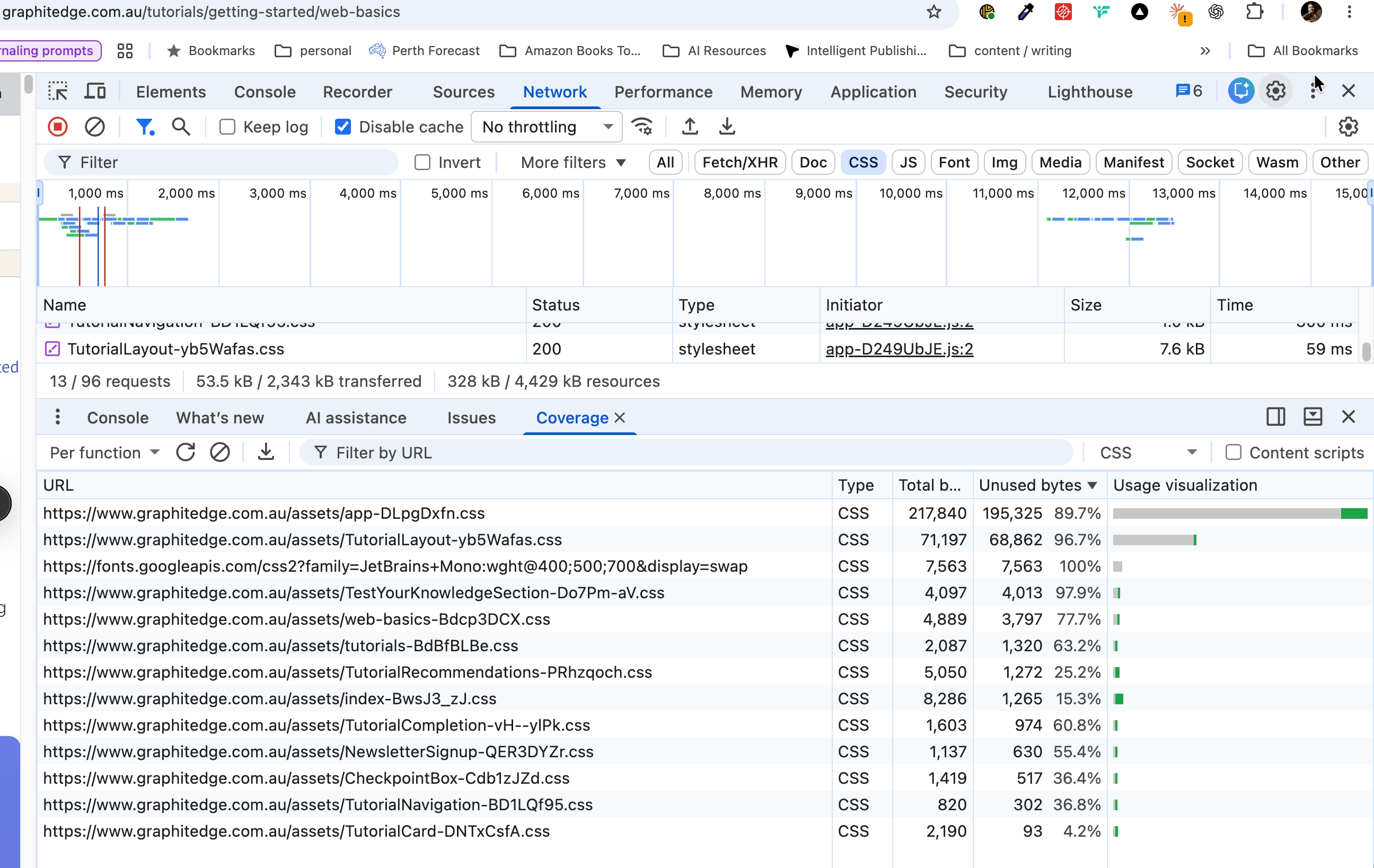
Coverage describes this recorded session. Exercise other pages and states before deciding that unused CSS can be removed.
Fonts are resources
Use the Network panel and filter by Font. Record:
| Font | Format | Weight | Size |
|---|---|---|---|
Ask:
- Are all downloaded weights actually used?
- Are multiple families necessary?
- Could a variable font help?
- Is a custom font adding sufficient design value?
font-display
Font-loading behaviour should be intentional.
@font-face {
  font-family: "Example Sans";
  src: url("/fonts/example.woff2") format("woff2");
  font-display: swap;
}
font-display: swap lets fallback text render while the web font loads, which can improve perceived loading but may create a visible font swap. That tradeoff should be understood rather than hidden.
Check Your Understanding
Before moving forward, can you answer these?
- 1. Why should Coverage results be interpreted carefully?
- 2. What does the Network font filter help you inspect?
- 3. Why is CSS performance not just about deleting rules?
Check Your Answers
- Because one page load does not prove a rule is unused across the entire site.
- It shows requested font files, formats, weights, transfer sizes, and timing.
- Because maintainability, reuse, and correct rendering still matter.
How confident are you with this concept?
Still confused | Getting there | Got it | Could explain it to a friend
Guided Practice
Audit CSS and fonts on one page.
Step 1 - Inspect CSS requests
Open the Network panel, reload the page, and record CSS files and transfer sizes.
Step 2 - Open Coverage
Use the Command Menu to open Coverage, reload the page, and identify a stylesheet with unused bytes.
Step 3 - Investigate fonts
Filter the Network panel by Font and record family, format, weight, and size.
Independent Practice
Audit one existing project and recommend one CSS or font improvement.
Your Task:
Audit one existing project and recommend one CSS or font improvement.
Requirements:
- record CSS transfer size
- list loaded stylesheets
- list font files and weights
- identify obvious duplication or over-delivery
- recommend one improvement with expected benefit
Success Criteria:
| Criteria | You've succeeded if... |
|---|---|
| your recommendation is based on evidence | Completed clearly and correctly in your solution. |
| you do not delete CSS purely because Coverage flags it once | Completed clearly and correctly in your solution. |
| your proposed change preserves readable styling architecture | Completed clearly and correctly in your solution. |
Before you continue
- I can inspect CSS usage.
- I understand that Coverage requires interpretation.
- I can identify font requests.
- I can explain
font-display. - I can justify a CSS or font optimisation.
Extension activity
Compare a page using one font family and a page using several families and weights. Record whether the design gain is worth the delivery cost.
Closure
Key Takeaways:
- CSS performance is not about writing the shortest stylesheet imaginable.
- Font performance is not about banning custom typography.
- Professional optimisation balances design, usability, maintainability, and delivery cost.
Learning Objectives Review:
Look back at what you set out to learn. Can you now:
- inspect CSS transfer size Check!
- identify potentially unused CSS Got it!
- investigate font requests Can explain it!
- reduce unnecessary font files Could teach this!
- explain `font-display` Check!
- preserve maintainable CSS architecture Got it!
If you can confidently answer "yes" to most of these, you're ready to move on!
Think & Reflect:
Pause and reflect
- Which idea from this lesson now feels practical rather than abstract?
- What would you build or test next to make this stick?
Looking Ahead:
- CSS performance is not about writing the shortest stylesheet imaginable.
- Font performance is not about banning custom typography.
- Professional optimisation balances design, usability, maintainability, and delivery cost.
Recommended Next Steps
Continue Learning
Ready to move forward? Continue with the next tutorial in this series:
JavaScript and Resource LoadingRelated Topics
Explore these related tutorials to expand your knowledge:
Additional Resources
Deepen your understanding with these helpful resources:
- Chrome DevTools: Coverage - Inspect used and unused CSS and JavaScript during a page load.
- MDN: Web fonts - Understand web-font formats, declarations, and loading behaviour.
- web.dev: Font performance - Techniques for reducing font transfer and rendering delays.
- Fontsource - Self-hostable open-source fonts packaged for web projects.