JavaScript and Resource Loading
Understand how JavaScript affects download, parsing, execution, responsiveness, third-party loading, and production build decisions.
Start Here
JavaScript can make pages interactive and useful.
It can also cost more than its file size suggests, because the browser must download it, parse it, compile it, execute it, and then respond to the page changes it creates.
- Where have you already seen javascript and resource loading in a real interface?
- Which part of this topic currently feels most important to test in a real page?
Understand how JavaScript affects download, parsing, execution, responsiveness, third-party loading, and production build decisions.
Learning Objectives
By the end of this lesson, you'll be able to:
- identify JavaScript resources
- explain script-loading behaviour
- recognise third-party JavaScript
- explain code splitting
- question whether JavaScript is needed
Why This Matters:
Understand how JavaScript affects download, parsing, execution, responsiveness, third-party loading, and production build decisions.
JavaScript costs more than bytes
JavaScript may need to move through this pathway:
- Download
- Parse
- Compile
- Execute
- Update page
Script loading
Script attributes affect when code runs relative to HTML parsing.
<script src="app.js" defer></script><script type="module" src="app.js"></script>Learners do not need to memorise every loading mode immediately. They do need to understand that scripts can block, delay, or coordinate with page rendering depending on how they are loaded.
The most effective optimisation
Ask:
Does this feature actually need JavaScript?
Modern HTML and CSS can provide functionality that previously required scripting. Less unnecessary code means less code to transfer, parse, execute, debug, and maintain.
Vite production builds
Development builds are designed for fast feedback while you code. Production builds are designed for deployment.
When a project uses Vite, students should run the normal production build and inspect the generated assets rather than manually minifying source files that the build tool already processes.
Check Your Understanding
Before moving forward, can you answer these?
- 1. Why can JavaScript cost more than its transfer size?
- 2. Why should you identify third-party scripts?
- 3. Why is "do we need JavaScript here?" a performance question?
Check Your Answers
- Because the browser must parse, compile, and execute it after downloading it.
- Because they may load code, make network requests, or affect responsiveness outside your direct source code.
- Because avoiding unnecessary JavaScript removes transfer, execution, and maintenance cost.
How confident are you with this concept?
Still confused | Getting there | Got it | Could explain it to a friend
Guided Practice
Create a JavaScript inventory.
Step 1 - Filter Network requests
Open Network, reload the page, and filter by JS.
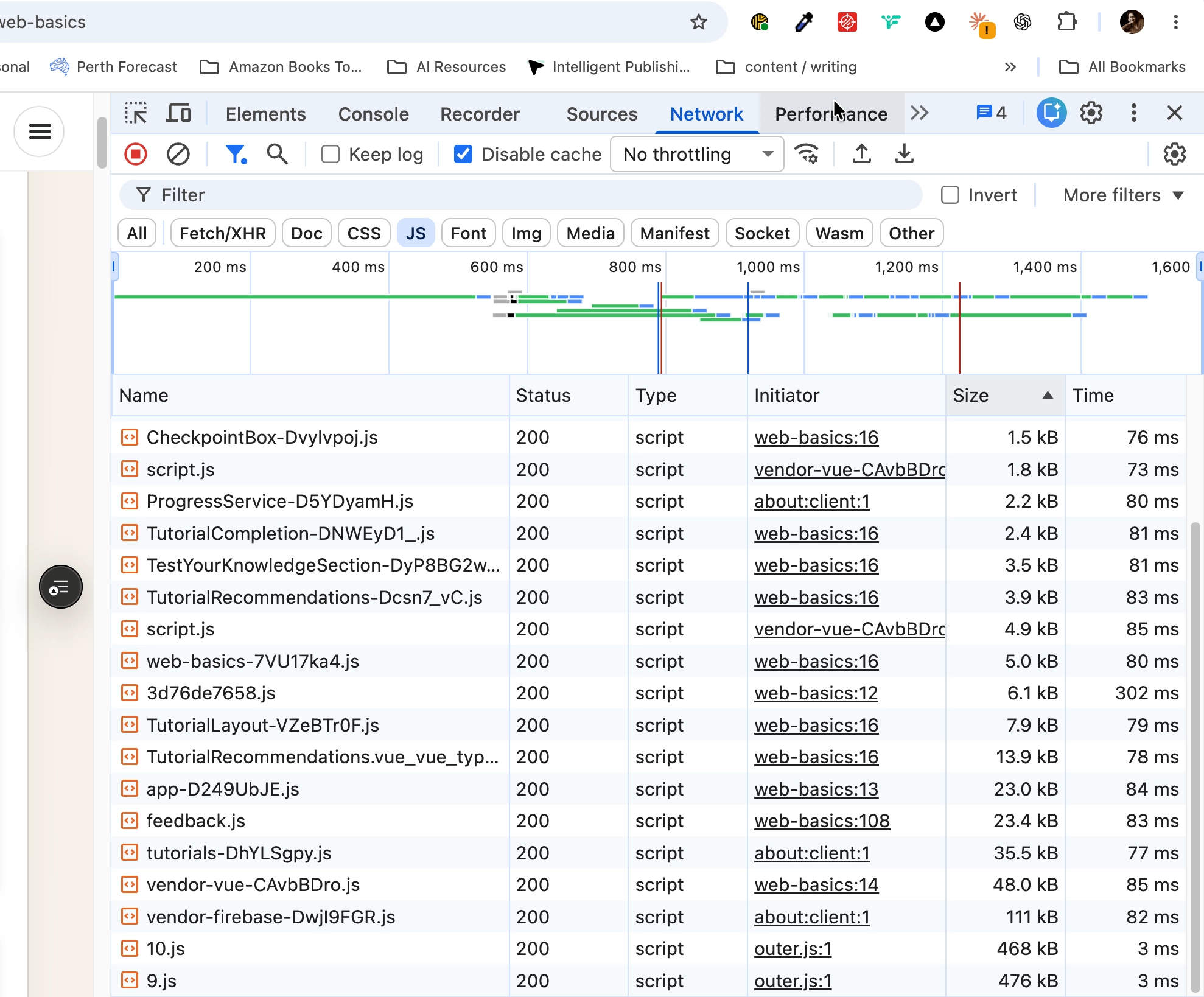
Use the JS filter to build a script inventory. Inspect each request's URL and initiator before classifying it as first-party or third-party.
Step 2 - Classify scripts
Record transfer size, whether each script is first-party or third-party, its likely purpose, and whether it is needed immediately.
Step 3 - Inspect a production build
Run the project's normal production build if available, then inspect generated asset names and sizes.
Independent Practice
Choose one JavaScript resource and answer:
Your Task:
- What does it do?
- When is it required?
- Is it first-party or third-party?
- Does every page need it?
- Could it load later?
- Could HTML or CSS provide the functionality instead?
Requirements:
- base your answers on Network evidence
- avoid removing code until its purpose is understood
- identify one possible loading improvement
Success Criteria:
| Criteria | You've succeeded if... |
|---|---|
| the script's purpose is clear | Completed clearly and correctly in your solution. |
| immediate versus later loading is considered | Completed clearly and correctly in your solution. |
| your recommendation does not break required interaction | Completed clearly and correctly in your solution. |
Before you continue
- I can identify JavaScript resources.
- I can explain why JavaScript affects responsiveness.
- I can recognise third-party JavaScript.
- I understand why production builds matter.
- I can question whether JavaScript is needed.
Extension activity
Find one interaction currently written in JavaScript and research whether HTML or CSS can provide the same behaviour accessibly.
Closure
Key Takeaways:
- The fastest JavaScript is sometimes JavaScript you never send.
- Removing code blindly is not optimisation.
- Understand purpose first, then decide.
Learning Objectives Review:
Look back at what you set out to learn. Can you now:
- identify JavaScript resources Check!
- explain script-loading behaviour Got it!
- recognise third-party JavaScript Can explain it!
- explain code splitting Could teach this!
- question whether JavaScript is needed Check!
If you can confidently answer "yes" to most of these, you're ready to move on!
Think & Reflect:
Pause and reflect
- Which idea from this lesson now feels practical rather than abstract?
- What would you build or test next to make this stick?
Looking Ahead:
- The fastest JavaScript is sometimes JavaScript you never send.
- Removing code blindly is not optimisation.
- Understand purpose first, then decide.
Recommended Next Steps
Continue Learning
Ready to move forward? Continue with the next tutorial in this series:
Caching, Compression and Content DeliveryRelated Topics
Explore these related tutorials to expand your knowledge:
Additional Resources
Deepen your understanding with these helpful resources:
- Chrome DevTools: Performance panel - Inspect main-thread activity, script work, rendering, and responsiveness.
- Vite: Build for production - Official guidance for creating and inspecting a Vite production build.
- MDN: script element - Reference for script loading attributes and module behaviour.
- web.dev: JavaScript performance - Strategies for reducing JavaScript transfer and processing cost.