Analytics Without Panic
Learn how to use website analytics calmly and practically without turning every number into a personal judgement.
Start Here
Analytics can be useful.
Analytics can also make perfectly sensible people stare at a graph and question their entire life.
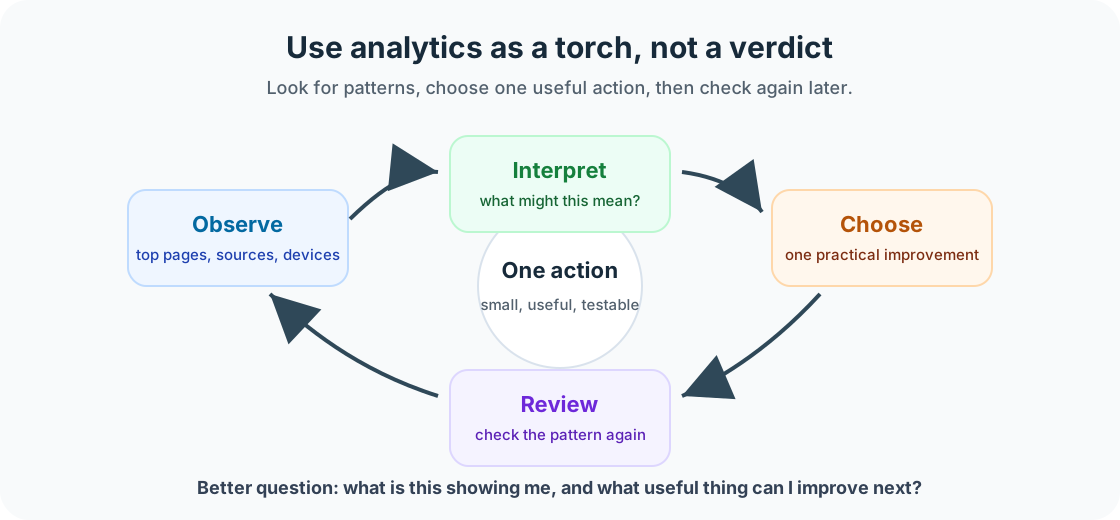
This lesson is about using analytics calmly. Website analytics are not a moral judgement. They are a torch.
- What part of this site would matter most if it broke?
- Where would you look first if the live version behaved differently from your local version?
This section follows deployment because launch is the start of a live website's working life, not the end of the project.
Analytics help you see where people are coming from, which pages they visit, what devices they use, what content attracts attention, where people might be getting stuck, and whether changes have affected traffic. The goal is not to worship the numbers. The goal is to learn from them.
Learning Objectives
By the end of this lesson, you'll be able to:
- Explain what website analytics can and cannot tell you
- Identify useful analytics patterns
- Review traffic without panic
- Use analytics to guide practical website improvements
- Avoid vanity metrics as the only measure of success
Why This Matters:
Website maintenance turns launch into a repeatable, calm workflow. These checks help you protect trust, usability, findability, and recovery options without overcomplicating beginner site care.
Before You Start:
You should be familiar with:
- Getting a Website Online Review here
- Test and Validate Your Site Review here
What Analytics Can Tell You
Analytics can help answer useful questions: How many people visited? Which pages were viewed most? Where did visitors come from? Did visitors use mobile or desktop? Did traffic change after a new post, update, or campaign?
If most visitors use mobile, mobile layout matters even more. If a tutorial gets strong traffic, it may deserve a follow-up lesson. If people visit the contact page but do not submit the form, the form may need checking.
What Analytics Cannot Tell You
Analytics cannot fully explain what a visitor was thinking, whether someone found the page emotionally helpful, whether a quiet reader valued the content, whether someone came back later on another device, whether a small audience is the right audience, or whether your work matters.
Analytics show behaviour, not the whole human story. Use them as evidence, not as the only source of truth.
Useful Numbers to Check
- Page views
- Which pages are people visiting?
- Visitors
- Is the site getting steady traffic, growing traffic, or no traffic?
- Traffic sources
- How are people finding the site?
- Device type
- Do you need to prioritise mobile improvements?
- Top pages
- What content is already working?
- Low-performing important pages
- Is an important page hard to find?
Vanity Metrics
A vanity metric is a number that looks impressive but does not necessarily help you make a useful decision. Examples include total views without context, follower counts without engagement, one traffic spike with no follow-up action, or comparing your small site with a massive platform.
Better questions include: Are the right people finding the site? Are visitors reaching the pages that matter? Are people able to take the next step? Is the site becoming clearer over time? What can I improve this month?
Analytics for Small Sites
Small sites often have small numbers. That is normal. A local business site, personal portfolio, student project, or niche tutorial site does not need millions of visitors to be useful.
For small sites, look for steady improvement, useful search queries, visits to important pages, engagement with new content, patterns over several months, and whether your site supports its purpose.
Do not judge a small site with big-platform expectations. That is like judging a backyard herb garden for not being the Amazon rainforest.
Monthly Analytics Review
Once a month, check top pages, traffic sources, device types, search queries if available, pages with traffic drops, pages with unexpected traffic, important pages with low traffic, and recent changes that may explain patterns.
Then choose one action. Not seventeen. One. Examples include improving the title of an important page, adding internal links to a useful tutorial, updating an old post, improving the mobile layout of a popular page, writing a follow-up tutorial, testing a contact form, or compressing images on a slow page.
Example Analytics Interpretation
Imagine a tutorial site has these patterns: most visitors arrive on the HTML basics tutorial, very few continue to the CSS tutorial, mobile users make up 70 percent of traffic, the tutorial index page gets very few visits, and search traffic is slowly increasing.
A practical interpretation is that the HTML tutorial is findable, but the learning pathway may not be clear enough. Mobile experience matters because most visitors use mobile. The tutorial index may need better internal links from popular lessons.
A practical action would be to add a clear next lesson link at the end of the HTML tutorial and improve the mobile layout of lesson navigation. No panic. No dramatic spreadsheet seance.
Checkpoint
Before moving on, answer these questions.
- Find the most visited page.
- Find the most common device type.
- Find one traffic source.
- Find one page that matters but may need more attention.
- Choose one small improvement you could make.
Show sample answers
- A useful answer names the page and time period, such as the HTML basics tutorial was the top page for the last 30 days.
- A useful answer names the dominant device category, such as mobile, desktop, or tablet, and notes whether that should affect testing priorities.
- A useful answer names where visitors came from, such as search, direct visits, social media, referrals, email, or another website.
- Look for an important page with low traffic, high exits, outdated content, weak internal links, unclear metadata, or a key user action that may need testing.
- Choose one action tied to evidence, such as adding a next-lesson link, improving a page title, testing a form, compressing images, or clarifying navigation.
How confident are you with this concept?
Still confused | Getting there | Got it | Could explain it to a friend
Guided Practice
Create a monthly analytics note.
Step 1: Record the basics
Add the month, website, top page, most common traffic source, and most common device.
Step 2: Interpret one pattern
Write one interesting pattern, one possible concern, and one action to take.
Step 3: Review next month
Make a note to review the same action next month so analytics become a learning loop.
You're on track if you can:
- You chose evidence, not just a feeling
- You avoided judging the whole site from one number
- You selected one useful action
Independent Practice
Now try this on your own without hints!
Your Task:
Review analytics for one website and choose one improvement based on evidence. Write down what you changed and why.
Requirements:
- one analytics pattern
- one possible explanation
- one improvement related to navigation, internal links, metadata, mobile layout, content, forms, images, or follow-up content
Reflection
- Which analytics number feels most useful?
- Which number feels distracting?
- What pattern would make you check the site more closely?
- What is one improvement analytics could guide?
- How can you use analytics without turning them into self-judgement?
Summary
- Analytics are useful when they help you make better decisions.
- They are not a measure of your worth, skill, or future success.
- Use analytics to notice patterns, ask better questions, and choose small improvements.
Lesson Complete: What You Can Do Now
Key Takeaways:
- Analytics are useful when they help you make better decisions.
- They are not a measure of your worth, skill, or future success.
- Use analytics to notice patterns, ask better questions, and choose small improvements.
Learning Objectives Review:
Look back at what you set out to learn. Can you now:
- Explain what website analytics can and cannot tell you Check!
- Identify useful analytics patterns Got it!
- Review traffic without panic Can explain it!
- Use analytics to guide practical website improvements Could teach this!
- Avoid vanity metrics as the only measure of success Check!
If you can confidently answer "yes" to most of these, you're ready to move on!
Think & Reflect:
Maintenance Habit
- Which analytics number feels most useful?
- Which number feels distracting?
Looking Ahead:
Continue through the Website Care and Feeding section in order, then adapt the final checklist for a real site you own, manage, or are learning from.
Recommended Next Steps
Continue Learning
Ready to move forward? Continue with the next tutorial in this series:
Website Care and Feeding ChecklistRelated Topics
Explore these related tutorials to expand your knowledge: