The Monthly Website Health Check
Learn how to run a monthly website health check covering content, links, SEO, accessibility, analytics, performance, and backups.
Start Here
The weekly check catches obvious problems. The monthly health check goes deeper.
This is where you look for the slow, quiet problems: outdated information, broken links, oversized images, confusing headings, missing alt text, poor mobile performance, forgotten downloads, analytics patterns, and backups that have not actually been checked.
Monthly maintenance is not glamorous. It is more like checking the oil in a car. Ignore it for long enough and eventually the machine makes expensive noises.
- What part of this site would matter most if it broke?
- Where would you look first if the live version behaved differently from your local version?
This section follows deployment because launch is the start of a live website's working life, not the end of the project.
For a small site, a monthly check might take 30 to 60 minutes. For a larger site, check the most important pages first.
Learning Objectives
By the end of this lesson, you'll be able to:
- Review website content for accuracy
- Check links, forms, images, and downloads
- Review basic SEO and accessibility issues
- Check page performance and analytics patterns
- Confirm backups or repository history are available
Why This Matters:
Website maintenance turns launch into a repeatable, calm workflow. These checks help you protect trust, usability, findability, and recovery options without overcomplicating beginner site care.
Before You Start:
You should be familiar with:
- Getting a Website Online Review here
- Test and Validate Your Site Review here
What to Check Each Month
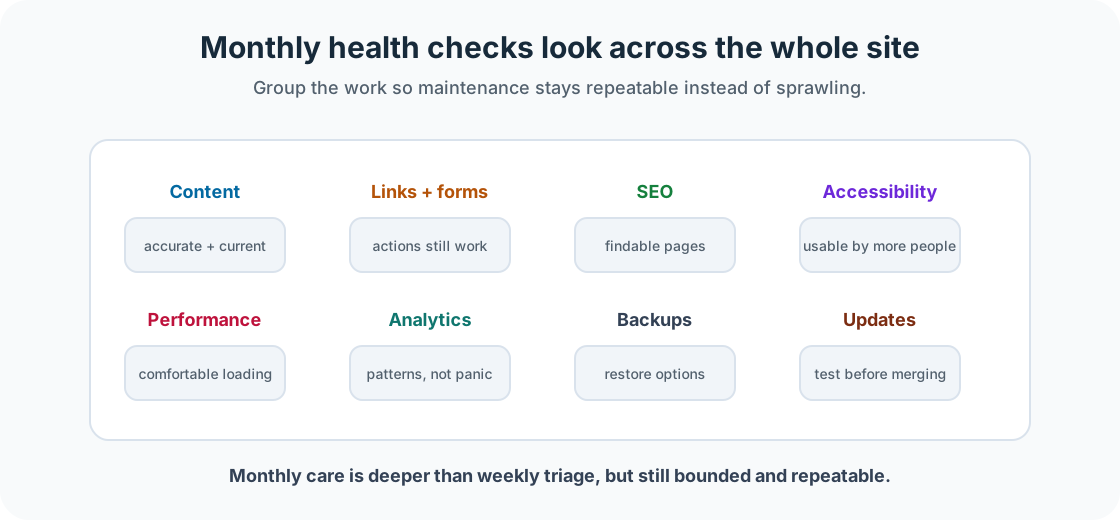
A monthly website health check should include content accuracy, broken links, forms, downloads, images, SEO metadata, heading structure, accessibility basics, mobile experience, page performance, analytics patterns, backups, updates, and dependencies.
Steps 1-3: Content, Links, and Forms
Start with content. Check dates, prices, opening hours, staff names, contact details, old announcements, service information, event details, and downloadable files. Outdated content weakens trust.
Then check internal links, external links, navigation links, buttons, footer links, download links, and links inside posts or tutorials. When recording a broken link, include the page, link text, broken URL, what it should link to instead, and whether it can be removed.
Forms deserve another check during monthly maintenance. Test required fields, error messages, success messages, notification emails, spam protection, and where submitted data goes.
Steps 4-6: Images, SEO, and Accessibility
Images affect performance, accessibility, and trust. Check whether images are loading, too large, meaningfully named, and supported by useful alt text where needed. Also check whether PDFs or downloads are current.
Monthly SEO maintenance does not mean chasing every search engine rumour like a caffeinated meerkat. Start with one clear H1, sensible H2 and H3 headings, descriptive page titles, useful meta descriptions, clear internal links, readable URLs, relevant image alt text, and content that matches the page purpose.
Accessibility maintenance helps more people use the site. Check heading order, text readability, colour contrast, recognisable links, keyboard access, visible focus, useful alt text, clear form labels, and respectful motion.
Steps 7-9: Mobile, Performance, and Analytics
Monthly mobile checks should go deeper than the weekly glance. Test key pages on a real phone if possible, including navigation, heading line breaks, tap targets, forms, images, cards, tables, code blocks, and page speed.
For performance, focus on common causes: oversized images, too many scripts, unused plugins, large videos, heavy fonts, uncompressed files, and unnecessary third-party embeds. Do not obsess over a perfect score. Ask whether the site is fast enough to use comfortably.
Monthly analytics reviews are about patterns: top pages, traffic sources, device types, search queries, exit patterns, traffic drops, traffic spikes, and important pages with little traffic. Analytics are not a report card on your worth as a human. They are a torch.
Step 10: Check Backups and Version History
Backups matter most when something has already gone wrong. That is precisely the worst time to discover they do not exist.
For static Git-based sites, check that the repository is up to date, recent changes have been committed, important branches are protected where needed, environment variables are documented safely, and deployment history is available.
For WordPress sites, check database backups, upload backups, theme and plugin file recovery, safe storage, and restore instructions. For traditional hosted sites, check website files, database backups, hosting access details, and configuration notes.
GitHub is not always a full website backup. If your database, uploads, form entries, or environment variables live somewhere else, they need their own backup plan.
Checkpoint
Before moving on, answer these questions.
- Choose three important pages on your site.
- For each page, check whether the content is accurate.
- For each page, check whether the main links work.
- For each page, check whether the heading structure is clear.
- For each page, record one improvement you could make.
Show sample answers
- Choose pages that affect trust or action, such as Home, Services, Pricing, Contact, Booking, About, a popular tutorial, or a checkout page.
- A good answer checks dates, prices, contact details, opening hours, services, staff names, event details, downloads, and any claims that may age.
- A useful check follows navigation links, buttons, downloads, internal links, form links, and calls to action to confirm they land in the expected place.
- A clear page has one main H1, then headings that describe the page sections in a sensible order without skipping into confusing levels.
- Choose one realistic improvement, such as updating stale text, fixing a broken link, improving a title, replacing a large image, or clarifying a call to action.
How confident are you with this concept?
Still confused | Getting there | Got it | Could explain it to a friend
Guided Practice
Create a monthly health check table.
Step 1: Choose no more than five pages
Pick the pages where accuracy, contact, conversion, or learning flow matters most.
Step 2: Add practical columns
Use: Page, content accurate, links working, mobile okay, SEO title okay, accessibility concern, performance concern, and action needed.
Step 3: Choose one next improvement
Do not turn the check into a rebuild. Choose one improvement to handle next.
You're on track if you can:
- You reviewed a realistic number of pages
- You checked content, links, mobile, SEO, accessibility, and performance
- You chose one concrete next action
Independent Practice
Now try this on your own without hints!
Your Task:
Run a monthly health check on one small website. Keep the scope small enough to finish.
Requirements:
- three things that are working well
- three things that need fixing
- one thing to improve next month
Reflection
- Which monthly check would have the biggest impact on your site?
- What content is most likely to become outdated?
- What would happen if your site needed to be restored tomorrow?
- Where should maintenance notes be stored?
- How could analytics guide your next improvement?
Summary
- The monthly website health check helps you look beyond obvious problems.
- It covers content, links, forms, images, SEO, accessibility, mobile experience, performance, analytics, and backups.
- The goal is to keep the site accurate, usable, findable, and reliable.
Lesson Complete: What You Can Do Now
Key Takeaways:
- The monthly website health check helps you look beyond obvious problems.
- It covers content, links, forms, images, SEO, accessibility, mobile experience, performance, analytics, and backups.
- The goal is to keep the site accurate, usable, findable, and reliable.
Learning Objectives Review:
Look back at what you set out to learn. Can you now:
- Review website content for accuracy Check!
- Check links, forms, images, and downloads Got it!
- Review basic SEO and accessibility issues Can explain it!
- Check page performance and analytics patterns Could teach this!
- Confirm backups or repository history are available Check!
If you can confidently answer "yes" to most of these, you're ready to move on!
Think & Reflect:
Maintenance Habit
- Which monthly check would have the biggest impact on your site?
- What content is most likely to become outdated?
Looking Ahead:
Continue through the Website Care and Feeding section in order, then adapt the final checklist for a real site you own, manage, or are learning from.
Recommended Next Steps
Continue Learning
Ready to move forward? Continue with the next tutorial in this series:
Updates, Backups, and Version ControlRelated Topics
Explore these related tutorials to expand your knowledge: