Website Care and Feeding Overview
Learn how to keep a website healthy after launch with simple checks for content, links, forms, accessibility, SEO, analytics, backups, and updates.
Start Here
Launching a website feels like the big finish.
You have written the HTML. You have argued with CSS. You have tested the navigation, checked the mobile layout, and deployed the site. The page is live. The internet has accepted your offering.
Surely that means the work is done. Not quite.
A website is not a microwave meal. You do not build it, launch it, and forget it exists. A website is more like a pot plant with DNS records. It needs checking, pruning, feeding, and the occasional stern conversation.
- What part of this site would matter most if it broke?
- Where would you look first if the live version behaved differently from your local version?
This section follows deployment because launch is the start of a live website's working life, not the end of the project.
Website care and feeding is the ongoing work of keeping a site useful, accurate, secure, accessible, and healthy after it goes live. This does not mean spending hours every day poking at your website. It means building simple habits so small problems are noticed before they become large problems.
Learning Objectives
By the end of this lesson, you'll be able to:
- Explain why a website needs ongoing care after launch
- Identify the main areas of website maintenance
- Describe the difference between building, deploying, monitoring, maintaining, and improving a site
- Create a simple care plan for a small website
- Understand how maintenance differs between static sites, WordPress sites, traditional hosting, and builder platforms
Why This Matters:
Website maintenance turns launch into a repeatable, calm workflow. These checks help you protect trust, usability, findability, and recovery options without overcomplicating beginner site care.
Before You Start:
You should be familiar with:
- Getting a Website Online Review here
- Test and Validate Your Site Review here
What Website Care and Feeding Means
Website care and feeding includes the practical tasks that keep a live website working properly.
- checking that pages still load
- checking links and navigation
- testing forms
- updating outdated content
- reviewing analytics
- checking mobile layouts
- improving page speed
- checking accessibility basics
- reviewing SEO titles and descriptions
- updating dependencies or plugins
- confirming backups are working
- checking that the site is still secure
This might sound like a lot. The trick is not to do everything all at once. Weekly checks catch obvious problems, monthly checks catch deeper issues, quarterly reviews keep the site aligned with its purpose, and update checks make sure new changes have not broken old work.
The goal is not perfection. The goal is awareness.
A Website Is a Living System
A live website may include content, HTML, CSS, JavaScript, images, documents, navigation, forms, hosting, domain registration, DNS records, analytics, SEO metadata, accessibility decisions, third-party scripts, backups, and security settings.
When one part changes, another part can be affected. A changed image might slow the page down. A deleted page might create a broken link. A plugin update might break a layout. A contact form might appear to work, even when the email notification has stopped arriving.
This is why professional web work includes checking, testing, and maintenance. Building the site is one part of the job. Caring for the site is what keeps it useful.
The Website Lifecycle
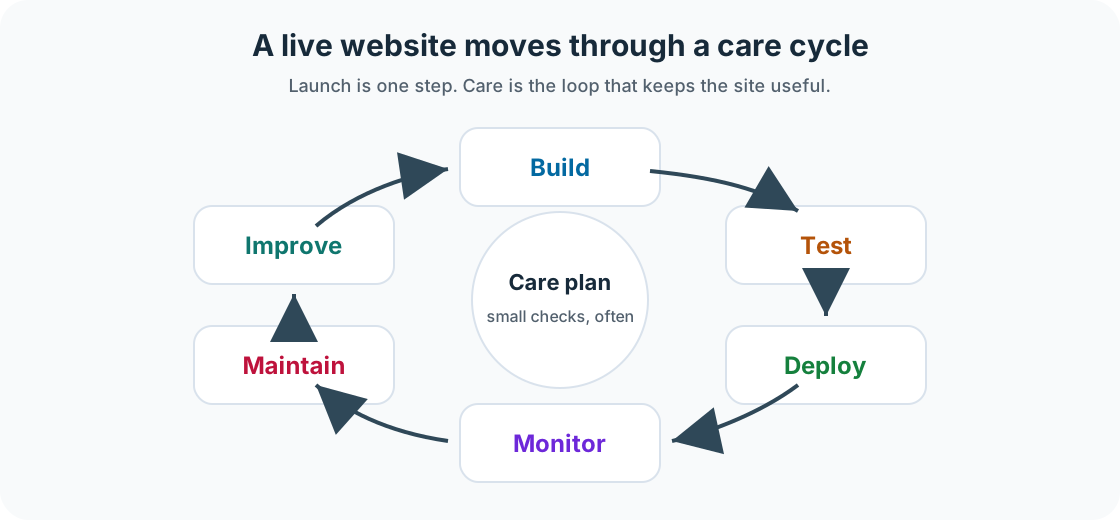
A healthy website moves through a cycle:
Build -> Test -> Deploy -> Monitor -> Maintain -> Improve
- Build
- Create the site structure, pages, content, layout, and functionality.
- Test
- Check layout, links, forms, accessibility, performance, and browser behaviour before publishing.
- Deploy
- Publish the website to a hosting service so other people can access it.
- Monitor
- Check how the live site is behaving. Look for broken links, form problems, traffic patterns, errors, and user behaviour.
- Maintain
- Keep the site updated, accurate, secure, and backed up.
- Improve
- Use what you learn to make small, useful changes over time.
A website does not need to be rebuilt every time something changes. Often, good maintenance is a series of small, sensible improvements. Tiny fixes. Big difference.
Care Needs Vary by Site Type
Static Sites
Static sites built with HTML, CSS, JavaScript, Vite, Eleventy, Astro, or similar tools usually need Git repository checks, dependency updates, content updates, image optimisation, deployment checks, analytics checks, broken link checks, and domain or DNS awareness.
WordPress Sites
WordPress sites usually need plugin updates, theme updates, WordPress core updates, database backups, upload folder backups, spam checks, security checks, admin account reviews, form testing, and performance checks. A WordPress site should never be updated blindly without a backup. That is not bravery. That is how people meet the white screen of despair.
Traditional Hosted Sites
A traditional hosted site might use plain HTML, CSS, JavaScript, PHP, or files uploaded with FTP or cPanel. These sites usually need file backups, hosting account checks, domain renewal checks, SSL certificate checks, manual content updates, form testing, and storage checks.
No-code and Builder Sites
Sites built with platforms such as Wix, Squarespace, Shopify, or similar tools still need content reviews, subscription and billing checks, domain checks, form testing, theme checks, app reviews, image optimisation, and SEO checks.
The Four Maintenance Questions
- Is it working? Can people load the site, move around it, submit forms, and complete important actions?
- Is it accurate? Are dates, prices, opening hours, services, names, links, and downloads up to date?
- Is it findable? Can search engines and people understand what the site is about?
- Is it usable? Can people use the site on mobile, read the text, navigate by keyboard, and load pages reasonably quickly?
Working. Accurate. Findable. Usable. That is a very good start.
Checkpoint
Before moving on, answer these questions.
- What kind of website are you maintaining?
- Where is the site hosted?
- Where are the files stored?
- Does the site have a database?
- Does the site have forms?
- Does the site use analytics?
- Who is responsible for updates?
- What would be the most serious thing that could break?
Show sample answers
- A useful answer names the site type, such as static site, WordPress site, hosted PHP site, Shopify store, Squarespace site, or another builder platform.
- A useful answer names the hosting or platform account, such as Vercel, Netlify, cPanel hosting, WordPress hosting, Shopify, Squarespace, or Wix.
- A useful answer identifies the source of truth: a Git repository, hosting file manager, WordPress theme/uploads area, builder account, or local project folder.
- Static sites often do not. WordPress, ecommerce, membership, booking, and many CMS sites usually do, and that database needs its own backup plan.
- If yes, name each form and how submissions are delivered or stored. If no, write not applicable so the care plan stays honest.
- A useful answer names the analytics tool and what you check, such as Plausible, Google Analytics, Search Console, Jetpack, or platform analytics.
- Name a person or role. A maintenance task without an owner is easy to forget, especially when the site appears to be working.
- Look for the highest-impact failure: the site going offline, contact forms not sending, checkout breaking, bookings failing, or key content becoming inaccurate.
How confident are you with this concept?
Still confused | Getting there | Got it | Could explain it to a friend
Guided Practice
Choose a small website you have built or managed and create a simple care note.
Step 1: Identify the site
Record the site name, site type, hosting provider, domain registrar, where the files live, and whether it uses a database, forms, or analytics.
Step 2: Name the important parts
List the main pages, the most important user action, and the biggest risk if something broke.
Step 3: Choose the first routines
Write one weekly check and one monthly check that would genuinely help this site.
You're on track if you can:
- You can describe the site type and where the site lives
- You know whether the site uses forms, analytics, or a database
- You have one realistic weekly check and one realistic monthly check
Independent Practice
Now try this on your own without hints!
Your Task:
Create a care and feeding plan for one website. Keep it simple enough that you would actually use it.
Requirements:
- a weekly check
- a monthly check
- a quarterly review
- an update process
- a backup process
- an emergency note explaining what you would check first if the site stopped working
Reflection
- What part of website maintenance surprised you?
- Which maintenance task feels most important for your current site?
- Which task could be automated or scheduled?
- What would you check first if the homepage suddenly looked broken?
- How could regular maintenance improve trust with visitors?
Summary
- A website is not finished when it is launched.
- Good website care includes checking content, links, forms, performance, accessibility, SEO, analytics, backups, and updates.
- The goal is to build simple routines that help you notice problems early.
Lesson Complete: What You Can Do Now
Key Takeaways:
- A website is not finished when it is launched.
- Good website care includes checking content, links, forms, performance, accessibility, SEO, analytics, backups, and updates.
- The goal is to build simple routines that help you notice problems early.
Learning Objectives Review:
Look back at what you set out to learn. Can you now:
- Explain why a website needs ongoing care after launch Check!
- Identify the main areas of website maintenance Got it!
- Describe the difference between building, deploying, monitoring, maintaining, and improving a site Can explain it!
- Create a simple care plan for a small website Could teach this!
- Understand how maintenance differs between static sites, WordPress sites, traditional hosting, and builder platforms Check!
If you can confidently answer "yes" to most of these, you're ready to move on!
Think & Reflect:
Maintenance Habit
- What part of website maintenance surprised you?
- Which maintenance task feels most important for your current site?
Looking Ahead:
Continue through the Website Care and Feeding section in order, then adapt the final checklist for a real site you own, manage, or are learning from.
Recommended Next Steps
Continue Learning
Ready to move forward? Continue with the next tutorial in this series:
The Weekly Website CheckRelated Topics
Explore these related tutorials to expand your knowledge: