The Weekly Website Check
Learn how to run a simple weekly website check to catch obvious problems before they become bigger issues.
Start Here
Weekly website maintenance should not feel like preparing for a moon landing.
The weekly check is a quick health check. Its job is to catch obvious problems before users find them first.
You are looking for the digital equivalent of: the front door is jammed, the lights are off, the sign points to the wrong room, or the contact form has quietly gone on holiday.
- What part of this site would matter most if it broke?
- Where would you look first if the live version behaved differently from your local version?
This section follows deployment because launch is the start of a live website's working life, not the end of the project.
For most small websites, a weekly check should take 10 to 15 minutes. You are not doing a full audit. You are making sure the site still works for a real person.
Learning Objectives
By the end of this lesson, you'll be able to:
- Perform a quick visual check of a live website
- Test key navigation links and important pages
- Check whether a contact form appears to work
- Review a website on mobile
- Record issues clearly for later fixing
Why This Matters:
Website maintenance turns launch into a repeatable, calm workflow. These checks help you protect trust, usability, findability, and recovery options without overcomplicating beginner site care.
Before You Start:
You should be familiar with:
- Getting a Website Online Review here
- Test and Validate Your Site Review here
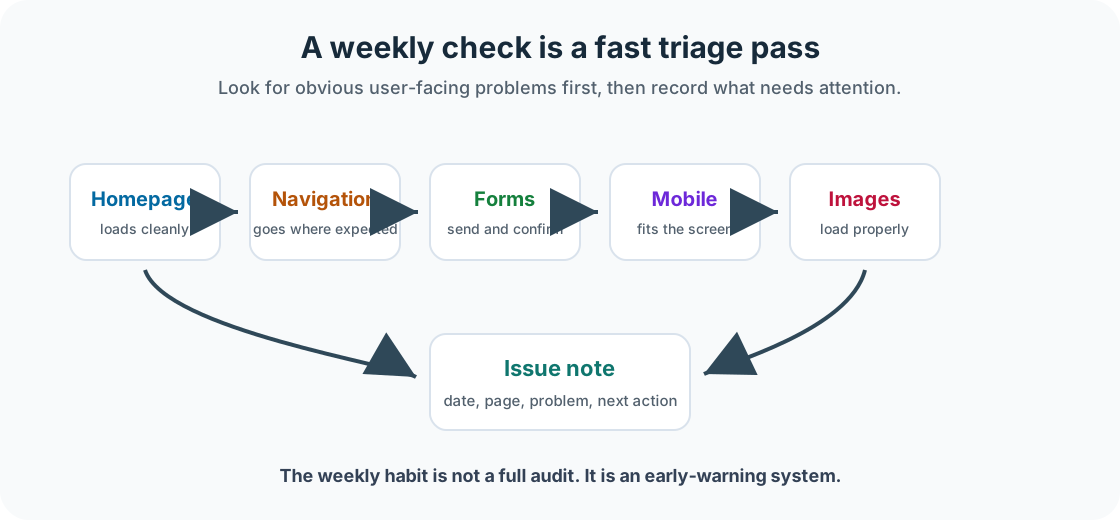
What to Check Each Week
Focus on the most visible and most important parts of the website: the homepage, main navigation, important pages, contact page, forms, mobile layout, broken images, analytics collection, and recent changes.
Step 1: Check That the Homepage Loads
Open the website in a browser and ask: Does the page load? Does the layout look normal? Is the main heading visible? Are images loading? Is anything obviously broken? Is the site using HTTPS?
Do not start fixing things yet. First, observe. A calm first look is better than immediately changing six things and accidentally creating a seventh problem.
Step 3: Check Important Pages
Every site has pages that matter more than others. For a business site, these might be Home, Services, About, Contact, Booking, Menu, Pricing, or Events. For a portfolio site, these might be Home, Projects, About, Contact, and Resume or CV.
Open the important pages and check whether the content is visible, headings are readable, images are loading, layout looks normal, and main links work.
Step 4: Test Forms
Forms are sneaky. A form can look perfectly fine on the page while completely failing behind the scenes.
If the site has a contact form, booking form, newsletter form, or enquiry form, test it regularly. Check whether you can fill it in, submit it, see the success message, receive the notification email, and understand what happens next.
A contact form that does not send messages is not a contact form. It is decorative disappointment.
Step 5: Check Mobile, Images, and Analytics
Open the site on a phone or use browser responsive design tools. Check that text is readable, buttons are easy to tap, navigation is usable, images resize properly, and there is no sideways scrolling.
Check whether images are loading on the homepage and important pages. If an image is missing, record which page it is on, what appears to be missing, whether the layout is affected, and whether the image is decorative or meaningful.
You do not need to analyse all the data weekly. Just check that analytics are still collecting visits.
Step 6: Record Issues Clearly
Do not rely on memory. Memory is where small website bugs go to wear disguises.
Create a simple issue note with the date, page, problem, seriousness, whether a screenshot was taken, possible cause, and next action.
Weekly Checklist
- Homepage loads
- HTTPS is working
- Main navigation works
- Important pages load
- Contact page works
- Forms have been tested
- Mobile layout checked
- Images are loading
- No obvious broken layout
- Analytics still collecting data
- Any issues recorded clearly
Checkpoint
Before moving on, answer these questions.
- Run a 10-minute weekly check on one live or local website.
- Record something that works well.
- Record something that needs fixing.
- Record something you are unsure about.
Show sample answers
- A solid check covers the homepage, navigation, important pages, forms or contact paths, mobile layout, images, analytics collection, and a short issue note.
- Name something specific, such as the homepage loads quickly, the mobile menu opens, the contact page is reachable, or images are loading correctly.
- A useful note includes the page, the problem, how serious it is, and the next action. Example: Contact page form submits, but no notification email arrived.
- Good uncertainty notes are specific. Example: Analytics dashboard shows no visits this week; check whether tracking is installed or traffic is genuinely low.
How confident are you with this concept?
Still confused | Getting there | Got it | Could explain it to a friend
Guided Practice
Open your project site and create a weekly check note.
Step 1: Add the basics
Record the website, date, and who checked it.
Step 2: Check the main areas
Write short notes for homepage, navigation, important pages, forms, mobile, images, and analytics.
Step 3: Choose the next action
List issues found and choose the one next action that matters most.
You're on track if you can:
- Your note is short enough to repeat next week
- You tested at least one important user action
- You recorded any issue clearly enough to fix later
Independent Practice
Now try this on your own without hints!
Your Task:
Create a weekly website check template for your own site. Include no more than 10 checks. If your checklist has 47 items, congratulations, you have accidentally created homework.
Requirements:
- homepage check
- navigation check
- important page check
- form or contact check, if relevant
- mobile check
- issue note area
Reflection
- Which weekly check is most important for your site?
- Which part of the site would cause the biggest problem if it broke?
- How could you make the weekly check easier to remember?
- Where will you record issues when you find them?
Summary
- The weekly website check is a quick routine for catching obvious problems.
- It should focus on the homepage, navigation, important pages, forms, mobile layout, images, and analytics.
- The aim is to notice problems early, record them clearly, and keep the site reliable.
Lesson Complete: What You Can Do Now
Key Takeaways:
- The weekly website check is a quick routine for catching obvious problems.
- It should focus on the homepage, navigation, important pages, forms, mobile layout, images, and analytics.
- The aim is to notice problems early, record them clearly, and keep the site reliable.
Learning Objectives Review:
Look back at what you set out to learn. Can you now:
- Perform a quick visual check of a live website Check!
- Test key navigation links and important pages Got it!
- Check whether a contact form appears to work Can explain it!
- Review a website on mobile Could teach this!
- Record issues clearly for later fixing Check!
If you can confidently answer "yes" to most of these, you're ready to move on!
Think & Reflect:
Maintenance Habit
- Which weekly check is most important for your site?
- Which part of the site would cause the biggest problem if it broke?
Looking Ahead:
Continue through the Website Care and Feeding section in order, then adapt the final checklist for a real site you own, manage, or are learning from.
Recommended Next Steps
Continue Learning
Ready to move forward? Continue with the next tutorial in this series:
The Monthly Website Health CheckRelated Topics
Explore these related tutorials to expand your knowledge: