Canonical URLs and Duplicate-Content Systems
Learn how redirects, canonical tags, sitemaps, and internal links work together to consolidate duplicate URL signals.
Start Here
The same menu is reachable at /menu, /menu/, /menu?utm_source=poster, and /summer-menu. One version redirects, one declares a different canonical, and the sitemap lists two.
Which URL is the site actually recommending?
- Where have you already seen canonical urls and duplicate-content systems in a real interface?
- Which part of this topic currently feels most important to test in a real page?
Learn how redirects, canonical tags, sitemaps, and internal links work together to consolidate duplicate URL signals.
Learning Objectives
By the end of this lesson, you'll be able to:
- explain duplicate URL clusters and selected canonicals
- implement a self-referencing HTML canonical correctly
- distinguish redirect, canonical, sitemap, and internal-link signals
- find and repair conflicting or circular canonical instructions
Why This Matters:
Learn how redirects, canonical tags, sitemaps, and internal links work together to consolidate duplicate URL signals.
Canonicalisation Consolidates Signals
A resource may be reachable through multiple URLs for legitimate technical reasons. Search systems can group sufficiently similar pages and select a representative canonical. Your site can recommend the preferred URL, but the search engine still makes the final selection.
Use a permanent redirect when the old URL should no longer be used. Use rel="canonical" when variants must remain accessible, such as tracking URLs or print views. Keep internal links and sitemap entries pointing to the preferred URL.
<link rel="canonical" href="https://example.com/menu">Canonical targets should be absolute, indexable, successful, and not redirected where avoidable. Do not canonicalise genuinely different pages just to suppress them.
Signals Should Agree
Canonicalisation works best when the whole site tells the same story. The canonical tag is important, but it is only one signal among several.
Check whether these signals point to the same preferred URL:
| Signal | Healthy pattern | Conflict example |
|---|---|---|
| Internal links | link to the preferred URL | navigation links to /menu/ while canonical says /menu |
| Redirects | old variants redirect to the preferred URL | /summer-menu redirects to /menu, but /menu canonicalises back to /summer-menu |
| Canonical tag | self-canonical on the preferred page | canonical points to a URL that redirects |
| Sitemap | lists only preferred canonical URLs | sitemap includes both /menu and /menu/ |
| Page content | duplicate variants are genuinely similar | canonical used between pages with different intent |
When signals disagree, search systems may still choose a canonical, but you have made the decision harder. Your job is not to force a choice with one tag. Your job is to make the preferred choice obvious and consistent.
When Not to Canonicalise
Do not use canonical tags as a hiding place for unresolved architecture decisions.
Avoid canonicalising when:
- the pages serve different locations, audiences, products, dates, or intents
- the target page does not contain the information the visitor expected
- the source page should really redirect because the old URL is gone
- the page should be
noindexbecause it is useful to users but not useful in search - the duplicate exists because internal links, filters, or route rules need repair
For example, two suburb service pages may look similar but still answer different local intent. Collapsing them into one canonical can remove useful specificity. A tracking parameter version of the same menu page, by contrast, is usually a good canonical candidate.
Choose the Right Consolidation
| Scenario | Best first choice | Why |
|---|---|---|
| HTTP to HTTPS | permanent redirect | old URL should not remain active |
| old slug to new slug | permanent redirect | destination has moved |
| tracking parameter | canonical to clean URL | variant may remain useful for analytics |
| print view | canonical to main page | variant duplicates main content |
| regional service pages | self-canonical if genuinely different | different user intent |
| filtered catalogue pages | case-by-case | may need architecture, noindex, or canonical decisions |
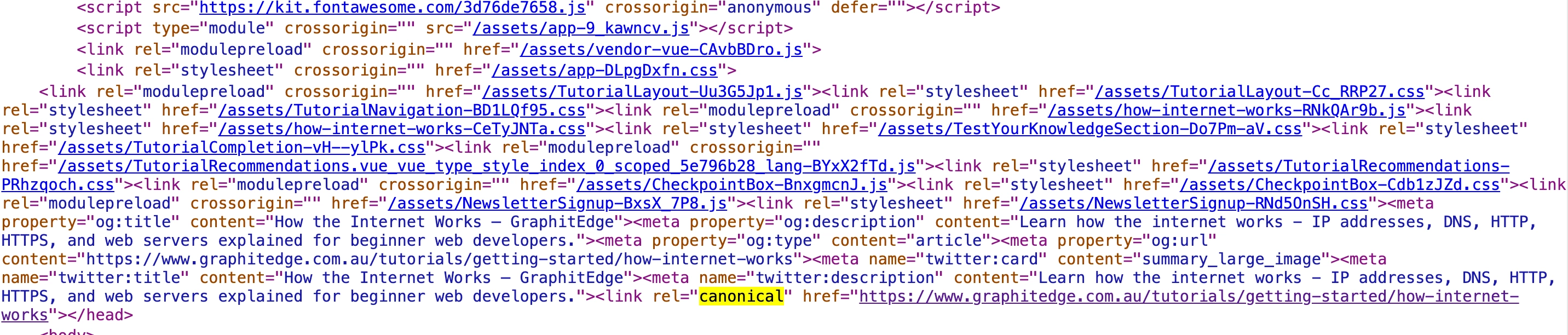
The canonical element names the preferred public URL for this page. It is a strong hint that should agree with redirects, internal links and the sitemap.
Check Your Understanding
Before moving forward, can you answer these?
- 1. Is a canonical tag a command?
- 2. When should you redirect instead of canonicalising?
- 3. What should the sitemap list?
Check Your Answers
- No. It is a strong hint. Search systems may choose a different canonical when signals conflict.
- When the old URL should no longer be used and there is a close permanent replacement.
- The preferred canonical URL, not every duplicate variant.
How confident are you with this concept?
Still confused | Getting there | Got it | Could explain it to a friend
Guided Practice
Map a canonical cluster for one page.
Step 1 - List URL variants
Include slash variants, tracking parameters, old slugs, HTTP/HTTPS, and www/non-www if relevant.
Step 2 - Request each variant
Record status, final URL, and whether a redirect occurs.
Step 3 - Inspect canonicals
Compare the canonical in raw source and rendered DOM.
Step 4 - Compare supporting signals
Check internal links and sitemap entries. Draw the current signal cluster.
Step 5 - Propose a small repair
Choose redirect, canonical, self-canonical, noindex, or no change. Retest the repaired path.
Step 6 - Check the supporting signals
After choosing a repair, confirm internal links and sitemap entries also point to the preferred URL. If they do not, the tag is carrying too much of the work alone.
Independent Practice
Create a canonical cluster worksheet for three important pages.
Your Task:
Create a canonical cluster worksheet for three important pages.
Requirements:
- list variants and evidence
- identify conflicts
- choose the preferred canonical
- name the remediation
- define the verification method
- identify one variant that should redirect, canonicalise, noindex, or remain separate
Success Criteria:
| Criteria | You've succeeded if... |
|---|---|
| signals point consistently at the chosen URL | Completed clearly and correctly in your solution. |
| genuinely different pages are not collapsed together | Completed clearly and correctly in your solution. |
| redirects are used for actual moves | Completed clearly and correctly in your solution. |
| the final recommendation explains why the chosen mechanism matches user intent | Completed clearly and correctly in your solution. |
Before you continue
- I can explain canonicalisation as signal consolidation.
- I can choose between redirect and canonical.
- I can find sitemap/internal-link/canonical conflicts.
- I know not to use canonical tags to hide unrelated pages.
Closure
Key Takeaways:
- explain duplicate URL clusters and selected canonicals
- implement a self-referencing HTML canonical correctly
- distinguish redirect, canonical, sitemap, and internal-link signals
- find and repair conflicting or circular canonical instructions
Learning Objectives Review:
Look back at what you set out to learn. Can you now:
- explain duplicate URL clusters and selected canonicals Check!
- implement a self-referencing HTML canonical correctly Got it!
- distinguish redirect, canonical, sitemap, and internal-link signals Can explain it!
- find and repair conflicting or circular canonical instructions Could teach this!
If you can confidently answer "yes" to most of these, you're ready to move on!
Think & Reflect:
Pause and reflect
- Which idea from this lesson now feels practical rather than abstract?
- What would you build or test next to make this stick?
Looking Ahead:
Canonicalisation works when redirects, internal links, sitemap entries, and canonical tags all point to the same preferred URL.
Recommended Next Steps
Continue Learning
Ready to move forward? Continue with the next tutorial in this series:
HTTP Status Codes, Redirects, and Removed PagesRelated Topics
Explore these related tutorials to expand your knowledge:
Additional Resources
Deepen your understanding with these helpful resources:
- Google canonicalisation guidance - How Google uses redirects, canonicals, sitemaps, and other signals.
- Google URL structure guidance - Reference for avoiding unnecessary URL duplication.
- Google faceted-navigation guidance - Optional extension for larger catalogue and filtered-navigation systems.