JavaScript SEO for Vite and Vue Sites
Learn how to inspect initial HTML, rendered DOM, client-side routing, mobile content parity, and metadata risks in Vite and Vue projects.
Start Here
The Vue app looks complete in a normal browser. View Source shows one <div id="app"></div>, a generic title, and no page content. The router also returns 200 OK for nonsense paths.
JavaScript may repair some of this for users and crawlers, but the server's first answer remains weak and errors are ambiguous.
- Where have you already seen javascript seo for vite and vue sites in a real interface?
- Which part of this topic currently feels most important to test in a real page?
Learn how to inspect initial HTML, rendered DOM, client-side routing, mobile content parity, and metadata risks in Vite and Vue projects.
Learning Objectives
By the end of this lesson, you'll be able to:
- compare initial HTML, live DOM, and crawler-rendered content
- identify app-shell, client-routing, lazy-content, and metadata risks
- verify crawlable Vue navigation and unique route metadata
- explain SPA, SSG, prerendering, and SSR as trade-offs
- test mobile content parity and primary-content availability
Why This Matters:
Learn how to inspect initial HTML, rendered DOM, client-side routing, mobile content parity, and metadata risks in Vite and Vue projects.
Before You Start:
You should be familiar with:
- HTTP Status Codes, Redirects, and Removed Pages Review here
Initial HTML and Rendered DOM
Initial HTML is the server or build output. The rendered DOM is what exists after scripts execute. Search engines can execute JavaScript, but rendering adds another dependency and failure surface.
Important navigation should render as anchors with real href values. Critical content should not require a click, swipe, or form action before it exists. Each indexable route needs meaningful content, title, canonical, and status behaviour.
SPA, static generation, prerendering, and server rendering solve different product and delivery needs. Do not treat any of them as a ranking switch. Choose based on evidence.
Rendering Options and Trade-Offs
Rendering architecture is a delivery decision. The right choice depends on content, freshness, interactivity, hosting, maintenance skill, and risk.
| Option | Strength | Risk to watch |
|---|---|---|
| Client-side SPA | simple deployment and rich interaction | thin initial HTML, weak status handling, metadata gaps |
| Static site generation | fast content pages with strong initial HTML | build complexity and stale generated content if workflow is weak |
| Prerendering selected routes | improves important public pages without full SSR | route coverage can drift as the site grows |
| Server-side rendering | fresh HTML per request and better status control | more moving parts, hosting constraints, runtime failures |
The practical question is not "Is Vue bad for SEO?" It is: which pages need strong initial HTML, unique metadata, accurate status responses, and reliable content before JavaScript? A portfolio gallery, tutorial article, product page, booking page, and logged-in dashboard may need different answers.
For Vite/Vue sites, a small improvement can often solve the real problem: generate public content routes, ensure router links render anchors, add per-route metadata, handle not-found routes honestly, and avoid hiding primary content behind client-only interactions.
Vite and Vue Checks
| Check | Why it matters | Evidence |
|---|---|---|
| View Source versus Elements | compares initial and rendered content | source HTML and DOM |
| Network document response | confirms status and content type | document request |
| Router links | verifies crawlable navigation | rendered <a href> |
| Direct nested route request | tests host rewrite behaviour | status and app response |
| Nonsense route request | finds fake 200 not-found risks | status and visible page |
| Mobile rendered view | tests mobile-first content parity | responsive rendered content |
Use several views of the same public route because each one answers a different question.
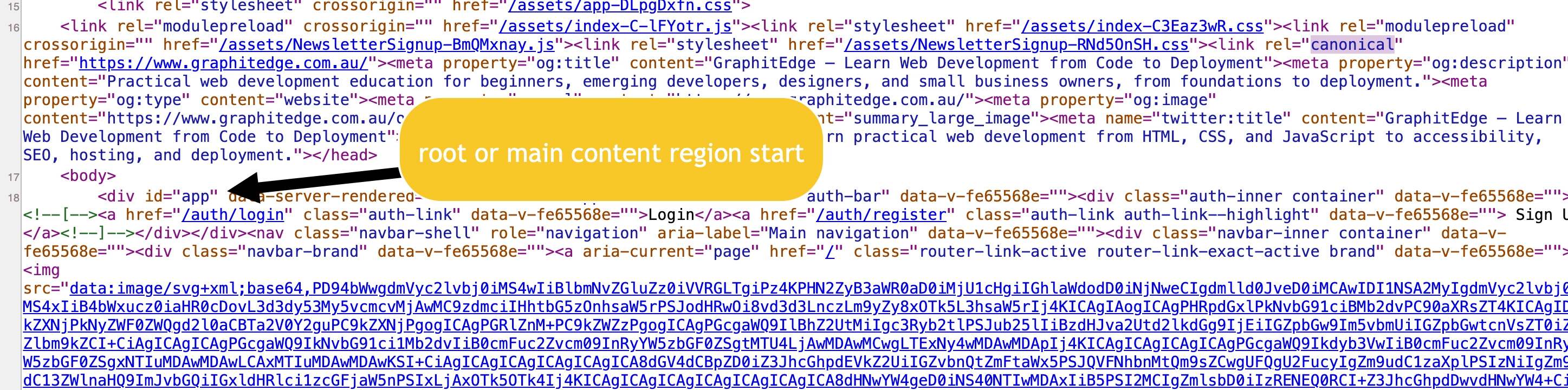
View Source shows that useful HTML and metadata exist in the initial response before client-side interaction.
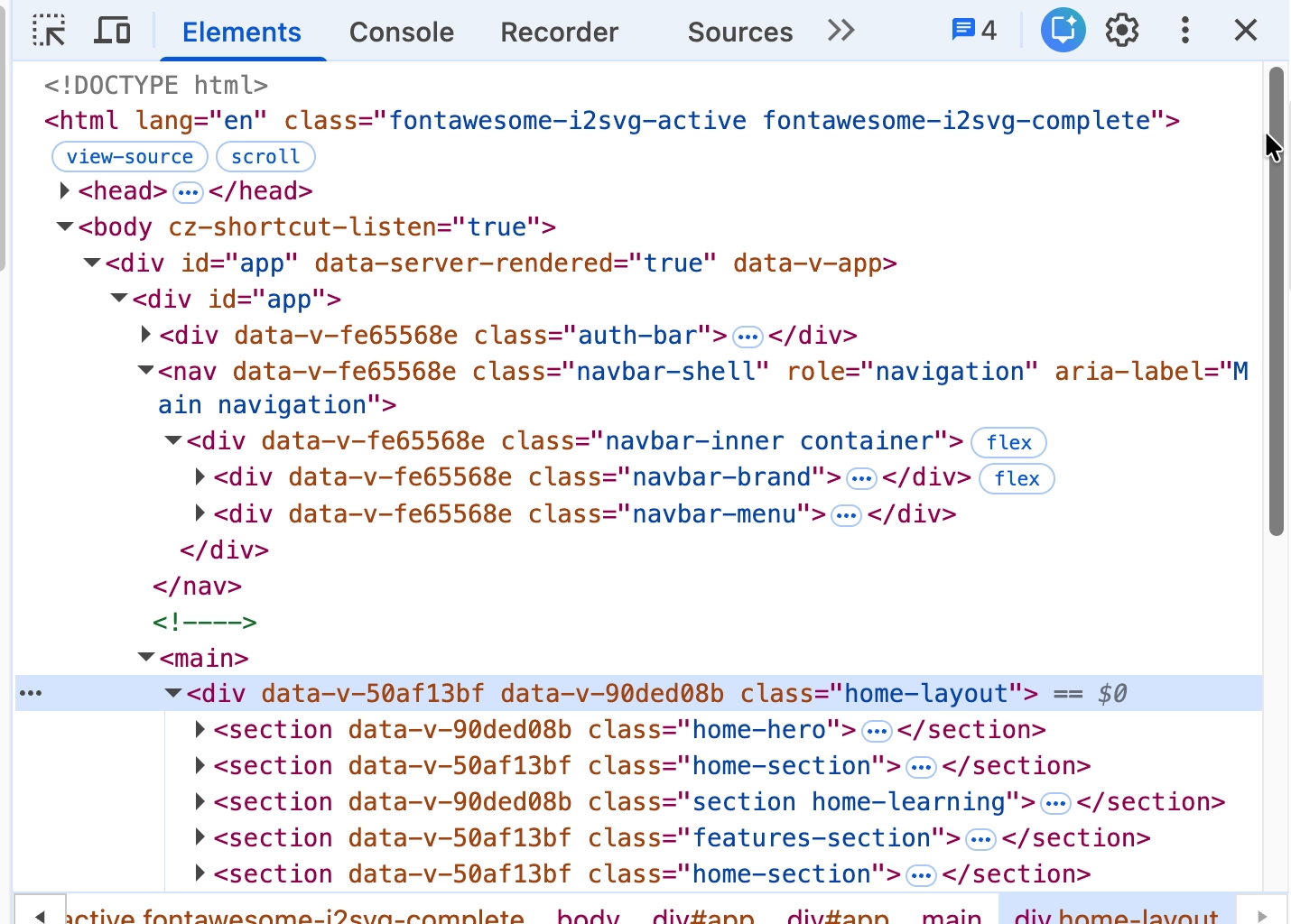
Elements shows the current rendered DOM. Compare it with View Source to find content that depends on client-side rendering.
View full-size rendered DOM image
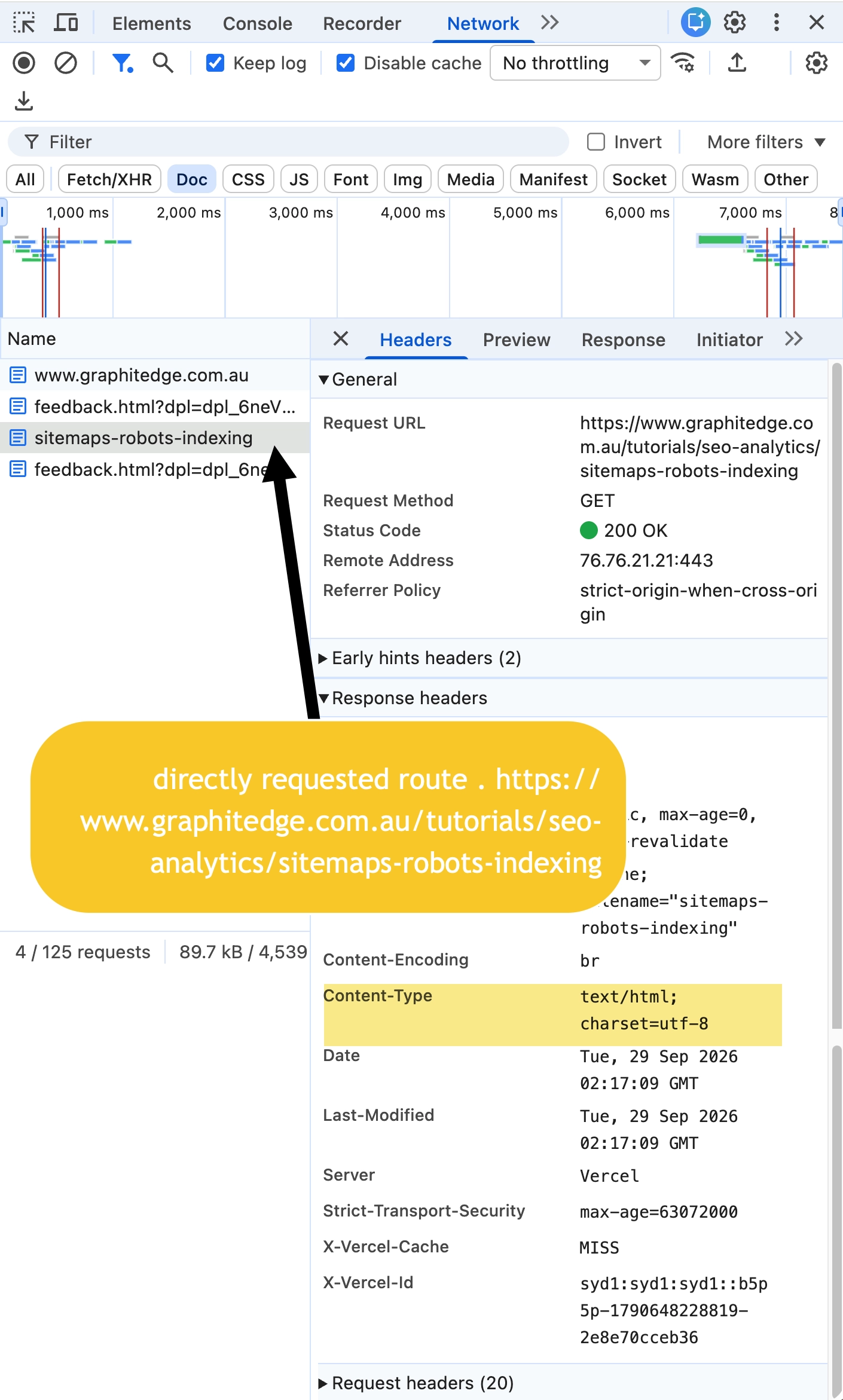
A direct request to the nested route returns an HTML document with 200 OK. Test a nonexistent route separately because this capture does not prove correct not-found handling.
View full-size route response image
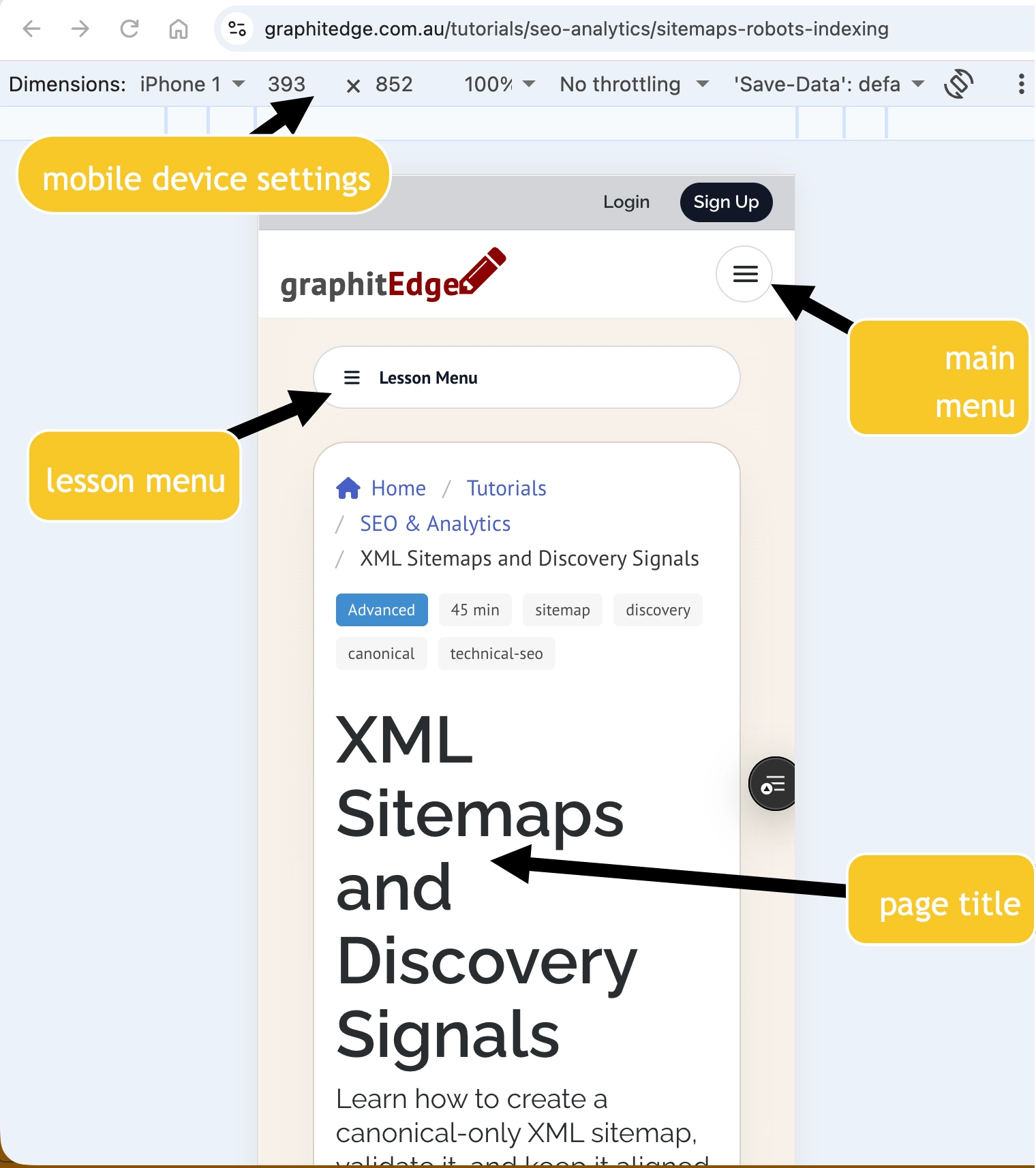
The mobile rendering retains navigation and the primary page heading. Continue checking the full lesson for content parity and usable controls.
Mobile Parity and Deferred Content
Search systems primarily evaluate mobile content. A desktop-only navigation link, collapsed content that is absent from the DOM, or route metadata that changes only after a delayed client request can create uneven evidence.
Check whether the mobile route still provides:
- the same primary heading and main content
- crawlable links to important related pages
- unique title, description, canonical, and structured data where used
- images and resources that are not blocked by robots rules
- content that appears without requiring a user-only gesture
Deferred content is not automatically wrong. Reviews, comments, maps, and interactive widgets may load after the main page. The risk appears when the content needed to understand the page does not exist until a fragile script, personalisation call, or interaction succeeds.
Check Your Understanding
Before moving forward, can you answer these?
- 1. Is JavaScript itself the SEO problem?
- 2. What does View Source show?
- 3. Why test a nonsense route?
Check Your Answers
- No. The risks are unclear URLs, weak first responses, inaccessible content, inconsistent metadata, and untested rendering assumptions.
- The initial HTML response or generated document, not the post-JavaScript DOM.
- It reveals whether the host and router return an honest not-found response or a misleading `200 OK`.
How confident are you with this concept?
Still confused | Getting there | Got it | Could explain it to a friend
Guided Practice
Audit three routes in a Vite/Vue project: homepage, content detail page, and nonexistent route.
Step 1 - Capture initial evidence
Record initial title, source content, document status, final URL, and content type.
Step 2 - Capture rendered evidence
Inspect the live DOM, route title, canonical, main content, internal links, and failed requests.
Step 3 - Compare mobile output
Use a mobile viewport. Confirm the same essential content, metadata, structured data, and accessible resources are available.
Step 4 - Classify findings
Mark each issue as content delivery, routing/status, metadata, resource access, or performance.
Step 5 - Choose the smallest remedy
For each finding, choose a proportionate fix: metadata update, real anchor link, prerendered route, host rewrite change, not-found handling, resource unblock, or deeper rendering architecture change.
Independent Practice
Write a rendering decision note.
Your Task:
Write a rendering decision note.
Requirements:
- current architecture
- observed risk
- affected routes
- user/search impact
- smallest viable remedy
- proof required after change
- reason a larger rendering change is or is not justified
Success Criteria:
| Criteria | You've succeeded if... |
|---|---|
| conclusions use initial and rendered evidence | Completed clearly and correctly in your solution. |
| mobile parity is checked | Completed clearly and correctly in your solution. |
| proposed remedies are proportionate | Completed clearly and correctly in your solution. |
| recommendations do not treat one rendering model as universally best | Completed clearly and correctly in your solution. |
Before you continue
- I can compare source HTML and rendered DOM.
- I can inspect Vue router links for real
hrefvalues. - I can test direct route requests and not-found behaviour.
- I can explain rendering options without promising rankings.
Closure
Key Takeaways:
- compare initial HTML, live DOM, and crawler-rendered content
- identify app-shell, client-routing, lazy-content, and metadata risks
- verify crawlable Vue navigation and unique route metadata
- explain SPA, SSG, prerendering, and SSR as trade-offs
- test mobile content parity and primary-content availability
Learning Objectives Review:
Look back at what you set out to learn. Can you now:
- compare initial HTML, live DOM, and crawler-rendered content Check!
- identify app-shell, client-routing, lazy-content, and metadata risks Got it!
- verify crawlable Vue navigation and unique route metadata Can explain it!
- explain SPA, SSG, prerendering, and SSR as trade-offs Could teach this!
- test mobile content parity and primary-content availability Check!
If you can confidently answer "yes" to most of these, you're ready to move on!
Think & Reflect:
Pause and reflect
- Which idea from this lesson now feels practical rather than abstract?
- What would you build or test next to make this stick?
Looking Ahead:
JavaScript itself is not the issue. Test whether each route has a clear URL, an honest response, accessible content, and consistent metadata.
Recommended Next Steps
Continue Learning
Ready to move forward? Continue with the next tutorial in this series:
Structured Data That Matches the PageRelated Topics
Explore these related tutorials to expand your knowledge:
Additional Resources
Deepen your understanding with these helpful resources:
- Google JavaScript SEO basics - Current Google guidance on JavaScript crawling, rendering, links, and metadata.
- Google mobile-first indexing best practices - How mobile-rendered content affects indexing and diagnostics.
- Google page experience - How page experience fits alongside other search and performance signals.