robots.txt, noindex, and Access Control
Learn the difference between crawl control, index control, and real privacy so you can choose the right mechanism for each URL group.
Start Here
A developer blocks /staging/ in robots.txt and assumes it is private. The URL is still public, may be linked elsewhere, and a search result may still show the address.
Crawl control is not authentication. That distinction matters.
- Where have you already seen robots.txt, noindex, and access control in a real interface?
- Which part of this topic currently feels most important to test in a real page?
Learn the difference between crawl control, index control, and real privacy so you can choose the right mechanism for each URL group.
Learning Objectives
By the end of this lesson, you'll be able to:
- explain the difference between crawl control, index control, and genuine privacy
- write and test a small standards-based `robots.txt`
- use robots meta directives or `X-Robots-Tag` appropriately
- avoid the blocked-plus-noindex contradiction
Why This Matters:
Learn the difference between crawl control, index control, and real privacy so you can choose the right mechanism for each URL group.
Crawl, Index, and Access Are Different Controls
robots.txt lives at the origin root, such as https://example.com/robots.txt. It tells cooperative crawlers which paths they may request. It is public and is not a security boundary.
Disallow controls crawling, not guaranteed indexing. A blocked URL can still be known through links or other signals. If you need a crawlable HTML page kept out of search, use a robots meta noindex directive and allow the crawler to fetch the page so it can see the directive.
For non-HTML resources such as PDFs, an X-Robots-Tag: noindex header can carry index directives. For private or staging content, use authentication, network restrictions, or another real access-control mechanism.
The Order of Operations Matters
A directive only works if the relevant system can see it. This is why the sequence matters:
- A crawler checks
robots.txtbefore requesting a URL. - If crawling is allowed, the crawler can request the page or file.
- If the response is fetched, page-level meta directives or headers can be read.
- If indexing is allowed, the page can be considered for the index.
So a public HTML page that should stay out of search often needs to be crawlable with noindex, not blocked. A private dashboard needs a login, not noindex. A deleted page needs an honest response, not a robots rule that hides the evidence.
Use robots.txt mainly to reduce unnecessary crawling of public low-value patterns, not to clean up every index problem.
Decision Table
| Goal | Correct first mechanism | Avoid |
|---|---|---|
| Reduce crawling of low-value public URL patterns | robots.txt where appropriate | treating it as privacy |
| Keep a crawlable HTML page out of search | robots meta noindex | blocking it before noindex can be seen |
| Keep a PDF out of search | X-Robots-Tag: noindex | assuming HTML meta tags affect the PDF |
| Keep staging/private data private | authentication or access control | any search directive as security |
| Remove a gone page | 404/410, plus removal workflow if urgent | Disallow alone |
A Small robots.txt
User-agent: *
Disallow: /internal-search/
Disallow: /thank-you/

Sitemap: https://example.com/sitemap.xml
This file is a crawler instruction, not a content inventory. Do not block CSS or JavaScript that search systems need to render public pages. Do not put secrets, tokens, or private paths in a public robots file.
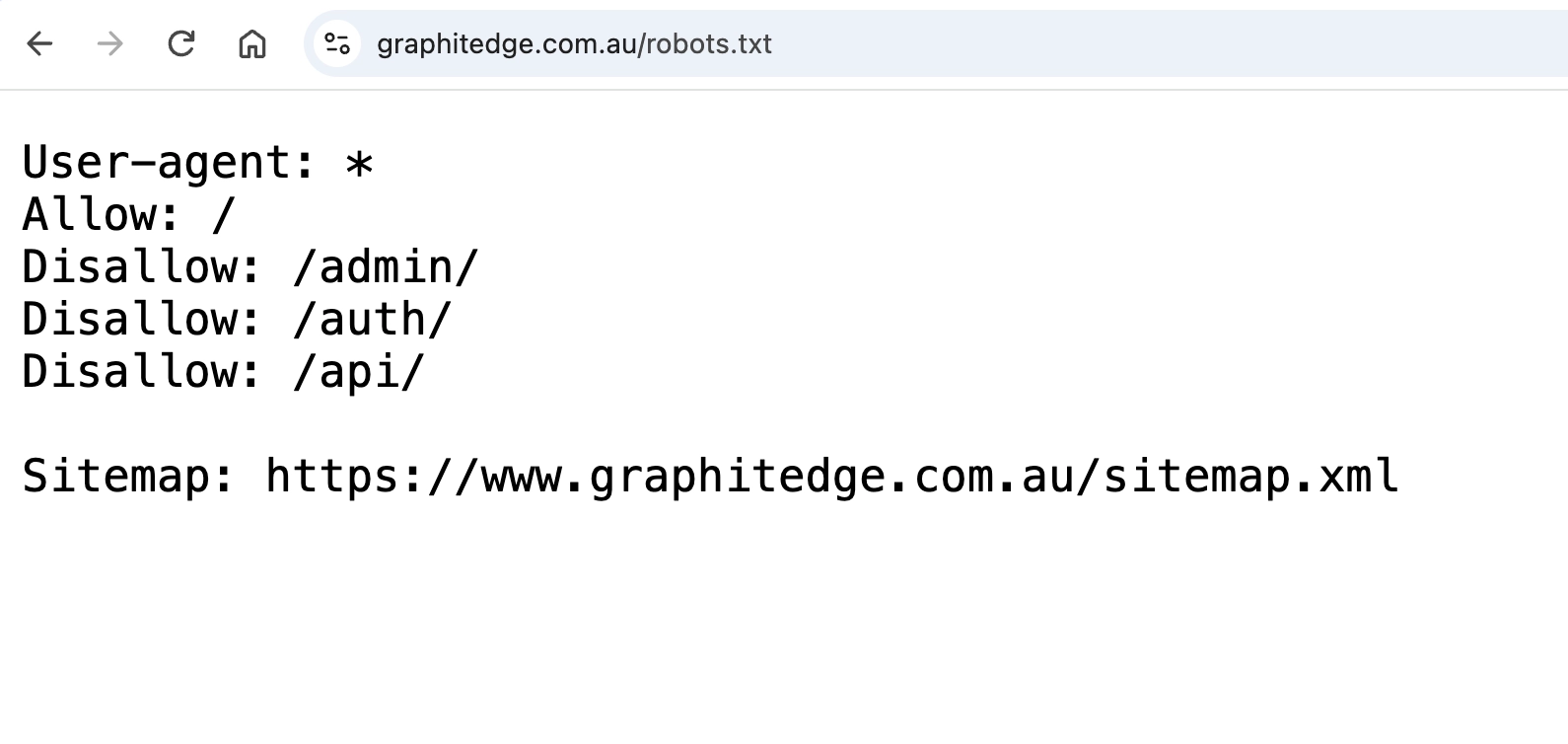
These public directives guide cooperating crawlers. Disallow is not authentication or access control.
Failure Modes to Recognise
These mistakes are common enough to deserve special attention:
- blocking
/assets/,/css/, or/js/so rendered pages cannot be understood - adding
noindexto a page and then blocking that same page from being fetched - listing sensitive staging paths in a public robots file
- using
Disallowto handle deleted content that should return404or410 - applying broad rules such as
Disallow: /during launch and forgetting to remove them - assuming all crawlers obey robots rules equally
When you audit a rule, write the intended outcome before judging the mechanism. A rule that is wrong for privacy may still be acceptable for crawl hygiene on a large public site. Context matters.
Check Your Understanding
Before moving forward, can you answer these?
- 1. Why is `robots.txt` not privacy protection?
- 2. Why is `Disallow` plus `noindex` often contradictory?
- 3. Which mechanism can apply to a PDF?
Check Your Answers
- It is public crawl guidance for cooperative crawlers. It does not require login, hide the URL, or prevent a human from opening the address.
- If the crawler is blocked from fetching the page, it may not see the page-level `noindex` directive.
- An `X-Robots-Tag` response header can carry a `noindex` directive for non-HTML resources.
How confident are you with this concept?
Still confused | Getting there | Got it | Could explain it to a friend
Guided Practice
Choose the right mechanism for six scenarios, then inspect a real robots file.
Step 1 - Classify the goal
For admin area, staging site, duplicate print page, PDF price list, filtered URLs, and deleted page, mark whether the goal is crawl control, index control, access control, or removal.
Step 2 - Choose the mechanism
Use robots.txt, robots meta, X-Robots-Tag, authentication, redirect, 404, or 410. Defend the choice.
Step 3 - Inspect a robots file
Open /robots.txt, identify user-agent groups, disallowed paths, and sitemap declarations.
Step 4 - Check for accidental resource blocking
Confirm important public CSS and JavaScript are not blocked when they are needed for rendering.
Step 5 - Test the contradiction
For any URL with both a crawl rule and an index directive, explain whether a crawler can actually see the directive.
Independent Practice
Create a crawl/index/privacy decision record for five URL groups on your site.
Your Task:
Create a crawl/index/privacy decision record for five URL groups on your site.
Requirements:
- name the current rule or absence of a rule
- state the intended outcome
- check for conflicts between crawl and index controls
- identify the verification method
- note whether the rule is temporary or permanent
Success Criteria:
| Criteria | You've succeeded if... |
|---|---|
| private content uses real access control | Completed clearly and correctly in your solution. |
| `noindex` pages remain crawlable where needed | Completed clearly and correctly in your solution. |
| removal decisions use honest HTTP responses | Completed clearly and correctly in your solution. |
| robots rules do not block resources needed to render public pages | Completed clearly and correctly in your solution. |
Before you continue
- I can explain crawl control, index control, and privacy separately.
- I will not teach or use
robots.txtas a privacy mechanism. - I can identify a blocked-plus-noindex conflict.
- I know when a response header is more suitable than an HTML meta tag.
Closure
Key Takeaways:
- explain the difference between crawl control, index control, and genuine privacy
- write and test a small standards-based `robots.txt`
- use robots meta directives or `X-Robots-Tag` appropriately
- avoid the blocked-plus-noindex contradiction
Learning Objectives Review:
Look back at what you set out to learn. Can you now:
- explain the difference between crawl control, index control, and genuine privacy Check!
- write and test a small standards-based `robots.txt` Got it!
- use robots meta directives or `X-Robots-Tag` appropriately Can explain it!
- avoid the blocked-plus-noindex contradiction Could teach this!
If you can confidently answer "yes" to most of these, you're ready to move on!
Think & Reflect:
Pause and reflect
- Which idea from this lesson now feels practical rather than abstract?
- What would you build or test next to make this stick?
Looking Ahead:
Use directives to guide cooperative crawlers. Use authentication or network controls when content must be private.
Recommended Next Steps
Continue Learning
Ready to move forward? Continue with the next tutorial in this series:
XML Sitemaps and Discovery SignalsRelated Topics
Explore these related tutorials to expand your knowledge:
Additional Resources
Deepen your understanding with these helpful resources:
- RFC 9309: Robots Exclusion Protocol - The standard for robots.txt crawler access rules.
- Google robots.txt introduction - How Google interprets robots.txt and what it is for.
- Google noindex guidance - How to prevent indexing with noindex when the crawler can fetch the page.
- Bing robots meta tags - Bing-specific support for robots meta tags and attributes.