Technical SEO System
Learn how discovery, crawling, rendering, indexing, and serving fit together so you can diagnose technical SEO problems by evidence, not guesswork.
Start Here
The Black Swan Bistro menu opens perfectly when its owner pastes the URL into a browser, yet it does not appear in search. Is the problem content, links, robots rules, rendering, indexing, or simply time?
The page working for one browser visit is useful evidence, but it is not evidence for the whole search pipeline. Technical SEO begins by locating the broken hand-off.
- Where have you already seen technical seo system in a real interface?
- Which part of this topic currently feels most important to test in a real page?
Learn how discovery, crawling, rendering, indexing, and serving fit together so you can diagnose technical SEO problems by evidence, not guesswork.
Learning Objectives
By the end of this lesson, you'll be able to:
- distinguish discovery, crawling, rendering, indexing, and serving
- identify the browser, server, and search-system responsibility at each stage
- explain why "Google found it" does not necessarily mean "Google indexed it"
- classify a symptom by pipeline stage before choosing a tool
Why This Matters:
Learn how discovery, crawling, rendering, indexing, and serving fit together so you can diagnose technical SEO problems by evidence, not guesswork.
The Search Pipeline
A search system must discover a URL, be allowed to request it, receive a meaningful HTTP response, render enough useful content, choose whether and how to index it, and later decide whether to show it for a particular query.
Those stages are connected, but they are not the same job:
| Stage | What is being tested | First evidence | What not to assume |
|---|---|---|---|
| Discovery | The system knows a URL exists | crawlable link, sitemap, submission | that the page was crawled |
| Crawling | The system can request the URL | HTTP request and response | that it was indexed |
| Rendering | The returned resources produce content | rendered DOM, mobile render | that all scripts always succeed |
| Indexing | The page is eligible and selected | URL Inspection or index report | that it will rank |
| Serving | The page is chosen for a query | impressions, clicks, result appearance | that one query explains all visibility |
Search is a pipeline, not a simple ladder. A system may revisit a URL many times. It may crawl a page and decide not to index it. It may index a page and rarely serve it because another result better matches the query. That is why ranking advice should wait until crawl and index evidence are checked.
Read Symptoms by Stage
A common beginner mistake is to treat every search problem as a content problem. Content matters, but technical SEO asks a more basic question first: can the page travel through the system without conflicting signals?
Use the symptom to choose your first test:
| Symptom | Likely first stage to inspect | Useful first question |
|---|---|---|
| New page cannot be found anywhere | Discovery | Is there a crawlable internal link or sitemap entry? |
| Search tool reports a crawl error | Crawling | What status and final URL does the server return? |
| Page content appears only after interaction | Rendering | Is the important content in the rendered DOM without special user action? |
| Page is crawled but excluded | Indexing | Is the page canonical, indexable, useful, and non-duplicate? |
| Page is indexed but has no traffic | Serving | Does it match a real query and compete with better results? |
This sequence prevents wasted work. Rewriting a title tag will not fix a URL blocked by robots rules. Adding schema will not help a page that returns a fake 200 OK not-found response. Improving copy may be worthwhile later, but first you need to know whether the page is technically eligible to appear.
What Each Tool Can and Cannot Prove
Technical SEO confidence comes from combining evidence. No single tool sees the whole system.
- A browser proves one user can load the page under current conditions.
- View Source proves what the initial HTML contains.
- Elements proves what the browser DOM contains after rendering.
- The Network panel proves status, final URL, redirects, headers, and failed resources for that visit.
- A sitemap proves the site is offering a discovery hint, not that the URL was indexed.
- Search Console or Bing Webmaster Tools prove observations for a verified property, usually with delay.
When a tool reports a problem, ask: which stage is this about, how current is the evidence, and what would confirm it independently?
Evidence Cards
Place each Black Swan Bistro observation at the strongest stage it proves:
- the menu has no internal links pointing to it
- the URL returns
200 OK - the initial HTML contains only an empty app shell
- the rendered DOM contains the menu
- URL Inspection reports "Crawled - currently not indexed"
The useful habit is to write both sides of the evidence: what it proves and what it does not prove. A 200 OK response proves a successful request at that moment. It does not prove discovery, indexing, canonical selection, or search presentation.
Honest Tool Use
Use tools in pairs. A browser visit shows what one user sees. The Network panel shows the document response. View Source shows the initial HTML. Elements shows the rendered DOM. Search Console and Bing Webmaster Tools show search-engine observations for verified properties, with scope and delay.
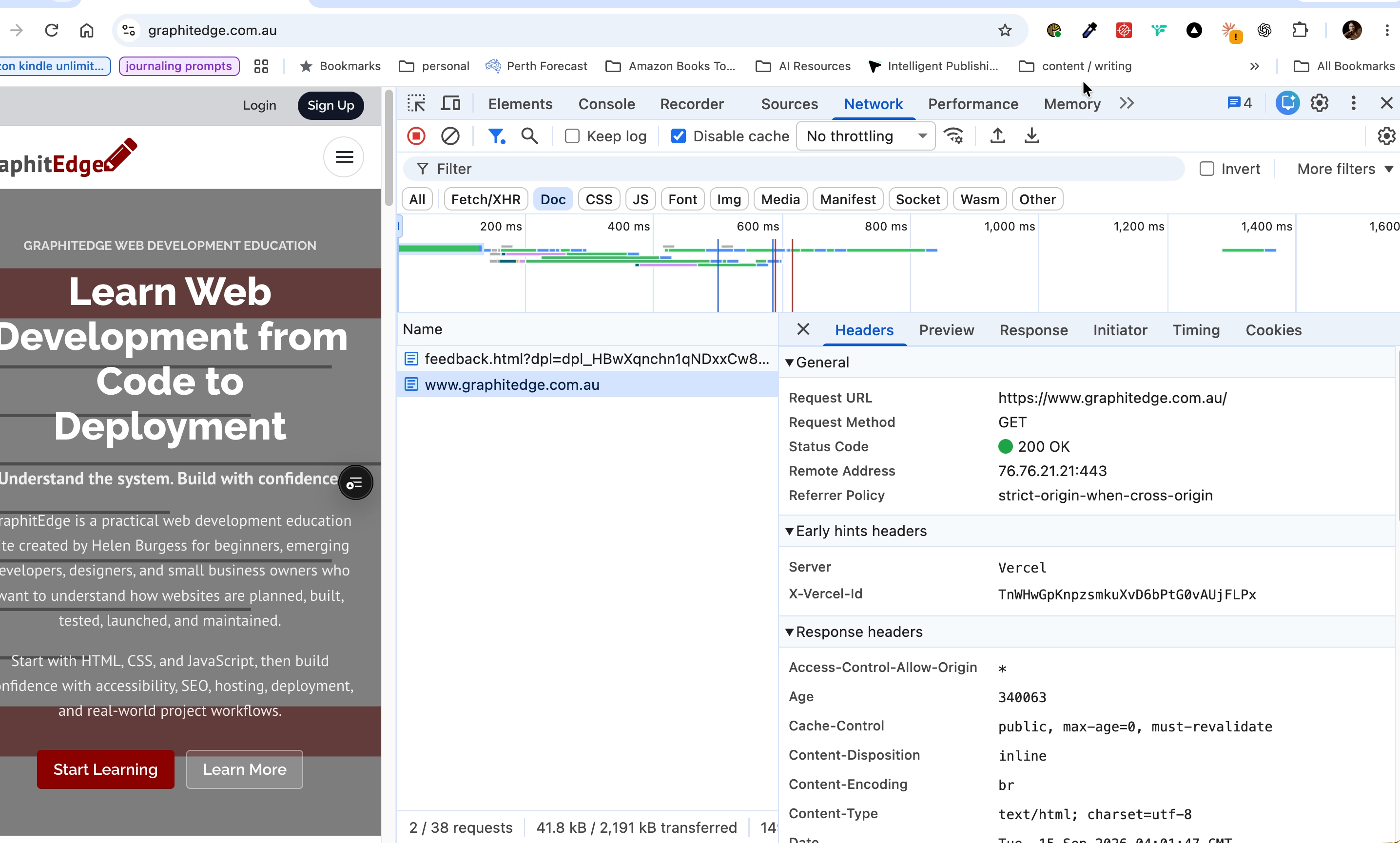
The document request shows the requested URL, HTTP status and response headers. A successful response alone does not prove indexing.
Check Your Understanding
Before moving forward, can you answer these?
- 1. A URL appears in a sitemap but not in the index. Which stage is proven?
- 2. A browser displays a styled 404 page but the response is `200 OK`. Which layers disagree?
- 3. Why should ranking advice wait until crawl and index evidence is checked?
Check Your Answers
- Discovery signal only. A sitemap can tell a search system about a URL, but it does not prove crawling or indexing.
- The visible content says "not found" while the HTTP response says "success". That is a soft-404 risk.
- A page cannot be served from an index it never entered. First find whether discovery, crawling, rendering, indexing, or serving is the likely stage.
How confident are you with this concept?
Still confused | Getting there | Got it | Could explain it to a friend
Guided Practice
For one public page, collect a small evidence map.
Step 1 - Open the page normally
Record the URL you used, the date, and whether the page appears to work for a visitor.
Step 2 - Inspect the document request
In DevTools Network, reload the page and select the document request. Record status, final URL, and content type.
Step 3 - Compare source and rendered DOM
Use View Source for the initial HTML, then Elements for the rendered DOM. Note whether the main content exists before JavaScript runs.
Step 4 - Check discovery evidence
Find at least one internal <a href> link pointing to the page. If none exists, record it as a discovery risk.
Step 5 - Classify the evidence
Write one observation for discovery, response, rendering, and indexability. Mark your confidence as high, medium, or low.
Step 6 - Name the next test
For each weak or unknown stage, write the next most useful test before proposing a fix. This keeps the diagnosis disciplined.
Independent Practice
Create a one-page search pipeline evidence map for a learner-owned page.
Your Task:
Create a one-page search pipeline evidence map for a learner-owned page.
Requirements:
- include discovery, crawling, rendering, indexing, and serving
- name the tool used for each observation
- separate observed facts from inferences
- include one confidence statement for each stage
- identify the highest-risk stage and the next test you would run
Success Criteria:
| Criteria | You've succeeded if... |
|---|---|
| each claim is tied to evidence | Completed clearly and correctly in your solution. |
| you avoid assuming indexing from discovery alone | Completed clearly and correctly in your solution. |
| you identify the next test before suggesting a fix | Completed clearly and correctly in your solution. |
| your recommendation is proportionate to the stage where evidence is weakest | Completed clearly and correctly in your solution. |
Before you continue
- I can explain the search pipeline in plain English.
- I know why a working browser page does not prove indexability.
- I can choose a first tool based on the stage I need to test.
- I can state what a piece of evidence does not prove.
Closure
Key Takeaways:
- distinguish discovery, crawling, rendering, indexing, and serving
- identify the browser, server, and search-system responsibility at each stage
- explain why "Google found it" does not necessarily mean "Google indexed it"
- classify a symptom by pipeline stage before choosing a tool
Learning Objectives Review:
Look back at what you set out to learn. Can you now:
- distinguish discovery, crawling, rendering, indexing, and serving Check!
- identify the browser, server, and search-system responsibility at each stage Got it!
- explain why "Google found it" does not necessarily mean "Google indexed it" Can explain it!
- classify a symptom by pipeline stage before choosing a tool Could teach this!
If you can confidently answer "yes" to most of these, you're ready to move on!
Think & Reflect:
Pause and reflect
- Which idea from this lesson now feels practical rather than abstract?
- What would you build or test next to make this stick?
Looking Ahead:
Start by identifying which stage failed. Until you can do that, any proposed fix is a guess.
Recommended Next Steps
Continue Learning
Ready to move forward? Continue with the next tutorial in this series:
Crawlable Architecture, Links, and URLsRelated Topics
Explore these related tutorials to expand your knowledge:
Additional Resources
Deepen your understanding with these helpful resources:
- Google: Crawling and indexing overview - Authoritative overview of discovery, crawling, rendering, indexing, and related controls.
- Google: How Search works - Broader explanation of how Google discovers, indexes, and serves pages.
- RFC 9110: HTTP Semantics - The web standard behind HTTP responses used throughout this pathway.