XML Sitemaps and Discovery Signals
Learn how to create a canonical-only XML sitemap, validate it, and keep it aligned with status, canonical, and index signals.
Start Here
The generated sitemap proudly lists the old menu URL, the redirected booking URL, a noindex thank-you page, and the new canonical pages. The file is syntactically valid but tells four different stories.
A sitemap helps only when its entries are current and accurate.
- Where have you already seen xml sitemaps and discovery signals in a real interface?
- Which part of this topic currently feels most important to test in a real page?
Learn how to create a canonical-only XML sitemap, validate it, and keep it aligned with status, canonical, and index signals.
Learning Objectives
By the end of this lesson, you'll be able to:
- explain a sitemap as a discovery and canonical hint
- build a valid minimal XML sitemap
- include only indexable, canonical, successful URLs
- use accurate `lastmod` values and understand protocol limits
- submit and inspect sitemap results without expecting instant indexing
Why This Matters:
Learn how to create a canonical-only XML sitemap, validate it, and keep it aligned with status, canonical, and index signals.
Sitemaps Are Discovery Hints
A sitemap inventories preferred URLs. It does not replace internal links, guarantee crawling, or guarantee indexing. It helps search systems find URLs, especially on new or recently changed sites.
Include absolute, canonical URLs that the site genuinely wants indexed. Exclude redirects, errors, blocked or noindex URLs, duplicate variants, and internal search results. lastmod should describe a meaningful page change, not the build time stamped onto every URL.
changefreq and priority are optional protocol hints. They are not ranking controls.
Decide Which URLs Belong in the Sitemap
A reliable sitemap is the result of earlier decisions:
- Which URLs are canonical?
- Which canonical URLs return successful responses?
- Which pages are intended to be indexed?
- Which pages are meaningful enough to discover through search?
- Which pages changed in a way that justifies updating
lastmod?
If those decisions are unclear, the sitemap becomes a wish list. A redirected URL in the sitemap tells crawlers to request an address the site no longer prefers. A noindex URL in the sitemap asks for discovery while also saying not to index the page. Those conflicts may not break a site, but they reduce trust in the site's signals.
Small sites can often maintain a sitemap through the route or content registry. Larger sites need generation rules that exclude drafts, private pages, internal search results, parameter variants, and error routes by default.
Minimal Valid Sitemap
<?xml version="1.0" encoding="UTF-8"?>
<urlset xmlns="http://www.sitemaps.org/schemas/sitemap/0.9">
  <url>
    <loc>https://example.com/</loc>
    <lastmod>2026-08-20</lastmod>
  </url>
  <url>
    <loc>https://example.com/menu</loc>
    <lastmod>2026-08-18</lastmod>
  </url>
</urlset>
A single sitemap is limited to 50,000 URLs or 50 MB uncompressed by the protocol. Small learner projects usually do not need sitemap indexes.
Inclusion Decision Table
| URL evidence | Include in sitemap? | Reason |
|---|---|---|
200 OK, self-canonical, indexable | Yes | preferred URL |
| redirects to another URL | No | list the destination instead |
returns 404 or 410 | No | removed or unavailable |
has noindex | No | not intended for indexing |
| duplicate tracking URL | No | consolidate to the canonical |
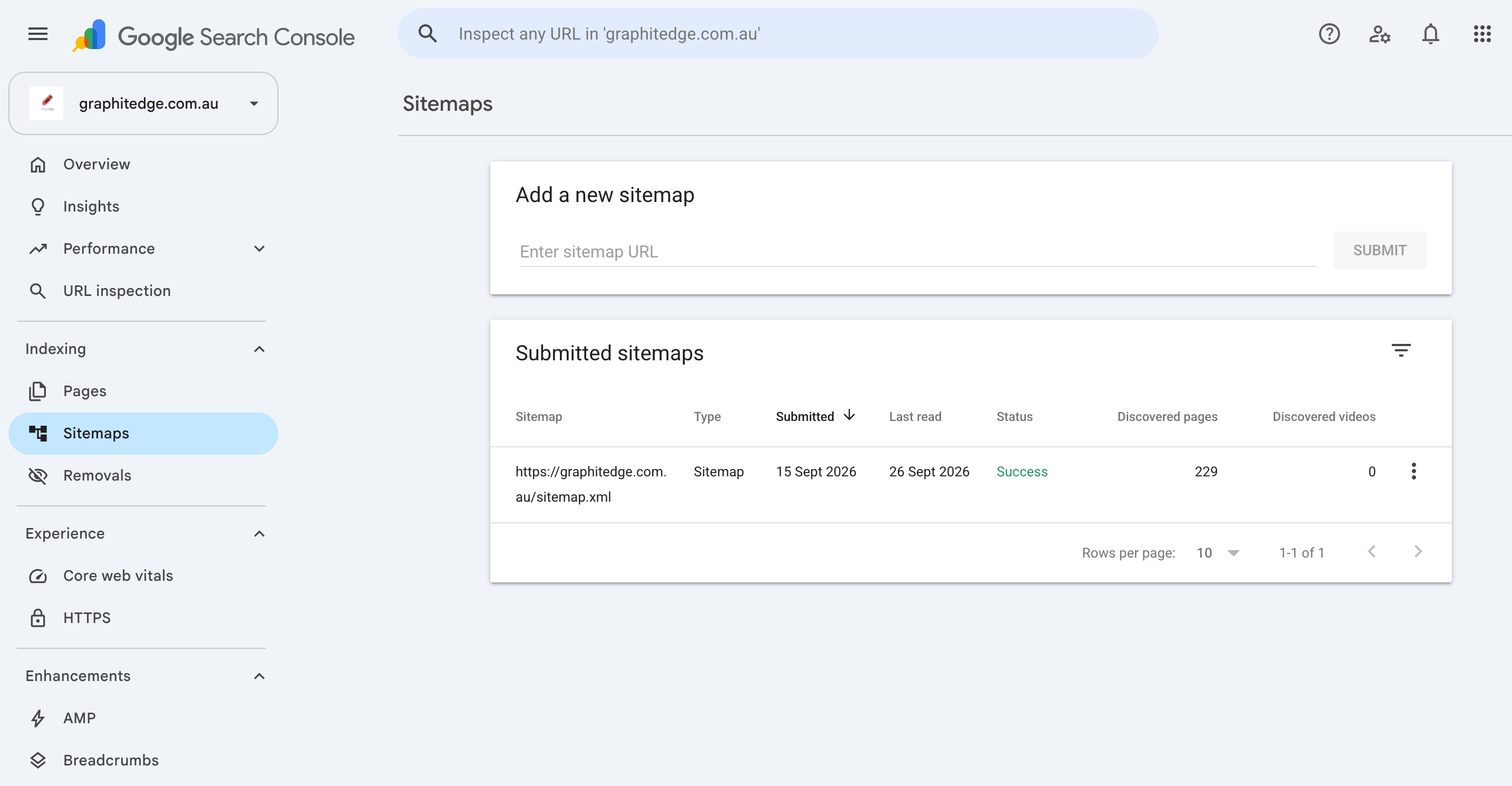
Search Console successfully read this sitemap and discovered 229 pages. This confirms sitemap processing, not that every listed URL was indexed.
Testing a Sitemap Like a Developer
Do not stop at "the XML opens in a browser." Test the file in layers:
- Syntax: the XML is well-formed and uses the correct namespace.
- URL format: every
<loc>is absolute and uses the preferred protocol and host. - Response: every listed URL returns a successful final response.
- Canonical: every listed URL is the preferred canonical version.
- Index directive: every listed URL is allowed to be indexed.
- Freshness:
lastmodchanges only when the page meaningfully changes.
When a generated sitemap fails, fix the source rule rather than hand-editing the output. Otherwise the next build will recreate the mistake.
Submit and Verify the Sitemap
Publishing the file and submitting it are separate steps. Submit only after the sitemap and its listed URLs pass the checks above.
Google Search Console
- Open the correct verified property and confirm you have permission to submit a sitemap.
- Request the public sitemap URL in a browser or command-line client. It must be accessible to Google without signing in.
- Open Sitemaps, enter the sitemap path for that property, and submit it.
- Record the submitted URL, submission date, status, last read date, and discovered-page count when they are available.
- If Google reports a fetch or parsing problem, reproduce it against the public file before changing the site.
- Use the Page indexing report's sitemap filter to investigate the index state of that submitted set.
Search Console records a sitemap address; it does not upload the XML file. A successful result means Google fetched and processed the file. It does not mean every URL was crawled or indexed.
Bing Webmaster Tools
- Open the correct verified Bing property.
- Open Sitemaps, choose Submit sitemap, and provide the public sitemap URL.
- Record whether the sitemap was submitted directly, discovered, or imported, together with its processing state and discovered-URL count.
- Use Bing URL Inspection or Site Explorer for important URLs that need individual diagnosis.
Importing a property from Search Console can make verification easier, but do not assume that a Google submission proves Bing processed the sitemap. Check Bing's own result.
Screenshot pending - Bing Sitemaps: Add a real, redacted Bing Webmaster Tools Sitemaps capture when authorised access is available. Do not invent a success state, discovered-URL count, warning, or error.
Read Each State Precisely
| State | What it proves | What it does not prove |
|---|---|---|
| sitemap published | the file exists at its public address | a search engine has fetched it |
| sitemap submitted | the address was sent through the tool | the file was processed successfully |
| success or processed | the service could read the sitemap | every listed URL was crawled or indexed |
| URL discovered | the service knows the URL | the page was selected for indexing |
| indexing pending | the final decision is not yet visible | the implementation failed |
Processing and indexing can take time. If the file is fetchable, valid, and submitted, record the pending state and review date. Investigate a reported fetch, syntax, response, directive, or canonical conflict; do not manufacture a technical fault simply because indexing is not immediate.
Check Your Understanding
Before moving forward, can you answer these?
- 1. Does a sitemap prove a URL is indexed?
- 2. Should a sitemap list redirected URLs?
- 3. What does an honest `lastmod` describe?
- 4. What does a successful sitemap status prove?
Check Your Answers
- No. It is a discovery hint and canonical signal, not an indexing guarantee.
- No. It should list the preferred final canonical URL instead.
- A meaningful modification to the page content or representation, not merely a site rebuild.
- It proves the search service could fetch and process the sitemap. It does not prove that every listed URL is indexed.
How confident are you with this concept?
Still confused | Getting there | Got it | Could explain it to a friend
Guided Practice
Create and test a sitemap for a five-page project.
Step 1 - Generate or hand-write the file
Include absolute URLs only. Keep the first version small enough to inspect by eye.
Step 2 - Validate XML structure
Use an XML parser or validator. Fix unescaped ampersands, missing closing tags, and incorrect namespaces.
Step 3 - Request every listed URL
Record status, final URL, canonical, and index directive for each entry.
Step 4 - Add discovery wiring
Add the full sitemap address to robots.txt, then follow the Google and Bing submission workflows when you have property access. If access or processing is pending, record that limitation instead of inventing a result.
Step 5 - State what each result proves
Submission proves submission. Discovery proves the system knows the URL. Indexing requires separate evidence.
Step 6 - Fix the generation rule
If a bad URL appears, identify the data source or route rule that included it. Record the rule change that would prevent the same class of mistake.
Independent Practice
Deliver a validated sitemap plus an evidence table.
Your Task:
Deliver a validated sitemap plus an evidence table.
Requirements:
- listed URL
- status and final URL
- canonical URL
- index directive
- inclusion decision
- last meaningful modification
- source of the sitemap entry
Success Criteria:
| Criteria | You've succeeded if... |
|---|---|
| every listed URL is absolute and canonical | Completed clearly and correctly in your solution. |
| no `noindex`, blocked, redirected, or error URL is listed | Completed clearly and correctly in your solution. |
| you can explain what the sitemap does and does not prove | Completed clearly and correctly in your solution. |
| sitemap output is generated from maintainable rules where possible | Completed clearly and correctly in your solution. |
| Google and Bing submission evidence is included or clearly labelled pending | Completed clearly and correctly in your solution. |
Before you continue
- I can build a minimal valid XML sitemap.
- I can test sitemap entries against status, canonical, and index signals.
- I understand that sitemap submission does not force indexing.
- I can keep
lastmodhonest.
Closure
Key Takeaways:
- explain a sitemap as a discovery and canonical hint
- build a valid minimal XML sitemap
- include only indexable, canonical, successful URLs
- use accurate `lastmod` values and understand protocol limits
- submit and inspect sitemap results without expecting instant indexing
Learning Objectives Review:
Look back at what you set out to learn. Can you now:
- explain a sitemap as a discovery and canonical hint Check!
- build a valid minimal XML sitemap Got it!
- include only indexable, canonical, successful URLs Can explain it!
- use accurate `lastmod` values and understand protocol limits Could teach this!
- submit and inspect sitemap results without expecting instant indexing Check!
If you can confidently answer "yes" to most of these, you're ready to move on!
Think & Reflect:
Pause and reflect
- Which idea from this lesson now feels practical rather than abstract?
- What would you build or test next to make this stick?
Looking Ahead:
Keep the sitemap current and accurate. It should list the canonical URLs you want search systems to discover.
Recommended Next Steps
Continue Learning
Ready to move forward? Continue with the next tutorial in this series:
Canonical URLs and Duplicate-Content SystemsRelated Topics
Explore these related tutorials to expand your knowledge:
Additional Resources
Deepen your understanding with these helpful resources:
- Google: Build and submit a sitemap - Current Google guidance for sitemap construction and submission.
- Sitemaps XML protocol - The shared XML protocol, including size and URL limits.
- Google: Sitemaps report - How to submit a sitemap and interpret fetch, processing, and discovered-URL results.
- Bing: Sitemaps - Bing guidance for submitting and monitoring sitemap files.