Status Codes and Redirects
Learn how HTTP responses, redirects, 404s, 410s, and soft 404s affect technical SEO diagnosis and site maintenance.
Start Here
Every missing page on a single-page app returns the homepage shell with 200 OK. The visitor sees "not found" after JavaScript runs, but the server has announced success.
Search systems read the response before they read the apology.
- Where have you already seen status codes and redirects in a real interface?
- Which part of this topic currently feels most important to test in a real page?
Learn how HTTP responses, redirects, 404s, 410s, and soft 404s affect technical SEO diagnosis and site maintenance.
Learning Objectives
By the end of this lesson, you'll be able to:
- interpret common `2xx`, `3xx`, `4xx`, and `5xx` responses
- choose permanent versus temporary redirects
- detect redirect chains, loops, irrelevant destinations, and soft 404s
- handle deleted or moved content honestly
Why This Matters:
Learn how HTTP responses, redirects, 404s, 410s, and soft 404s affect technical SEO diagnosis and site maintenance.
Before You Start:
You should be familiar with:
- Canonical URLs and Duplicate-Content Systems Review here
Status Codes Are Web Semantics
Status codes are not SEO decorations. They are the server's answer to the request. 200 means the request succeeded and the response contains a real representation. 301 and 308 communicate a permanent move. 302 and 307 communicate a temporary destination.
A permanent redirect should lead to the closest real replacement, preferably in one hop. If content is gone without a replacement, 404 or 410 is honest. If the server returns 200 OK for error-like content, search systems may treat it as a soft 404.
Persistent 5xx failures can reduce crawling and availability. A custom error page does not change the underlying status.
Choose the Response From Intent
Start with what actually happened to the resource. Then choose the response.
| Intent | Better response | Reasoning |
|---|---|---|
| The content moved and has a close replacement | 301 or 308 | users and signals should transfer to the new URL |
| The content is temporarily elsewhere | 302 or 307 | the original URL may be useful again |
| The content is gone with no replacement | 404 or 410 | the address should not pretend to succeed |
| The site is temporarily unavailable | 503 | communicates temporary server-side failure |
| The user is not authorised | 401 or 403 | access is denied, not missing |
Do not redirect every missing page to the homepage. That may feel tidy, but it gives users an irrelevant destination and search systems a weak signal. A helpful 404 page with search, navigation, and contact options is often better than a misleading redirect.
Redirect Quality
A redirect is a promise that the destination is the best available replacement. Check:
- relevance: the new page satisfies the same or very similar intent
- permanence: the status code matches whether the move is lasting
- chain length: the path resolves in one hop where practical
- consistency: internal links and sitemaps use the final URL
- loops: no URL redirects back into itself or a repeating chain
- method preservation: use
307or308when preserving the request method matters
For most learner sites, the highest-value redirect work is simple: map old public URLs to close new URLs, remove redirected URLs from the sitemap, and update internal links so visitors do not rely on redirects during normal navigation.
Response Decision Table
| Situation | Response | User-facing content | Follow-up |
|---|---|---|---|
| Menu moved permanently | 301/308 | destination page | update internal links and sitemap |
| Booking paused for a day | usually 200 | clear availability message | restore normal content |
| Old event with useful archive | 200 | archived event page | self-canonical and label date |
| Deleted page with replacement | 301/308 | replacement page | remove old URL from sitemap |
| Deleted page without replacement | 404/410 | helpful not-found page | remove internal links |
| Server overload | 503 | temporary error | fix capacity; do not serve fake 200 |
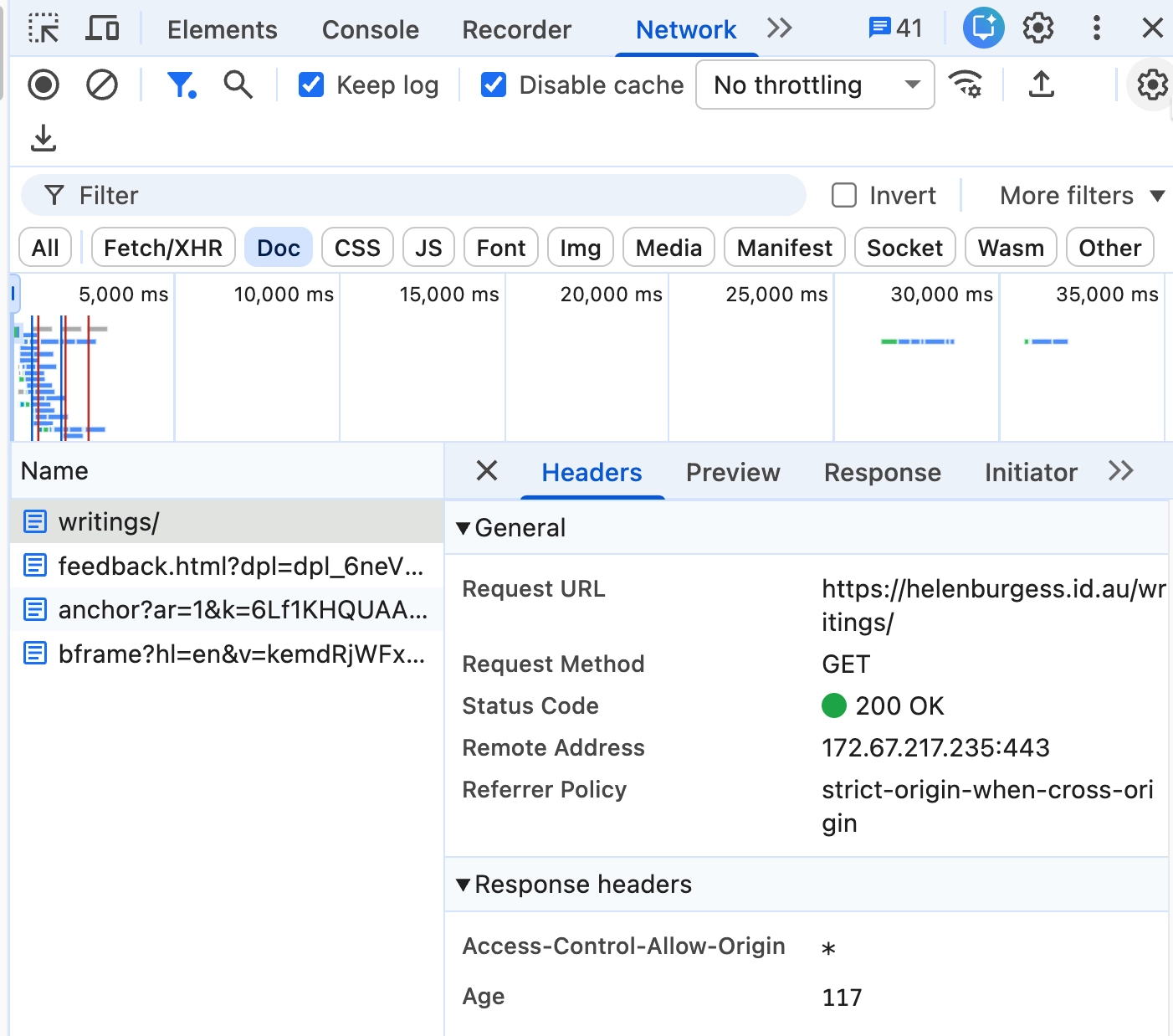
This capture proves that the selected final URL returned 200 OK. It does not show the earlier redirect hops, so it cannot establish the full chain by itself.
Remaining evidence: Add a Network or command-line capture that visibly lists each redirect response and the final destination.
Check Your Understanding
Before moving forward, can you answer these?
- 1. What does a `200 OK` response claim?
- 2. When is a `404` acceptable?
- 3. What is a soft 404?
Check Your Answers
- The request succeeded and the response represents the requested resource.
- When a URL is genuinely not found and there is no close replacement. A helpful 404 page is still a valid outcome.
- Error-like content returned with a success status, such as a missing page that returns `200 OK`.
How confident are you with this concept?
Still confused | Getting there | Got it | Could explain it to a friend
Guided Practice
Inspect ten URLs: successful, redirected, missing, and deliberately broken.
Step 1 - Record the initial request
Use DevTools or a command-line HTTP client. Capture status, location header if present, and content type.
Step 2 - Follow redirects
Record each hop. Note whether the destination is relevant and whether the chain is longer than needed.
Step 3 - Compare visible content
Open the final page and check whether content matches the status semantics.
Step 4 - Decide the repair
Update internal links, redirect rules, sitemap entries, or deletion handling as needed.
Step 5 - Retest the exact URL
Repeat the original request after the repair. Record the new status, final URL, number of hops, and whether the visible content matches the response.
Independent Practice
Create a redirect/removal plan for a hypothetical five-page migration.
Your Task:
Create a redirect/removal plan for a hypothetical five-page migration.
Requirements:
- old URL
- intended outcome
- status code
- destination if any
- internal-link update
- sitemap update
- verification method
- whether the visible page content matches the HTTP response
Success Criteria:
| Criteria | You've succeeded if... |
|---|---|
| moved pages redirect to close replacements | Completed clearly and correctly in your solution. |
| gone pages return honest 404/410 responses | Completed clearly and correctly in your solution. |
| no redirect chain is longer than necessary | Completed clearly and correctly in your solution. |
| internal links point to final URLs rather than relying on redirects | Completed clearly and correctly in your solution. |
Before you continue
- I can read status and redirect evidence.
- I can choose permanent or temporary redirects based on intent.
- I understand why a fake
200error page is risky. - I can update links and sitemaps after response changes.
Closure
Key Takeaways:
- interpret common `2xx`, `3xx`, `4xx`, and `5xx` responses
- choose permanent versus temporary redirects
- detect redirect chains, loops, irrelevant destinations, and soft 404s
- handle deleted or moved content honestly
Learning Objectives Review:
Look back at what you set out to learn. Can you now:
- interpret common `2xx`, `3xx`, `4xx`, and `5xx` responses Check!
- choose permanent versus temporary redirects Got it!
- detect redirect chains, loops, irrelevant destinations, and soft 404s Can explain it!
- handle deleted or moved content honestly Could teach this!
If you can confidently answer "yes" to most of these, you're ready to move on!
Think & Reflect:
Pause and reflect
- Which idea from this lesson now feels practical rather than abstract?
- What would you build or test next to make this stick?
Looking Ahead:
Choose the response that matches what happened. Redirect a moved page, and return a genuine error status when no replacement exists.
Recommended Next Steps
Continue Learning
Ready to move forward? Continue with the next tutorial in this series:
JavaScript SEO for Vite and Vue SitesRelated Topics
Explore these related tutorials to expand your knowledge:
Additional Resources
Deepen your understanding with these helpful resources:
- RFC 9110: HTTP Semantics - The standard reference for HTTP status semantics.
- Google redirects and Search - Search-specific guidance for redirects and site moves.
- Google crawling-error and soft-404 guidance - How Google describes crawl errors, soft 404s, and server issues.