Search Tools and Diagnosis
Learn how to use search-engine reports calmly, separating evidence, inference, action, and retest.
Start Here
Search Console reports 40 "not indexed" URLs. The site owner assumes 40 emergencies. Some are redirects, some are intentionally noindex, some are duplicates, and one is the important new menu page.
Counts need context.
- Where have you already seen search tools and diagnosis in a real interface?
- Which part of this topic currently feels most important to test in a real page?
Learn how to use search-engine reports calmly, separating evidence, inference, action, and retest.
Learning Objectives
By the end of this lesson, you'll be able to:
- choose the correct report for a discovery, indexing, enhancement, security, or performance question
- use URL Inspection to compare indexed and live information
- interpret common exclusions without assuming every exclusion is an error
- submit and monitor sitemaps
- use Bing Webmaster Tools and optionally IndexNow for freshness workflows
- write a diagnosis that separates evidence, inference, action, and retest
Why This Matters:
Learn how to use search-engine reports calmly, separating evidence, inference, action, and retest.
Reports Answer Different Questions
Search Console and Bing Webmaster Tools are diagnostic systems, not daily scoreboards. A report line is an observation with scope, delay, and context.
Verify ownership safely. Page Indexing answers site-wide pattern questions. URL Inspection answers page-level indexed and live questions. Sitemaps reports processing and discovered-URL information, not guaranteed inclusion. Rich-result reports show detected enhancement issues. Core Web Vitals complements the performance pathway. Security Issues and Manual Actions require separate attention.
Bing has its own crawl and index evidence. IndexNow can notify participating search engines about added, updated, or deleted URLs, but it is optional and not an indexing guarantee.
Use Page Indexing for Patterns
The Page indexing report answers a site-level question: which known URLs are indexed, and which broad reasons explain the others? Use it to find patterns across a template, directory, or sitemap rather than to prove the status of one URL.
- Select the correct verified property and note the reporting date.
- Review indexed and not-indexed groups without assuming that "not indexed" means broken.
- Open a reason and inspect representative example URLs.
- Filter by submitted sitemap when you need to assess a defined set of preferred URLs.
- Compare the result with the site's intent: redirect,
noindex, duplicate, canonical, removed page, or indexable page. - Use URL Inspection for an important individual URL before recommending a change.
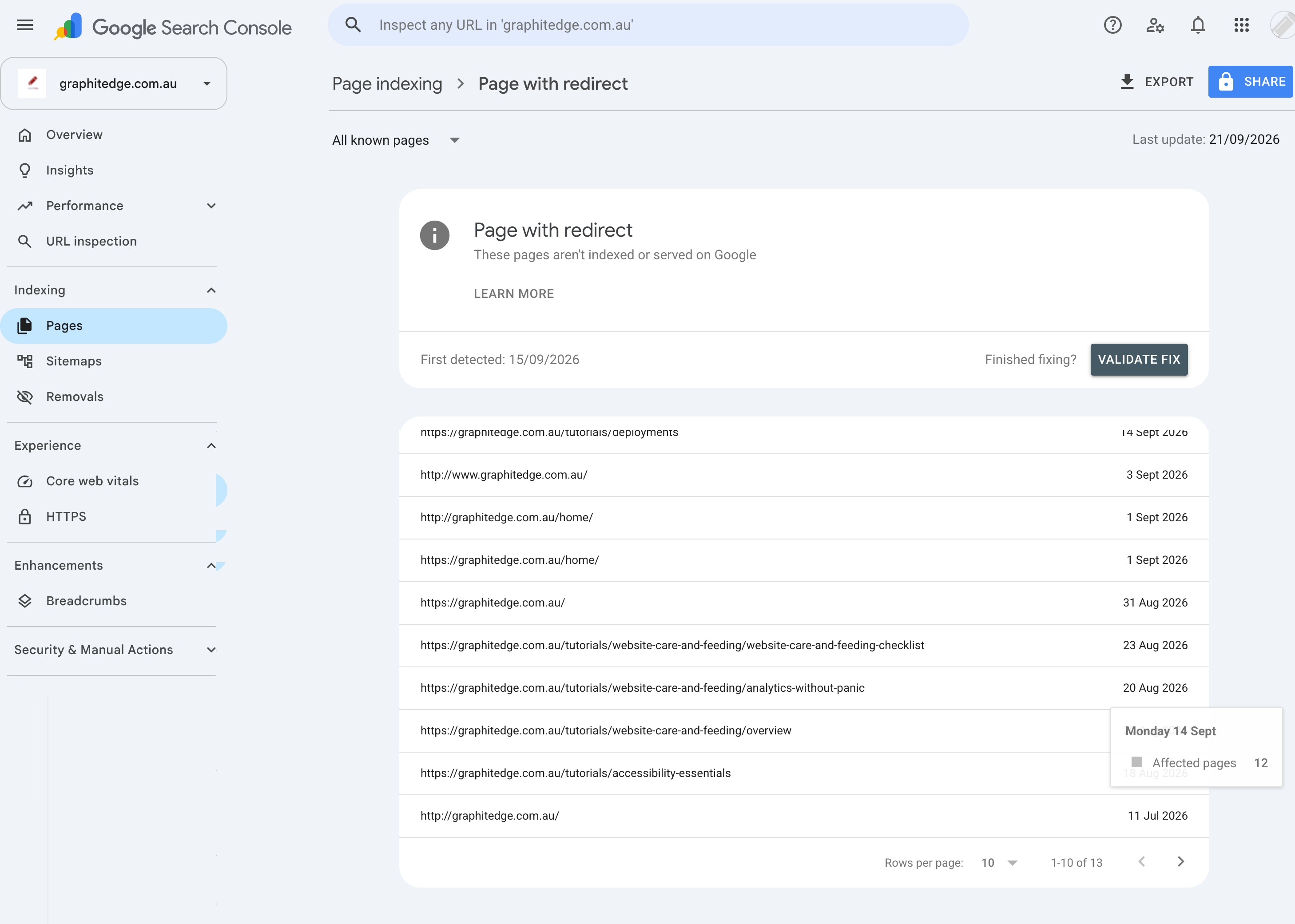
"Page with redirect" is often an expected exclusion. Check that each source URL redirects to the intended destination and that internal links and the sitemap use the final URL.
Validation in Search Console asks Google to recheck a group after a fix. It does not make an intentionally excluded URL indexable and it does not guarantee that a suitable page will be indexed.
Inspect One URL Carefully
URL Inspection separates two useful views:
- Indexed information describes the version and signals Google currently has for the URL. It can include the last crawl, fetch result, crawl permission, index permission, referring discovery sources, and Google's selected canonical.
- Test live URL checks whether the current page can be fetched and appears indexable now. It does not prove that the page will be indexed or that every indexing system will make the same decision.
For a canonical diagnosis, record both the canonical declared in the page and the canonical selected by Google. Then compare redirects, internal links, sitemap membership, protocol, hostname, and visible content. A different selected canonical is evidence to investigate signal consistency, not permission to add canonicals blindly.
Request indexing only after the important URL is published, returns the intended response, is crawlable and indexable, and has the correct canonical content. Use a sitemap for a set of URLs. Repeated requests do not guarantee faster inclusion.
Screenshot pending - Search Console URL Inspection: Add a real, redacted capture showing the indexed result and relevant canonical evidence. Add a separate live-test capture only when it supports the lesson. Do not expose private URLs, query data, or account details.
An inspection can be successful while indexing remains pending. Search systems still decide whether and when to crawl and index a page. Record the request date and a sensible review window; do not report a recently submitted URL as a failed implementation solely because it is not indexed yet.
Connect the Sitemap Evidence
The Sitemaps report shows whether Google could fetch and process a submitted sitemap and how many URLs it discovered from that file. It does not prove that every URL was crawled or indexed.
Before diagnosing an indexing gap, confirm that the sitemap is public, the submitted address is correct, the relevant URL is the preferred canonical version, and the Page indexing report is filtered to that sitemap where useful. Complete the construction and submission workflow in XML Sitemaps and Discovery Signals.
Use Bing's Equivalent Tools
Do not repeat the whole Google investigation in different words. Keep the same diagnostic question and use Bing's evidence:
| Question | Bing tool | Useful evidence |
|---|---|---|
| What does Bing know about one URL? | URL Inspection | index status, crawl details, SEO or markup issues, and live URL result |
| Which site areas show crawl or index problems? | Site Explorer | indexed, error, redirect, robots, noindex, and canonical-filtered URL groups |
| Could Bing process the submitted file? | Sitemaps | submission source, processing status, last submission, and discovered URLs |
| What broad issues has Bing detected? | Site Scan and SEO reports | reproducible technical observations to verify on the live page |
Use Bing URL Inspection to compare the indexed evidence with the live URL. If a URL redirects, inspect the destination separately because the live test does not diagnose the destination on your behalf. Request indexing only after the page itself is ready.
Submit the same canonical-only sitemap in Bing Webmaster Tools, then record its processing status and discovered URL count. Importing a verified Search Console property can reduce setup work, but the Bing property and submitted sitemap still need to be checked.
IndexNow is an optional freshness notification for changed URLs. It complements, rather than replaces, crawlable links, a correct sitemap, and Bing's diagnostic tools. A successful notification is not an indexing or ranking promise.
Screenshot pending - Bing URL Inspection: Add a real, redacted capture of an indexed or live URL result when authorised access is available. Label processing or indexing as pending when that is the real state.
Screenshot pending - Bing diagnostic view: Add a real, redacted Site Explorer or Site Scan capture only when it demonstrates a diagnosis used in the lesson.
Interpret Reports With Intent
A report is useful only when compared with what the site intended. A noindex thank-you page appearing under excluded URLs may be healthy. A new service page missing from the index may deserve investigation. A redirect reported as not indexed may be expected if the destination is correct.
Use this triage pattern:
| Report observation | First interpretation | Next check |
|---|---|---|
| Submitted URL blocked by robots | sitemap and robots signals conflict | inspect sitemap inclusion and robots rule |
| Crawled - currently not indexed | search engine has seen the URL but not selected it | check content quality, duplication, canonical, and timing |
| Duplicate, chose different canonical | canonical signals may disagree | compare canonical tag, sitemap, redirects, and internal links |
| Page with redirect | often expected | confirm the destination is relevant and listed instead |
| Soft 404 | success status may not match content | inspect HTTP response and visible page |
| Structured-data warning | may be optional or feature-limiting | compare warning with target feature requirements |
Do not optimise by count alone. Sort by important page types, affected templates, recent changes, and whether the behaviour matches the site's decisions.
Diagnosis Template
| Field | What to record |
|---|---|
| Question | What are we trying to learn? |
| Evidence | Exact report, URL, date range, status, screenshot, or export |
| Interpretation | What the evidence supports |
| Unknowns | What it cannot prove |
| Action | Smallest relevant change |
| Retest | Tool, expected result, and sensible review time |
Monthly or change-triggered review is usually more useful than compulsive daily checking for a small site.
From Report to Action
A calm diagnosis separates four things:
- Evidence: the exact report, URL, date range, and status.
- Inference: what the evidence probably means.
- Action: the smallest change that addresses the cause.
- Retest: how and when to check whether the change worked.
Some technical retests are immediate, such as confirming the live redirect response. Search Console and Bing reports may take days or weeks to settle, and requesting indexing does not make that process immediate. That delay is not failure by itself. Record the request date and expected review window so the site owner does not rework the same issue every morning.
Check Your Understanding
Before moving forward, can you answer these?
- 1. Does a Search Console exclusion always require a fix?
- 2. Which tool is better for one specific URL: site search or URL Inspection?
- 3. Does IndexNow guarantee indexing?
- 4. What should you compare when diagnosing a canonical mismatch?
Check Your Answers
- No. Redirects, intentional `noindex` pages, and duplicates can be expected behaviour.
- URL Inspection is the better diagnostic source for a verified property. Search operators are limited and can be unreliable for debugging.
- No. It is a notification protocol for changed URLs, not a promise of indexing or ranking.
- Compare the page-declared canonical, search engine-selected canonical, redirects, internal links, sitemap URL, hostname, protocol, and page content.
How confident are you with this concept?
Still confused | Getting there | Got it | Could explain it to a friend
Guided Practice
Diagnose supplied anonymised examples or a verified property you are allowed to inspect.
Step 1 - Choose the question
Classify each case as discovery, indexing, enhancement, security, performance, or monitoring.
Step 2 - Read the evidence
Inspect examples such as a redirect URL excluded from indexing, a valid noindex page, "Duplicate, Google chose different canonical", a sitemap fetch error, a live URL blocked by robots, and a structured-data warning. Record whether the evidence came from Page indexing, URL Inspection, the live test, or a Bing equivalent.
Step 3 - Triage the result
Mark each as expected, needs investigation, or action required. Give one reason.
Step 4 - Write the diagnosis
Use the diagnosis template and include canonical evidence where relevant. Separate an immediate technical retest from the later report or indexing review.
Step 5 - Limit the action list
Choose the three most important actions only. Put expected exclusions and low-risk observations into a monitoring section instead of pretending everything is urgent.
Independent Practice
Write a five-item search-health brief for a real or supplied property.
Your Task:
Write a five-item search-health brief for a real or supplied property.
Requirements:
- include no more than three actions
- state which observations need no action
- separate evidence, inference, and recommendation
- include dates, tools, and affected URLs
- include an expected retest window for each action
Success Criteria:
| Criteria | You've succeeded if... |
|---|---|
| report choice matches the question | Completed clearly and correctly in your solution. |
| sensitive account data is not exposed | Completed clearly and correctly in your solution. |
| the brief is calm, bounded, and actionable | Completed clearly and correctly in your solution. |
| expected behaviour is not reported as a defect | Completed clearly and correctly in your solution. |
Before you continue
- I can choose the report that matches the question.
- I can use Page indexing for patterns and URL Inspection for one URL.
- I can recognise expected exclusions.
- I can map a Google diagnosis to the relevant Bing tool without assuming identical results.
- I can use evidence without chasing every count.
- I can write a retest plan.
Closure
Key Takeaways:
- choose the correct report for a discovery, indexing, enhancement, security, or performance question
- use URL Inspection to compare indexed and live information
- interpret common exclusions without assuming every exclusion is an error
- submit and monitor sitemaps
- use Bing Webmaster Tools and optionally IndexNow for freshness workflows
- write a diagnosis that separates evidence, inference, action, and retest
Learning Objectives Review:
Look back at what you set out to learn. Can you now:
- choose the correct report for a discovery, indexing, enhancement, security, or performance question Check!
- use URL Inspection to compare indexed and live information Got it!
- interpret common exclusions without assuming every exclusion is an error Can explain it!
- submit and monitor sitemaps Could teach this!
- use Bing Webmaster Tools and optionally IndexNow for freshness workflows Check!
- write a diagnosis that separates evidence, inference, action, and retest Got it!
If you can confidently answer "yes" to most of these, you're ready to move on!
Think & Reflect:
Pause and reflect
- Which idea from this lesson now feels practical rather than abstract?
- What would you build or test next to make this stick?
Looking Ahead:
Use the reports to check whether important pages are discoverable, technically sound, and behaving as intended. Expected exclusions can remain excluded.
Recommended Next Steps
Continue Learning
Ready to move forward? Continue with the next tutorial in this series:
Final Project: Technical SEO Audit and Repair PlanRelated Topics
Explore these related tutorials to expand your knowledge:
Additional Resources
Deepen your understanding with these helpful resources:
- Google: Get started with Search Console - Current Search Console guidance for monitoring and debugging search presence.
- Google: Page indexing report - How to investigate site-wide indexing patterns and expected exclusions.
- Google: URL Inspection tool - Indexed and live URL evidence, canonical information, and request-indexing limits.
- Bing: URL Inspection - Bing index, live URL, SEO, and markup diagnostics for one URL.
- Bing: Site Explorer - Site-wide URL groups and filters for crawl, index, redirect, robots, and canonical diagnosis.
- IndexNow protocol - Protocol documentation for optional changed-URL notifications.