Crawlable Architecture, Links, and URLs
Learn how crawlable links, stable URL design, and connected site architecture help people and search systems reach important pages.
Start Here
The restaurant menu exists, but the only way to open it is a JavaScript click handler on a styled <div>. Visitors can click it; a crawler may not discover a usable URL.
A sitemap can help with discovery, but the site's everyday links form its crawlable architecture.
- Where have you already seen crawlable architecture, links, and urls in a real interface?
- Which part of this topic currently feels most important to test in a real page?
Learn how crawlable links, stable URL design, and connected site architecture help people and search systems reach important pages.
Learning Objectives
By the end of this lesson, you'll be able to:
- recognise crawlable and non-crawlable link patterns
- draw a small site as a link graph and find orphan or over-deep pages
- design stable, human-readable, crawlable URLs
- distinguish navigation, contextual links, breadcrumbs, and sitemap discovery
Why This Matters:
Learn how crawlable links, stable URL design, and connected site architecture help people and search systems reach important pages.
Architecture Is a Link System
Search discovery follows addresses exposed through standard web mechanisms. A standard link such as <a href="/menu">View the seasonal menu</a> is understandable to browsers, assistive technology, and crawlers.
Buttons perform actions. Links navigate. A JavaScript click handler can still be part of an interface, but it should not replace a real link when the goal is navigation to a page.
<!-- Fragile navigation -->
<div class="menu-link" onclick="goToMenu()">View menu</div>

<!-- Crawlable navigation -->
<a href="/menu">View the seasonal menu</a>
Every important page should have at least one meaningful internal link. A shallow, logical hierarchy helps people and crawlers understand relationships, but there is no magic click-depth number. The question is whether the pathway makes sense.
Crawlable Does Not Mean Overloaded
A page can be technically reachable and still poorly connected. Good architecture gives important pages clear pathways, sensible context, and enough internal signals to explain why they matter.
Think about four qualities:
| Quality | What to check | Why it matters |
|---|---|---|
| Reachability | Can a user or crawler arrive through normal links? | orphan pages are easy to miss |
| Meaning | Does the link text describe the destination? | vague links weaken understanding |
| Hierarchy | Does the path match the site's mental model? | users and crawlers infer relationships |
| Stability | Will the URL still make sense after the next redesign? | durable URLs reduce migration work |
For Black Swan Bistro, /menu is stronger than /page?id=47 because it is memorable, readable, and likely to survive design changes. A contextual link from a dish page to dietary information is stronger than relying only on a footer sitemap because it appears at the moment the visitor needs it.
URL Design
URL paths should be stable, descriptive, consistently encoded, and free of avoidable duplicate parameters. A useful URL does not need to contain every keyword. It should make the address understandable and durable.
Avoid treating fragments as separate indexable pages. A fragment such as #dietary-options identifies a location or state inside a document. If dietary information is important enough to search for as its own page, give it a real URL and link to it.
Before changing URLs, ask whether the benefit outweighs the migration cost. Renaming an already indexed page creates redirect, sitemap, canonical, analytics, and internal-link work. New projects can choose cleaner URL patterns early. Existing projects should change URLs only when there is a clear user or maintenance benefit.
Link Roles
| Link type | What it helps | Example |
|---|---|---|
| Primary navigation | broad section discovery | Menu, Bookings, Contact |
| Contextual link | next useful step in content | "See dietary information before booking" |
| Breadcrumb | hierarchy and orientation | Home > Menu > Dietary information |
| Footer link | stable utility discovery | Privacy, Contact, Sitemap |
| XML sitemap | discovery hint | canonical URL inventory |
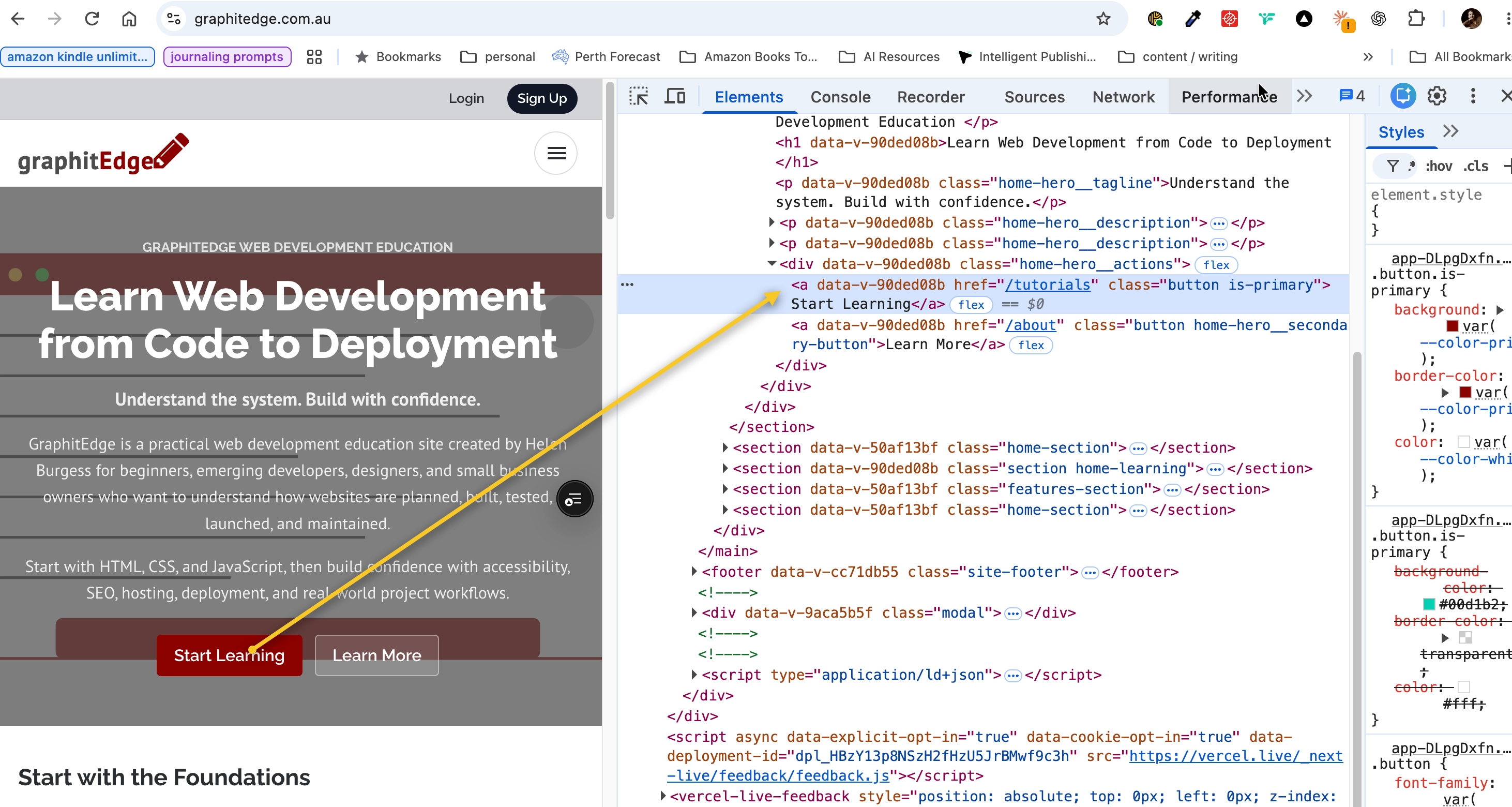
The Start Learning control is an anchor with a real destination, making the link available for discovery.
Common Architecture Problems
Watch for these patterns during an audit:
- important pages reachable only through search, filters, tabs, or JavaScript-only controls
- "click here" links that do not explain the destination
- duplicate paths for the same content, such as
/menuand/menus/current - navigation that disappears on mobile and removes important links from the DOM
- deep pages with no contextual links back to related pages
- autogenerated tag, search, or filter pages that create many thin URL combinations
Not every page needs to be in the main navigation. The goal is intentional connectedness: key pages are easy to find, supporting pages are linked from relevant context, and utility pages remain available without pretending to be primary content.
Check Your Understanding
Before moving forward, can you answer these?
- 1. Can the destination be discovered without executing a custom click handler?
- 2. Does link text need to make sense outside its sentence?
- 3. Can two different URLs accidentally represent the same content?
Check Your Answers
- If navigation depends only on a script attached to a non-link element, discovery is weaker than a real anchor or router link that renders as an anchor.
- Yes. Clear link text helps users, screen-reader users, and search systems understand the destination.
- Yes. Variants such as trailing slashes, tracking parameters, and duplicate routes can create canonicalisation work later.
How confident are you with this concept?
Still confused | Getting there | Got it | Could explain it to a friend
Guided Practice
Audit up to 20 pages from a small project.
Step 1 - Inventory URLs
Record page URL, title, incoming links, and click path from the homepage.
Step 2 - Mark link types
Label navigation links, contextual links, breadcrumbs, and footer links. Identify pages with weak or missing incoming links.
Step 3 - Check rendered anchors
Inspect important navigation in Elements. Confirm Vue router links render to anchors with useful href values.
Step 4 - Sketch the intended graph
Draw Home -> Menu -> Dietary information -> Booking or an equivalent path for your site.
Step 5 - Repair one link
Improve one internal link in a local project. Verify both the visible text and the href.
Step 6 - Explain the trade-off
Write one sentence explaining why the repair helps discovery, user orientation, or both. If you would not repair a weak link yet, explain the risk of changing it.
Independent Practice
Create a before/after architecture diagram plus a short rationale for three internal-link improvements.
Your Task:
Create a before/after architecture diagram plus a short rationale for three internal-link improvements.
Requirements:
- include the homepage and at least four important pages
- mark any orphan or weakly linked pages
- note one URL naming decision
- explain why each new link helps users and discovery
- include one decision you deliberately leave unchanged and why
Success Criteria:
| Criteria | You've succeeded if... |
|---|---|
| the diagram shows incoming links to important pages | Completed clearly and correctly in your solution. |
| links use meaningful text | Completed clearly and correctly in your solution. |
| URL choices are stable and human-readable | Completed clearly and correctly in your solution. |
| recommendations consider migration cost as well as SEO benefit | Completed clearly and correctly in your solution. |
Before you continue
- I can tell the difference between links and actions.
- I can inspect whether a router link renders a crawlable anchor.
- I can find orphan-page risks in a small site.
- I can explain why a sitemap does not replace internal links.
Closure
Key Takeaways:
- recognise crawlable and non-crawlable link patterns
- draw a small site as a link graph and find orphan or over-deep pages
- design stable, human-readable, crawlable URLs
- distinguish navigation, contextual links, breadcrumbs, and sitemap discovery
Learning Objectives Review:
Look back at what you set out to learn. Can you now:
- recognise crawlable and non-crawlable link patterns Check!
- draw a small site as a link graph and find orphan or over-deep pages Got it!
- design stable, human-readable, crawlable URLs Can explain it!
- distinguish navigation, contextual links, breadcrumbs, and sitemap discovery Could teach this!
If you can confidently answer "yes" to most of these, you're ready to move on!
Think & Reflect:
Pause and reflect
- Which idea from this lesson now feels practical rather than abstract?
- What would you build or test next to make this stick?
Looking Ahead:
A useful site structure works for people and crawlers. Visitors can see where to go, and each destination appears in a real link.
Recommended Next Steps
Continue Learning
Ready to move forward? Continue with the next tutorial in this series:
robots.txt, noindex, and Access ControlRelated Topics
Explore these related tutorials to expand your knowledge:
Additional Resources
Deepen your understanding with these helpful resources:
- Google link best practices - Guidance on links that Google can crawl and understand.
- Google URL structure guidance - Current guidance on URL structure and crawl-friendly site organisation.
- WHATWG HTML: links - The HTML standard behind links and navigation relationships.