Analytics Setup and Measurement Foundations
Plan useful website measurement, choose an analytics tool, verify the setup, and compare optimisation changes without inventing certainty.
Start Here
A site owner installs three analytics tools and collects hundreds of events. A month later, they still cannot answer whether more visitors found the booking page or completed an enquiry.
Useful measurement starts with a decision, not a dashboard.
- Where have you already seen analytics setup and measurement foundations in a real interface?
- Which part of this topic currently feels most important to test in a real page?
Plan useful website measurement, choose an analytics tool, verify the setup, and compare optimisation changes without inventing certainty.
Learning Objectives
By the end of this lesson, you'll be able to:
- separate search diagnostics, user analytics, performance evidence, and business outcomes
- turn a website goal into a useful measurement question
- define baseline metrics before making an optimisation change
- choose between existing hosting analytics, GA4, and specialist tools without installing everything
- install and verify analytics without collecting unnecessary personal data
- compare before-and-after evidence and explain what the result can and cannot prove
Why This Matters:
Plan useful website measurement, choose an analytics tool, verify the setup, and compare optimisation changes without inventing certainty.
Before You Start:
You should be familiar with:
- Final Project: Technical SEO Audit and Repair Plan Review here
Measure Decisions, Not Everything
Different evidence answers different questions. One dashboard cannot replace all of it.
| Evidence type | Useful question | Example evidence |
|---|---|---|
| Search diagnostics | Can a search engine discover and index the intended page? | Search Console or Bing Webmaster Tools status |
| Search visibility | Are people seeing and selecting the page in search? | impressions, clicks, and search landing pages |
| On-site behaviour | What do visitors do after arrival? | landing pages, navigation paths, and completed actions |
| User experience | Does the page load and respond well? | field Core Web Vitals and repeatable lab tests |
| Site outcome | Did the visit support the site's purpose? | a completed enquiry, booking, signup, or download |
Analytics cannot prove that a URL is indexed. Search Console cannot explain every action a visitor takes on the site. A Lighthouse run is not a conversion report. Keep each tool attached to the question it can answer.
For ongoing, low-pressure interpretation after setup, continue to Analytics Without Panic.
Start With a Measurement Plan
Write the purpose of the page before choosing metrics. Then move from purpose to decision:
| Planning field | Example for a contact page |
|---|---|
| Intended outcome | a suitable visitor sends an enquiry |
| Measurement question | do visitors reach and complete the enquiry form? |
| Primary metric | completed enquiry submissions |
| Supporting metrics | contact-page visits, form starts, and completion rate |
| Decision | investigate the form or page journey if completion remains unexpectedly low |
| Important limitation | analytics cannot show whether every enquiry was commercially suitable |
The example defines a structure, not a universal target. A useful target must come from the site's purpose, existing evidence, capacity, and a realistic review period.
Avoid treating page views, session duration, or a low bounce rate as automatic success. A visitor may get a phone number quickly and leave, which could be a successful visit. The metric needs context.
Define a Baseline Before You Change the Site
A baseline is the recorded starting point used for comparison. Collect only metrics that help answer the measurement question:
- the exact page or journey being changed
- the primary outcome count and rate
- relevant landing-page visits or users
- traffic source and device breakdown when they could affect the result
- the measurement period and any known campaign, outage, or seasonal influence
- the analytics configuration and event definition used
- a performance baseline when speed is part of the change
There is no universal good conversion rate, traffic number, or engagement score. Compare the site with its own purpose and earlier evidence. Small samples are volatile, so report the count as well as the rate and avoid confident conclusions from a handful of visits.
For repeatable lab and field performance evidence, use Measuring Website Performance. For limits and retesting rules, use Performance Budgets and Continuous Improvement.
Start With the Analytics You Already Have
Start with the smallest tool that answers the site's questions and can be maintained responsibly.
| Platform | Often suitable when | Check before choosing |
|---|---|---|
| Vercel Web Analytics | the site is already deployed on Vercel and needs page, visitor, referrer, device, and location patterns | Hobby-plan event and reporting limits, whether custom events are available, and whether the dashboard answers the measurement question |
| GA4 | the site needs broad acquisition, event, and advertising integration | consent configuration, account complexity, data retention, and who needs access |
| Plausible or PostHog | a funded project needs a specialist privacy-focused or product-analytics workflow | subscription or usage cost, implementation effort, data governance, and whether the extra detail is genuinely useful |
GraphitEdge already uses Vercel Web Analytics through the @vercel/analytics Vue package. The analytics component is mounted once in the root application, so page loads and client-side route changes can be measured without adding another provider merely for this lesson.
Vercel documents a limited free allowance for Hobby projects. Features such as custom events and longer reporting windows depend on the current plan. Check the current limits before designing a measurement plan, and use page-view, referrer, device, and route evidence when those are the features available to you.
Do not install several providers for comparison on a live site unless there is a defined, time-bounded evaluation and permission to collect the data. Extra trackers increase maintenance, privacy review, and performance work. A paid Plausible or PostHog account is not required to complete this lesson.
Privacy and Data Minimisation
Analytics configuration is a data decision, not just a code snippet.
- collect only what supports a named measurement question
- do not place names, email addresses, account IDs, form contents, or other personal details in page URLs or event properties
- review consent requirements for the site's users, location, tool, and configuration
- restrict account access and review retention settings
- document each event, its purpose, and its owner
- test that rejected consent is respected where consent is required
- remove unused trackers and stale events
Privacy and consent obligations vary. Use current provider documentation and obtain appropriate legal advice for the site's circumstances rather than copying another site's banner or settings.
Install and Verify the Setup
Provider interfaces change, but the verification workflow is stable:
- Create or select the correct production property, site, or project.
- Record the approved domain, data region, retention choice, and account owner.
- Add the provider's current installation method. Use the real account value rather than a tutorial placeholder.
- Apply the site's consent rules before sending data that requires consent.
- Open the deployed site in a clean browser session and use DevTools Network to confirm the expected analytics request.
- Verify the visit in the provider's live or recent-events view. Allow for the delay described by that provider.
- Navigate between client-side routes on a Vue site and confirm each intended page view is recorded once.
- Test one important action and confirm its event name and properties contain no personal data.
- Record the test date, browser, URL, consent state, expected result, and actual result.
For a Vercel-hosted Vue site, enable Web Analytics for the project, install @vercel/analytics, render its Analytics component once in the root application, deploy, and then check the project dashboard. Verify both a fresh page load and client-side navigation. GraphitEdge already contains this implementation, so learners can inspect it rather than add a duplicate tracker.
For GA4, create a web data stream and install the Google tag directly or through the site's approved tag manager, then use Realtime to verify the visit. Plausible and PostHog remain optional specialist choices for projects that can justify their cost and additional capabilities. Follow the current provider instructions linked in Additional Resources because installation details and plan limits can change.
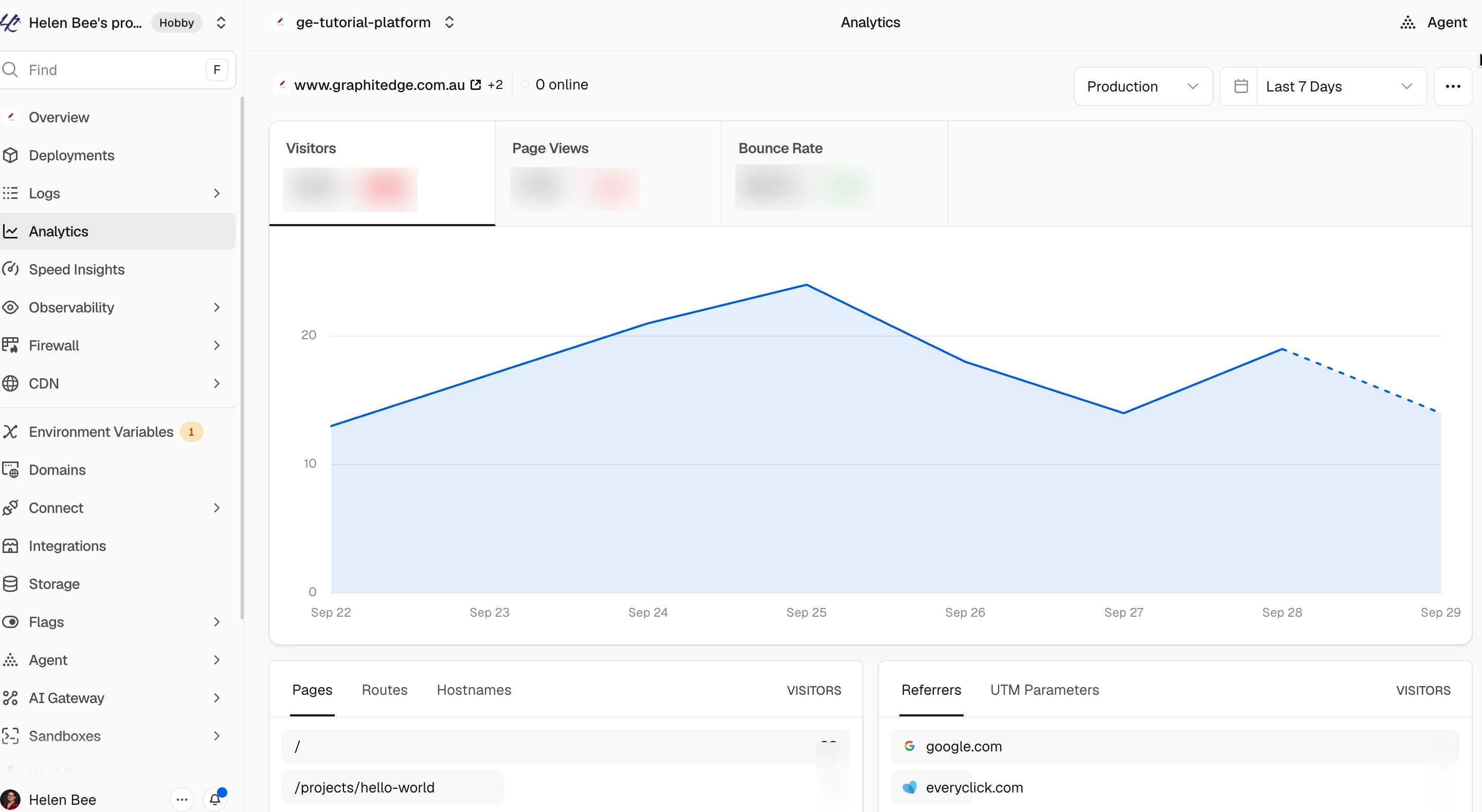
The production dashboard contains recorded visitor and page-view activity, confirming that the deployed Vercel Analytics integration is collecting data. Summary values have been obscured for privacy.
View full-size Vercel Analytics dashboard
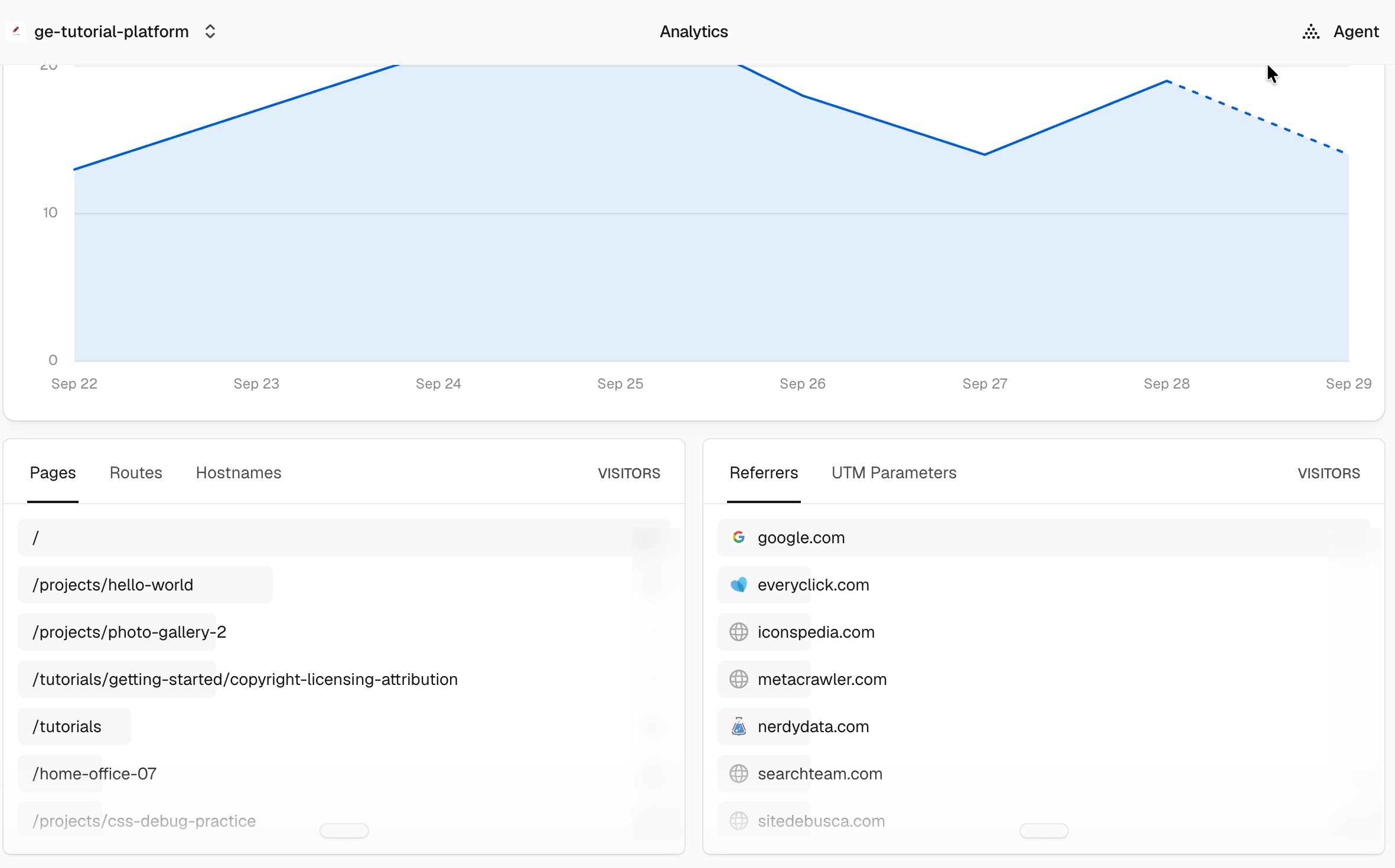
The Pages and Referrers panels provide supporting evidence about where visits occurred and how visitors arrived. They do not prove why a visitor chose a page or whether the visit achieved the site's intended outcome.
Measure Whether an Optimisation Worked
Define success before changing the site:
- Write one hypothesis: "Changing X is expected to improve Y because Z."
- Name the primary metric, guardrail metrics, page scope, and comparison period.
- Capture the baseline and configuration notes.
- Make one bounded change where practical.
- Verify that analytics still records the page and action correctly.
- Compare a suitable period using the same metric definition and equivalent filters.
- Check traffic mix, campaigns, seasonality, outages, and simultaneous site changes.
- Decide to keep, revise, reverse, or monitor the change.
An increase after a change is evidence of association, not automatic proof of cause. If several things changed together, state that limitation. For performance work, repeat the same device, network, location, and test method before comparing lab results.
Use this results table:
| Field | What to record |
|---|---|
| Hypothesis | expected change and reason |
| Baseline | metric, count, rate, dates, filters, and source |
| Change | exact implementation and deployment date |
| Verification | analytics request and event checked after release |
| Comparison | same metric definition over a suitable later period |
| Confounders | campaigns, outages, seasonality, or other releases |
| Decision | keep, revise, reverse, or monitor |
| Confidence | what the evidence supports and what remains unknown |
Check Your Understanding
Before moving forward, can you answer these?
- 1. Does a missing analytics page view prove that a page is not indexed?
- 2. Why record both outcome count and rate?
- 3. Is adding the analytics script enough to verify setup?
Check Your Answers
- No. It could indicate no visits, blocked analytics, rejected consent, a configuration error, or another measurement gap. Use search-engine tools for index evidence.
- The count shows sample size. The rate makes periods with different traffic volumes easier to compare. Both need context.
- No. Confirm the network request, provider-side receipt, client-side route changes, consent behaviour, and one important event.
How confident are you with this concept?
Still confused | Getting there | Got it | Could explain it to a friend
Guided Practice
Create a measurement plan for one important page.
Step 1 - Name the outcome
Write one sentence describing what a successful visitor should be able to do.
Step 2 - Choose the evidence
Select one primary metric, up to three supporting metrics, and any privacy or data-quality constraints.
Step 3 - Choose the platform
Check whether the site's existing hosting analytics answers the question first. For GraphitEdge, compare Vercel Web Analytics with GA4 and the optional specialist tools, then explain why the existing Vercel setup is sufficient or identify one evidence gap it cannot fill.
Step 4 - Verify or plan the installation
If authorised access exists, follow the provider-neutral verification workflow. Otherwise, write the exact steps and mark account-dependent evidence as pending.
Step 5 - Capture the baseline
Record the current values, dates, filters, and sample size. If real data is unavailable, write "not yet collected" rather than using example numbers as evidence.
Step 6 - Design the comparison
State the proposed change, review period, likely confounders, and the decision each possible result would support.
Independent Practice
Produce a one-page analytics setup and measurement brief for a real or teaching project.
Your Task:
Produce a one-page analytics setup and measurement brief for a real or teaching project.
Requirements:
- one website outcome and one measurement question
- one primary metric and no more than three supporting metrics
- a justified platform choice
- installation and consent boundaries
- evidence that page views and one important action were verified, or clearly labelled pending evidence
- baseline period, comparison method, confounders, and decision rule
- no invented figures or exposed account data
Success Criteria:
| Criteria | You've succeeded if... |
|---|---|
| each metric supports a named decision | Completed clearly and correctly in your solution. |
| search, analytics, performance, and outcome evidence are not confused | Completed clearly and correctly in your solution. |
| the setup collects no unnecessary personal data | Completed clearly and correctly in your solution. |
| verification covers client-side route changes where relevant | Completed clearly and correctly in your solution. |
| conclusions match the strength and size of the evidence | Completed clearly and correctly in your solution. |
Before you continue
- I can explain why each selected metric matters.
- I can choose an analytics tool based on the site's needs.
- I can verify data collection without exposing private information.
- I can compare a change with a recorded baseline.
- I can state uncertainty without treating pending data as failure.
Closure
Key Takeaways:
- separate search diagnostics, user analytics, performance evidence, and business outcomes
- turn a website goal into a useful measurement question
- define baseline metrics before making an optimisation change
- choose between existing hosting analytics, GA4, and specialist tools without installing everything
- install and verify analytics without collecting unnecessary personal data
- compare before-and-after evidence and explain what the result can and cannot prove
Learning Objectives Review:
Look back at what you set out to learn. Can you now:
- separate search diagnostics, user analytics, performance evidence, and business outcomes Check!
- turn a website goal into a useful measurement question Got it!
- define baseline metrics before making an optimisation change Can explain it!
- choose between existing hosting analytics, GA4, and specialist tools without installing everything Could teach this!
- install and verify analytics without collecting unnecessary personal data Check!
- compare before-and-after evidence and explain what the result can and cannot prove Got it!
If you can confidently answer "yes" to most of these, you're ready to move on!
Think & Reflect:
Pause and reflect
- Which idea from this lesson now feels practical rather than abstract?
- What would you build or test next to make this stick?
Looking Ahead:
Start with the decision you need to make. Collect the minimum useful evidence, verify the setup, and compare later results with the recorded baseline.
Recommended Next Steps
Continue Learning
Ready to move forward? Continue with the next tutorial in this series:
Accessibility EssentialsRelated Topics
Explore these related tutorials to expand your knowledge:
Additional Resources
Deepen your understanding with these helpful resources:
- Vercel: Web Analytics - Overview of Vercel Web Analytics, available dimensions, privacy model, and project integration.
- Vercel: Web Analytics quickstart - Enable Web Analytics, add the framework package, deploy, and verify page-view data.
- Vercel: Web Analytics limits and pricing - Current Hobby and paid-plan event allowances, reporting windows, and feature limits.
- Google: Set up Analytics for a website - Current GA4 web data stream, Google tag, and Realtime verification steps.
- Vercel: Analytics privacy and compliance - Data collection, anonymisation, sensitive URL handling, and customer configuration responsibilities.