Cascade, Specificity, and Debugging CSS
Understand why styles collide, inherit, or lose, then debug those conflicts with more confidence.
Why Did My Style Disappear?
You write a CSS rule. It should work. You reload the page and nothing changes. Or worse - some other style appears instead of yours, and you have no idea where it came from.
This is one of the most common frustrations in CSS. The good news is that the browser is not acting randomly. It follows a precise set of rules called the cascade to decide which style wins when multiple rules target the same element.
Once you understand those rules, CSS debugging stops feeling like guesswork and starts feeling like detective work.
- Have you ever added !important to force a style to work? Did it feel like a fix or a workaround?
- When two CSS rules conflict, how do you currently figure out which one wins?
- Do you know which CSS properties are inherited from a parent element and which are not?
This lesson fills a gap between knowing CSS properties and being able to debug real stylesheets. The specificity and cascade concepts here apply to every CSS project you work on, including the Black Swan Bistro series.
Learning Objectives
By the end of this lesson, you'll be able to:
- Explain Explain the four layers of the cascade: origin, specificity, source order, and inheritance
- Calculate specificity scores and predict which selector wins a conflict
- Distinguish inherited properties from non-inherited ones
- Use browser DevTools to identify why a style is overridden
- Apply Apply practical strategies to write lower-specificity, more maintainable CSS
Why This Matters:
Debugging CSS is not about finding tricks. It is about understanding the system. When you know how the cascade works, you stop guessing and start reading the browser's decisions.
Before You Start:
You should be familiar with:
- BSB Part 4: Multi-page Site Review here
- Why Your CSS Isn’t Working Review here
The Cascade: How the Browser Decides
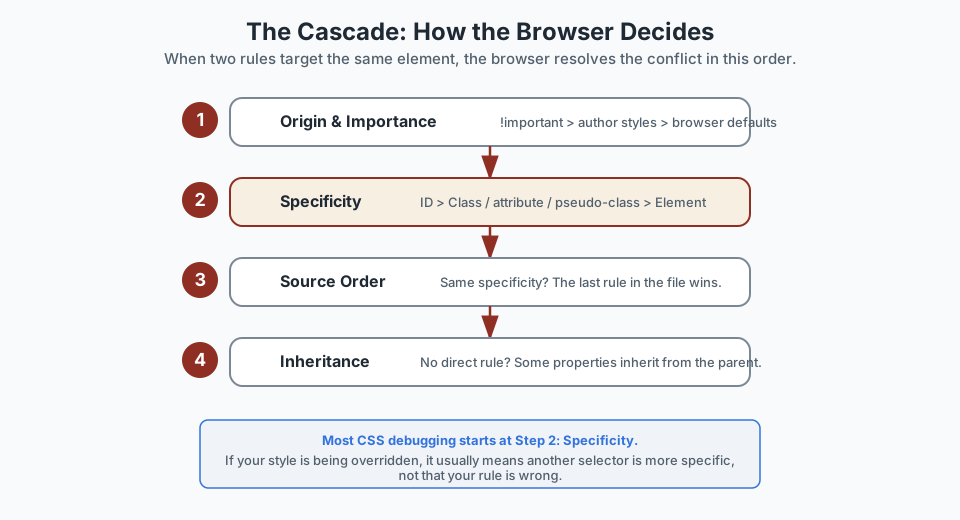
CSS stands for Cascading Style Sheets. The cascade is the algorithm the browser uses to decide which CSS rule wins when more than one rule targets the same property on the same element.
The browser checks four things, in order. As soon as one layer produces a clear winner, the browser stops and applies that rule.
The Four Cascade Layers
- Origin and importance - browser defaults, your stylesheet, and
!importantdeclarations are ranked. Your author styles override browser defaults.!importantoverrides everything else. - Specificity - among rules from the same origin, the more specific selector wins. This is where most conflicts are decided.
- Source order - if two rules have the same origin and specificity, the one that appears later in the stylesheet wins.
- Inheritance - if no rule targets the property directly, some properties (like
colorandfont-family) inherit from the parent element.
In practice, most CSS conflicts come down to specificity and source order. If you can read those two layers, you can debug most style problems.
Specificity: Why Some Selectors Win
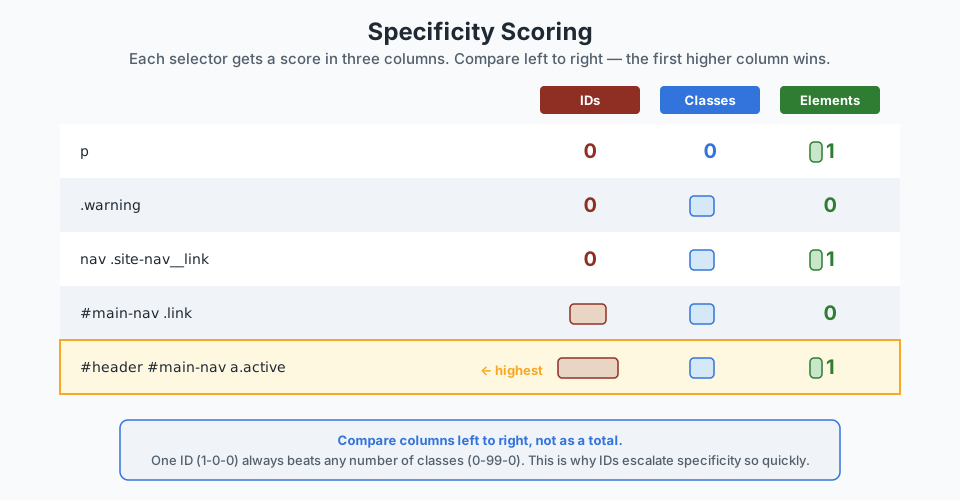
Specificity is how the browser ranks selectors. Each selector gets a score split into three columns:
- Column A - IDs. Each
#idin the selector adds 1 to this column. - Column B - Classes, attributes, and pseudo-classes. Each
.class,[attribute], or:hoveradds 1 here. - Column C - Element types and pseudo-elements. Each
p,nav, or::beforeadds 1 here.
The browser compares specificity column by column, from left to right. The first column where one selector scores higher is the winner. This means one ID will always beat any number of classes.
Working through examples
Score some real selectors:
/* 0-0-1 — one element selector */
p { color: grey; }

/* 0-1-0 — one class selector */
.warning { color: orange; }

/* 0-1-1 — one class + one element */
nav .site-nav__link { color: #1f2933; }

/* 1-1-0 — one ID + one class */
#main-nav .link { color: #8f2f23; }

/* 1-0-1 — one ID + one element */
#header a { color: #333; }
If .warning and p both target the same paragraph, .warning wins because 0-1-0 beats 0-0-1 in the class column. Source order does not matter here - the class always wins.
Watch out for specificity escalation. If you fix a conflict by making a selector more specific, the next conflict might need an even more specific selector. This arms race is how stylesheets become hard to maintain. Prefer keeping selectors at a consistently low specificity instead.
Where !important fits
!important jumps ahead of normal specificity entirely. A declaration marked !important beats any normal declaration, regardless of selector specificity.
/* This wins over even #header #nav a.active */
.site-nav__link {
  color: navy !important;
}
That sounds useful, but it is a trap. If two rules both use !important, they fall back to the normal cascade - and now both sides of the conflict are harder to override. Use !important only as a last resort, and treat it as a code smell that suggests the specificity structure needs rethinking.
Inheritance: What Passes Down the Tree
When no CSS rule directly targets a property on an element, some properties inherit the value from the nearest ancestor that has one. This is how you can set font-family on the <body> and have every paragraph, heading, and list item use that font without extra rules.
But not all properties inherit. Layout and box-model properties like border, padding, margin, and display do not inherit - otherwise every child element would duplicate its parent's border, which would be chaos.
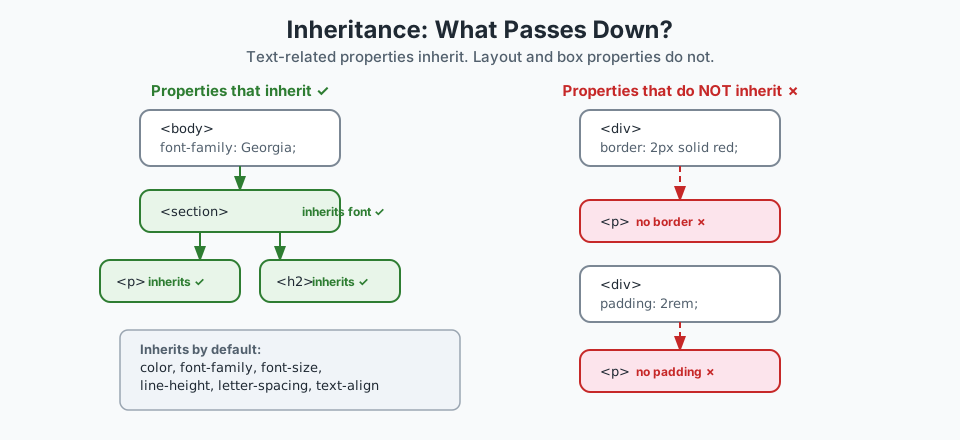
font-family and color flow down the tree. Layout properties like border and padding stop where they are set. Common Inherited vs Non-Inherited Properties
| Inherits ✓ | Does not inherit ✗ |
|---|---|
color | border |
font-family | padding |
font-size | margin |
line-height | width / height |
letter-spacing | display |
text-align | background |
Controlling inheritance explicitly
You can force or remove inheritance with the inherit, initial, and unset keywords:
/* Force a non-inheriting property to inherit */
.child {
  border: inherit;
}

/* Reset a property to the browser default */
.reset {
  color: initial;
}

/* If the property normally inherits, act like inherit.
   If it does not, act like initial. */
.flexible {
  all: unset;
}
These keywords are most useful for debugging or for resetting styles in a component boundary. You do not need them in everyday CSS.
Common Style Conflicts and Why They Happen
Most CSS frustration comes from a small set of recurring patterns. Once you recognise them, the mystery disappears.
Conflict 1: A class rule loses to a more specific selector
/* 0-1-0 */
.button { background: navy; }

/* 0-1-1 — wins because of the extra element selector */
section .button { background: grey; }
The second rule is more specific. The fix is usually to keep both selectors at the same specificity - for example, by removing the unnecessary parent section from the second rule.
Conflict 2: Source order overrides what you expect
/* Both have specificity 0-1-0 */
.card { padding: 2rem; }

/* This one wins because it comes later */
.card { padding: 1rem; }
When specificity is tied, the last rule in the file wins. The fix is to remove the duplicate or organise the stylesheet so the intended value appears last.
Conflict 3: An inherited value is mistaken for a direct rule
body { color: #333; }

/* The .card has no color rule, but text appears grey
   because it inherits color from body.
   Adding a direct rule will override the inheritance. */
.card { color: #1f2933; }
Inheritance is not a bug - it is the expected behaviour. But it can be confusing if you do not realise the value is coming from an ancestor.
Conflict 4: !important blocking a later fix
.nav-link {
  color: navy !important;
}

/* This does NOT work — !important can only be overridden
   by another !important with higher specificity */
.nav-link.is-active {
  color: #8f2f23;
}
The solution is to remove the !important from the first rule and let normal specificity handle the conflict.
Debugging with DevTools
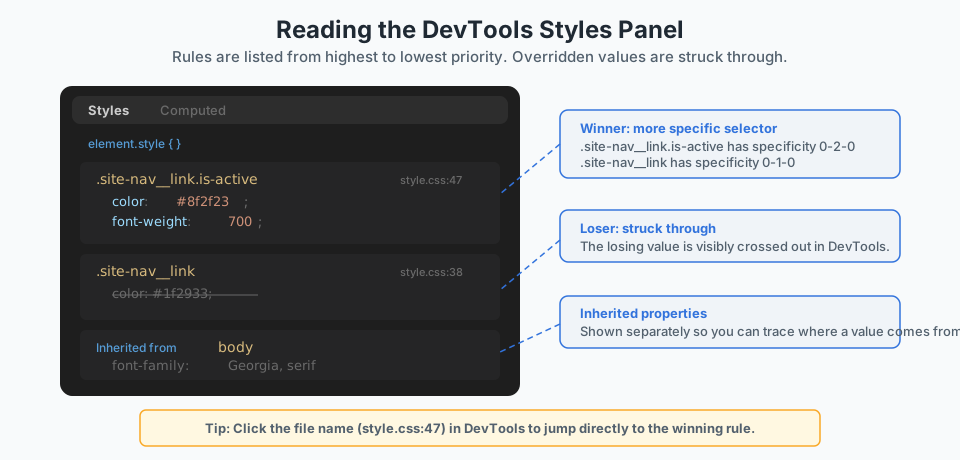
The browser's DevTools Styles panel is the single most useful tool for CSS debugging. It shows you exactly what the browser sees: which rules target the selected element, which values are applied, and which are overridden.
Step-by-step DevTools debugging
- Inspect the element. Right-click the element in the page and choose Inspect. The Elements panel highlights the element in the DOM tree and the Styles panel shows all rules targeting it.
- Read the Styles panel top to bottom. Rules are listed from highest priority to lowest. The winning declaration is the one that is not struck through.
- Look for strikethroughs. A struck-through value means another rule overrides it. The winning rule is above it in the panel.
- Check the Computed tab. Switch to the Computed tab to see the final resolved values the browser is actually using, including inherited values and their source.
- Click the source link. Each rule shows a filename and line number. Click it to jump directly to the rule in the source code.
Computed tab tip: the Computed tab is especially useful for tracing inheritance. It shows where a value came from - whether it was set directly or inherited from an ancestor.
Practical Strategies for Maintainable CSS
Understanding the cascade is not just for debugging. It also helps you write CSS that causes fewer conflicts in the first place.
Keep Specificity Low and Flat
If most selectors in your stylesheet are single classes (0-1-0), conflicts are decided by source order, which is easy to control. Avoid nesting selectors unnecessarily.
/* ❌ High specificity — hard to override later */
#sidebar .widget ul li a { color: grey; }

/* ✅ Low specificity — easy to override with another class */
.widget-link { color: grey; }
.widget-link.is-active { color: navy; }
Use Source Order Intentionally
Organise your stylesheet in layers: resets first, then foundations, then layout, then components, then overrides. That way, later rules naturally override earlier ones when specificity is equal.
/* 1. Reset / foundations */
/* 2. Layout helpers */
/* 3. Components */
/* 4. Page-specific overrides */
Avoid !important Except for Utilities
The one reasonable use of !important is for small utility classes that must always win - like a visually-hidden class or a print-only override. Everywhere else, prefer fixing the specificity structure.
Name Components for Purpose, Not Position
Class names that describe what a component does (.menu-card) are easier to reuse than names that describe where it sits (.sidebar-box). Purpose-based names also tend to keep specificity flat because they do not need parent selectors.
Pause & Check: Do You Understand?
Before moving forward, can you answer these?
- Two rules target the same element. One uses a class selector, the other uses an element selector. Which one wins and why?
- You set font-family on the body element, but you never set it on a paragraph inside a section. Why does the paragraph still use that font?
- A developer adds !important to fix a style conflict. What is the risk of that approach?
- In DevTools, you see a CSS property value with a strikethrough. What does that tell you?
Check Your Answers
- The class selector wins because it has higher specificity (0-1-0 vs 0-0-1). Specificity is compared column by column from left to right, and the class column is checked before the element column.
- Because font-family is an inherited property. When no direct rule sets it, the paragraph inherits the value from its nearest ancestor that has one - in this case, body.
- !important overrides the normal cascade, so it wins regardless of specificity. The risk is that future rules also need !important to override it, creating an arms race that makes the stylesheet harder to debug and maintain.
- It means another rule with higher specificity, later source order, or !important is overriding that property. The rule above the struck-through one in the Styles panel is the winner.
How confident are you with this concept?
Still confused | Getting there | Got it | Could explain it to a friend
Debug a Style Conflict
Use DevTools to find, diagnose, and fix a real CSS conflict in your own project.
Find the conflict in DevTools
Open any web page you have been working on - your Black Swan Bistro project is ideal. Right-click an element that has a colour or font style and choose Inspect.
In the Styles panel, look at the list of rules targeting that element. Can you find a property that appears in more than one rule? If so, one of them should be struck through.
Need a hint?
Read the specificity
For the winning rule, count its specificity score using the three-column method: IDs, classes, elements. Do the same for the losing rule.
Write the scores on paper or in a code comment. Does the higher-specificity rule match what DevTools is showing as the winner?
Need a hint?
Fix a conflict without !important
If your stylesheet has a style conflict that is currently resolved by source order or a selector that is more specific than it needs to be, try refactoring it:
- Lower the specificity of the over-specific selector (e.g. remove unnecessary parent selectors)
- Make both selectors equal specificity and rely on deliberate source order
- Verify in DevTools that the intended rule still wins
Need a hint?
Trace an inherited value
Select a deeply nested element - a paragraph inside a section inside main. In the Computed tab of DevTools, find a property like color or font-family.
Click the arrow or expand the property to see where the value was inherited from. Trace the chain back to the element that set it.
Need a hint?
You have finished when:
- You found a conflicting property in the Styles panel
- You calculated the specificity of both the winning and losing selectors
- You resolved a conflict by adjusting specificity rather than adding !important
- You traced an inherited value in the Computed tab back to its source
Independent Challenge
Now try this on your own without hints!
Your Task:
css/style.css from any project (the Black Swan Bistro project works well) and identify the three highest-specificity selectors. For each one, calculate its score and decide whether the specificity is necessary or could be reduced.Requirements:
- Calculate the three-column specificity score for at least five selectors in the stylesheet
- Identify the three highest-specificity selectors and explain why they are high
- Refactor at least one high-specificity selector to a lower-specificity alternative that still works
- Verify the refactored rule still applies correctly using DevTools
Stretch Goals (Optional):
- Check the entire stylesheet for any !important declarations and decide if each one is justified
- Reorganise the stylesheet into clear layers: reset, layout, components, overrides
- Add a comment at the top of the stylesheet documenting the intended specificity strategy
Success Criteria:
| Criteria | You've succeeded if... |
|---|---|
| Specificity awareness | Scores are calculated correctly using the three-column method |
| Practical refactoring | At least one selector is simplified without changing the visual result |
| Tool use | DevTools is used to verify that the refactored rule still applies correctly |
Recap
The cascade is not a mystery - it is a decision tree. When two rules target the same property on the same element, the browser checks origin and importance first, then specificity, then source order. If no rule targets the property at all, inheritance may supply a value from a parent element.
Specificity is the layer that causes the most confusion. But once you can score selectors in three columns - IDs, classes, elements - you can predict which rule wins before you open the browser. And when something unexpected happens, DevTools shows you the browser's reasoning directly.
The best defence against style conflicts is not a clever trick. It is a consistent, low-specificity approach to writing selectors: flat class names, intentional source order, and no !important unless you genuinely need it.
You Can Read the Cascade Now
Key Takeaways:
- The cascade resolves style conflicts in a clear order: origin and importance, then specificity, then source order.
- Specificity is a three-column comparison (IDs, classes, elements) - not a single total.
- Inheritance passes text-related properties down the DOM tree automatically. Layout properties do not inherit.
- DevTools shows exactly which rule wins and which rules lose. Debugging starts there, not by guessing.
- Keeping specificity low and consistent is the best way to avoid !important and make stylesheets maintainable.
Learning Objectives Review:
Look back at what you set out to learn. Can you now:
- Explain how the cascade resolves conflicting CSS rules Check!
- Calculate and compare specificity scores for different selectors Got it!
- Predict which properties inherit and which do not Can explain it!
- Use DevTools to identify and fix style conflicts Could teach this!
- Apply low-specificity strategies to keep CSS maintainable Check!
If you can confidently answer "yes" to most of these, you're ready to move on!
Think & Reflect:
Cascade Thinking
- Before this lesson, when a style did not apply, what was your first instinct? Has that changed?
- Can you think of a time you used !important that could have been solved by adjusting specificity instead?
Debugging Confidence
- Which DevTools feature feels most useful for CSS debugging now?
- How would you explain a struck-through rule to someone who has never used DevTools?
Writing Better CSS
- How does keeping specificity low help when multiple developers work on the same stylesheet?
- What naming convention have you seen that naturally keeps specificity flat?
Looking Ahead:
Recommended Next Steps
Continue Learning
Ready to move forward? Continue with the next tutorial in this series:
Styling Details: Selectors, Pseudo-elements, and MotionRelated Topics
Explore these related tutorials to expand your knowledge:
Additional Resources
Deepen your understanding with these helpful resources:
- MDN: Specificity - Clear explanation of how selectors compete and why some rules win.
- MDN: Inheritance - Helpful for understanding which properties inherit and why some styles flow through the document.